
Navifleet Manager / Handover reports module
Digital handover reports for vehicles
Can you run a fleet without piles of paper reports? It turns out you can. Digital handover reports are a genuine game changer that makes life easier for fleet staff and for the people who drive the company cars. No more typing data in by hand, no more mistakes in documents, no more time at the scanner and printer. Keeping digital reports in order saves nerves and time you can spend on more important work. Managing the fleet's condition and equipment becomes more efficient at once, and damage control more effective. Try our digital handover reports and see how simple and quick vehicle handovers can be.

Trusted by over 1,800 customers








Paper reports do not work. We fixed them.
Report
on paper
Report
Navifleet
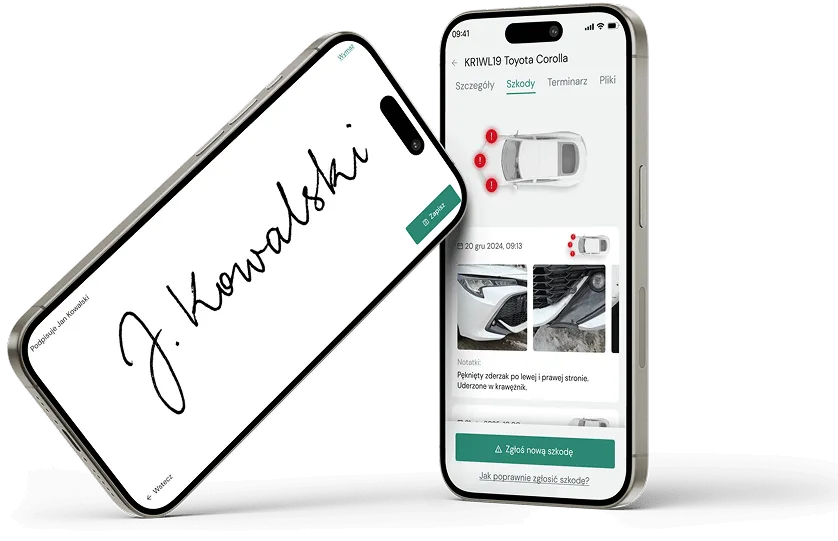
Digital handover reports — see how simple it is
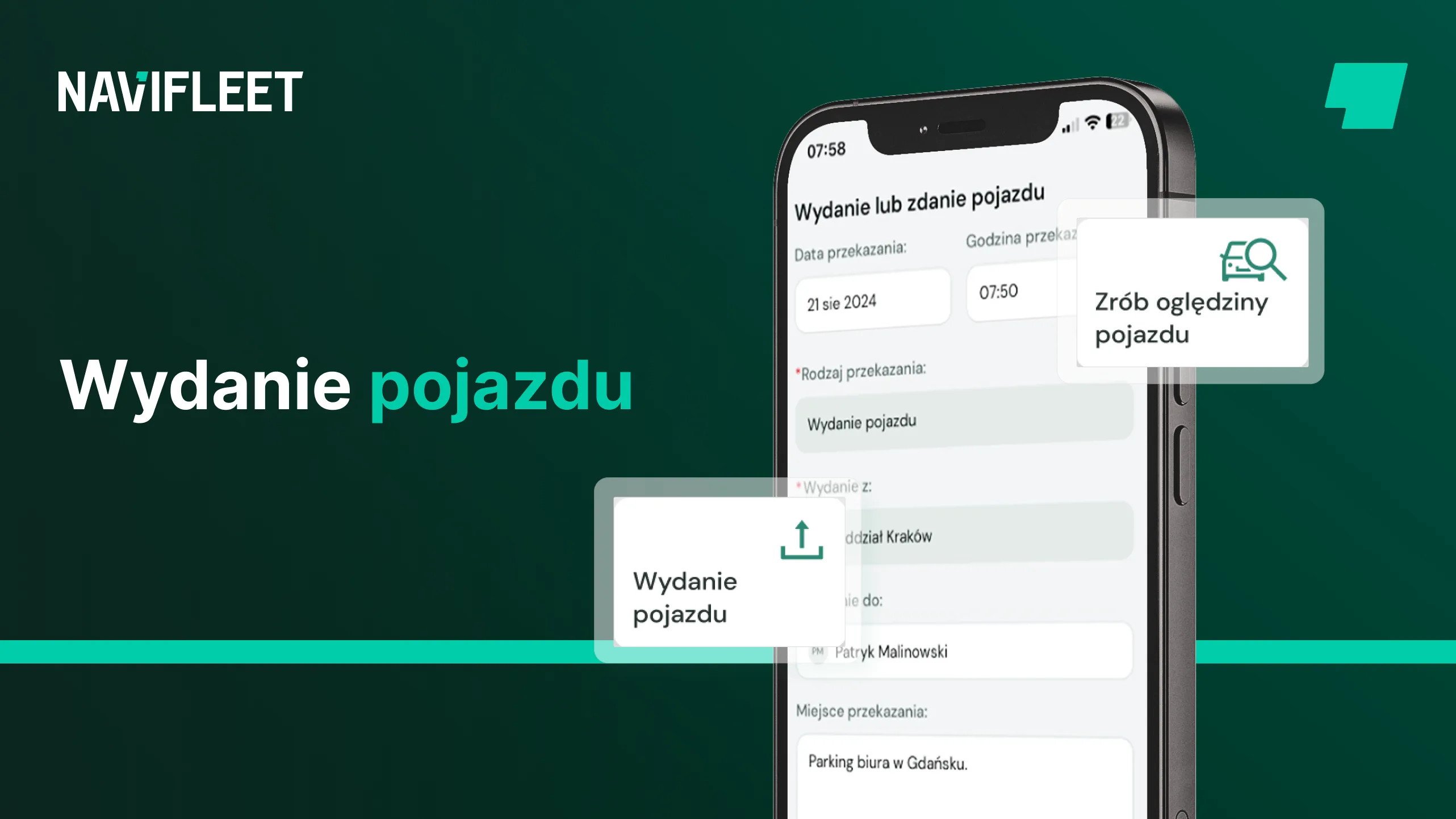
Digital handover reports are the modern alternative to their paper counterparts. They remove the pile of paper, the risk of a mistake while filling documents in, and they standardise how vehicles are handed over and taken back. All you need is the intuitive Navifleet app for handover reports.
 Handover report
 Handover report
 Handover report
 Handover report
Handing a car over is a breeze now. I do not have to agree a specific hour with the user or fill documents in by hand. I simply walk to the car with them and we do everything on the spot.
 Sebastian Brzuzy
Warehouse and Procurement Manager
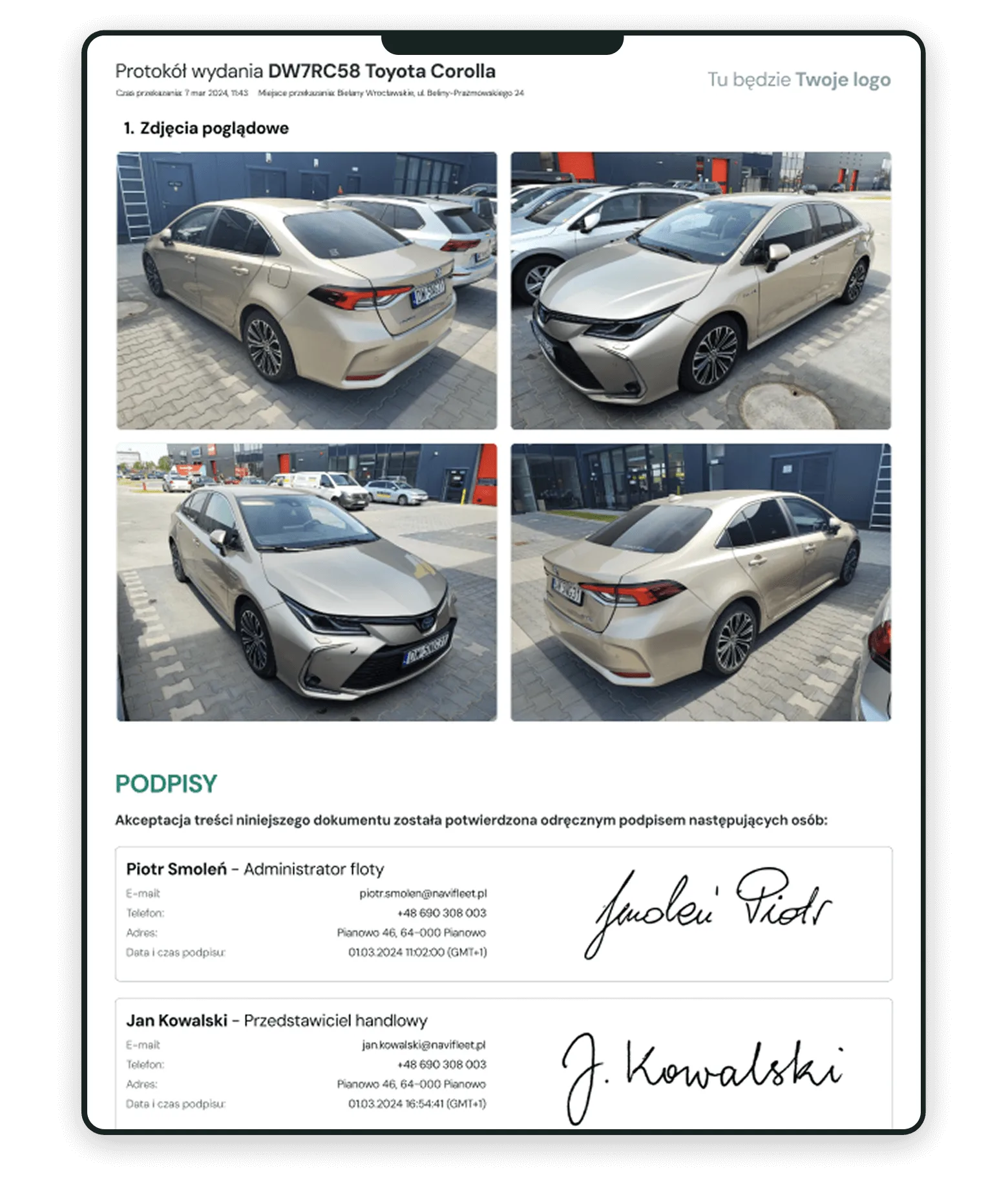
A digital handover report for the driver
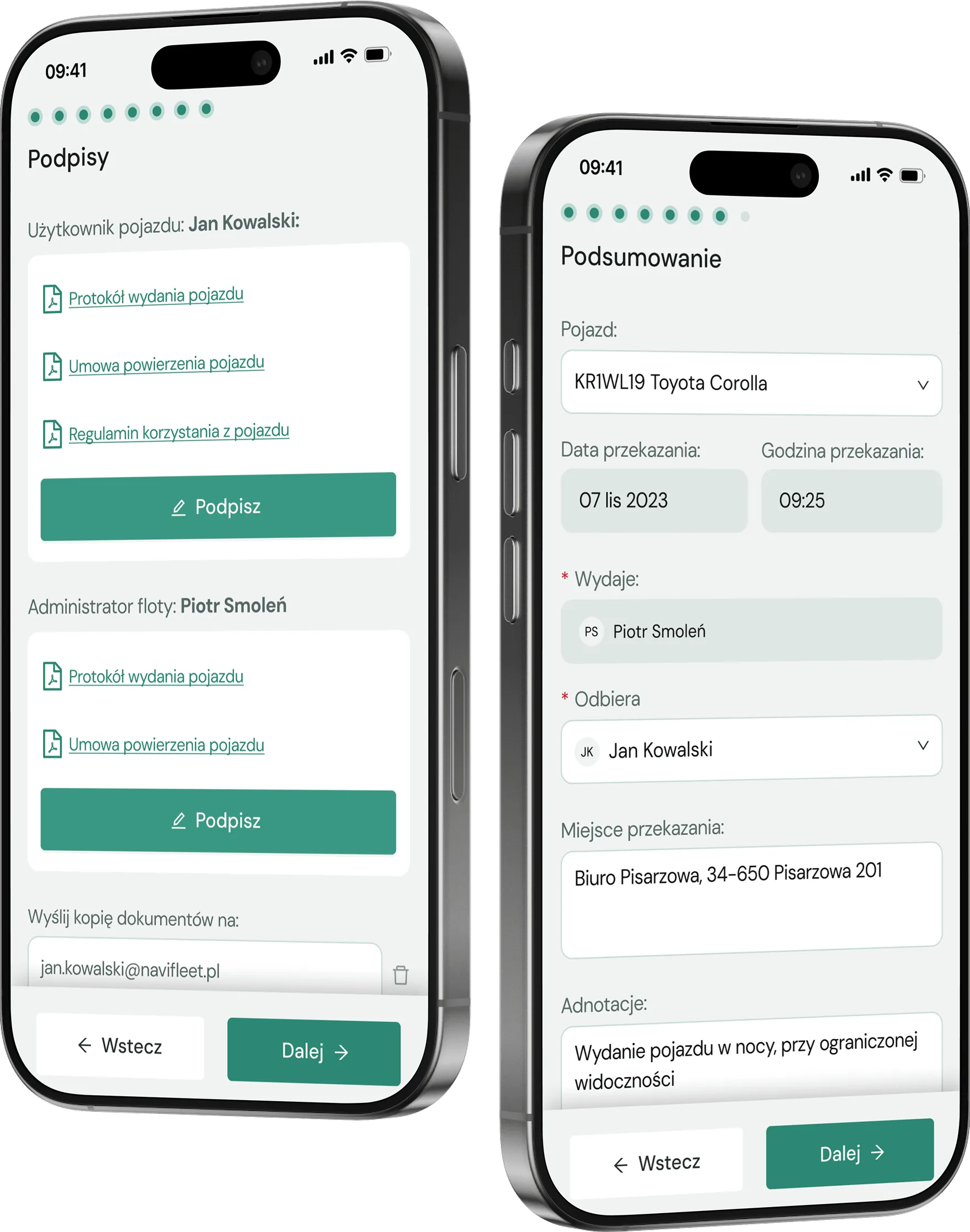
Swap paper handover reports for PDFs with photos. A digital report is filled in and signed on a tablet or phone screen and then e-mailed to the driver. If you are wondering how to make vehicle handovers run better in your company, Navifleet is the answer.
Fill in a handover report in 5 steps
Choose the vehicle, the driver, and the time and place of handover.
Check what has been reported and add anything new.
Take photos showing the general condition of the vehicle.
Check the equipment that is present.
Sign all the documents with the driver, on screen.
Document templates for signing — generating driver agreements the easy way
When handing a car over you can also sign the other documents with the driver. Upload your own vehicle entrustment agreement and fleet policy templates, and fleet management app the app fills them in with the data and generates a file ready to sign. Sharing documents with drivers simply makes the necessary formalities far easier.
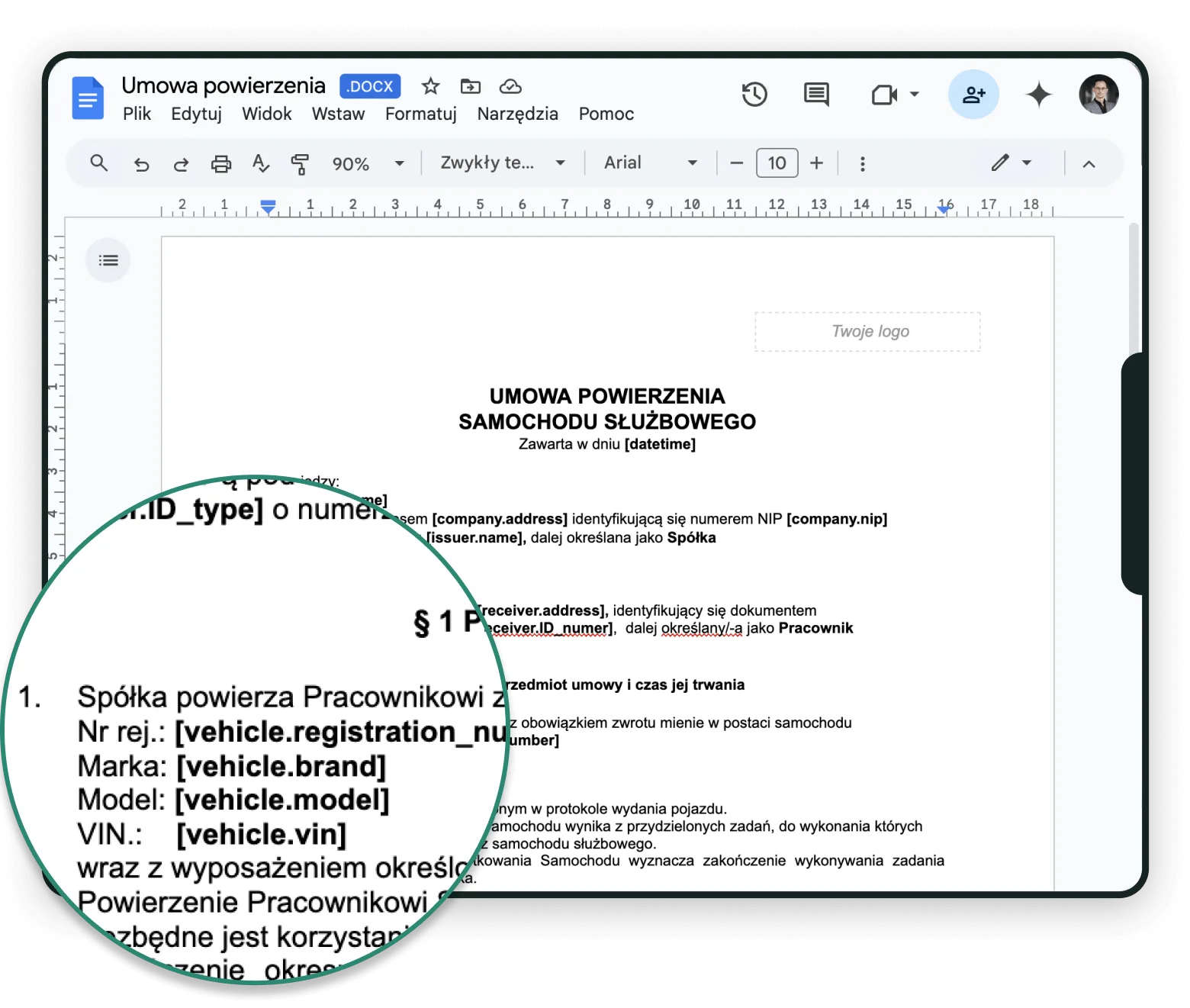
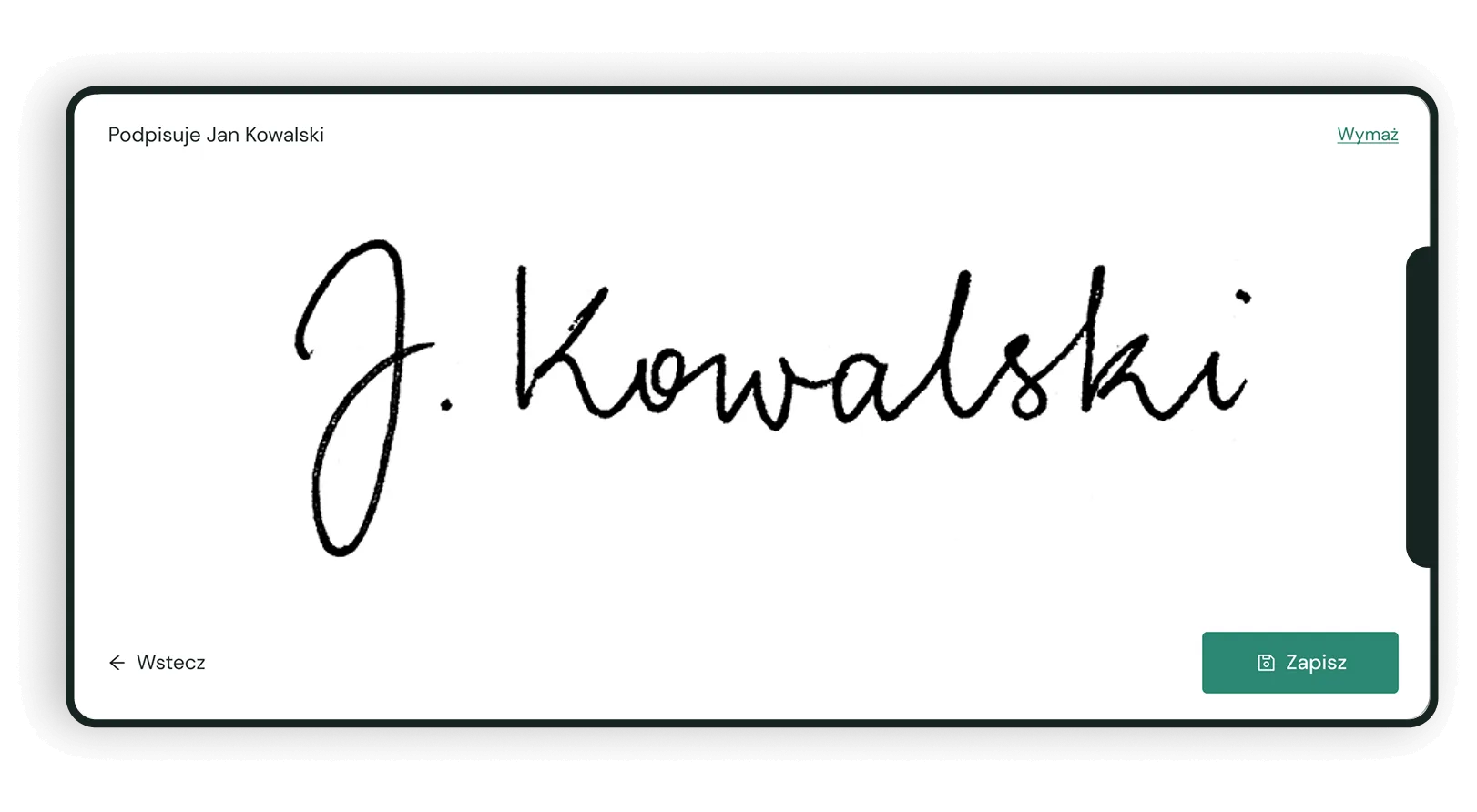
Signing documents electronically at handover
Tired of printing a handover report or other documents every time, only to scan them and put them on a drive afterwards? Digital forms and handover reports put an end to that. Our app makes the whole process easier: instead of printing and scanning, you and the driver accept the contents of all the documents with a single signature. And no, it is no less valid than a signature on paper.
How does collaborative mode work when filling in a report?
Several people can take part in filling in a report, each adding and confirming information at a different stage. How you use it is up to you. For example:
You start the draft of the handover report yourself, whenever it suits you.
The user comes for the keys. You deal with the formalities in your office.
The user walks to the car alone, checks its condition and signs the documents in their own app.
Usage history — the key to easier condition checks across the fleet
Do you want the fleet's condition history to be easy to reach, so that checking it is simpler? Navifleet does exactly that. Every handover and return creates an entry in the vehicle's usage history automatically, so later you can establish who was driving it at any given time. When you need to, you can go straight back to the documents signed at both handover and return. Damage control can be simple and effective — all it takes is managing fleet reports digitally with Navifleet.
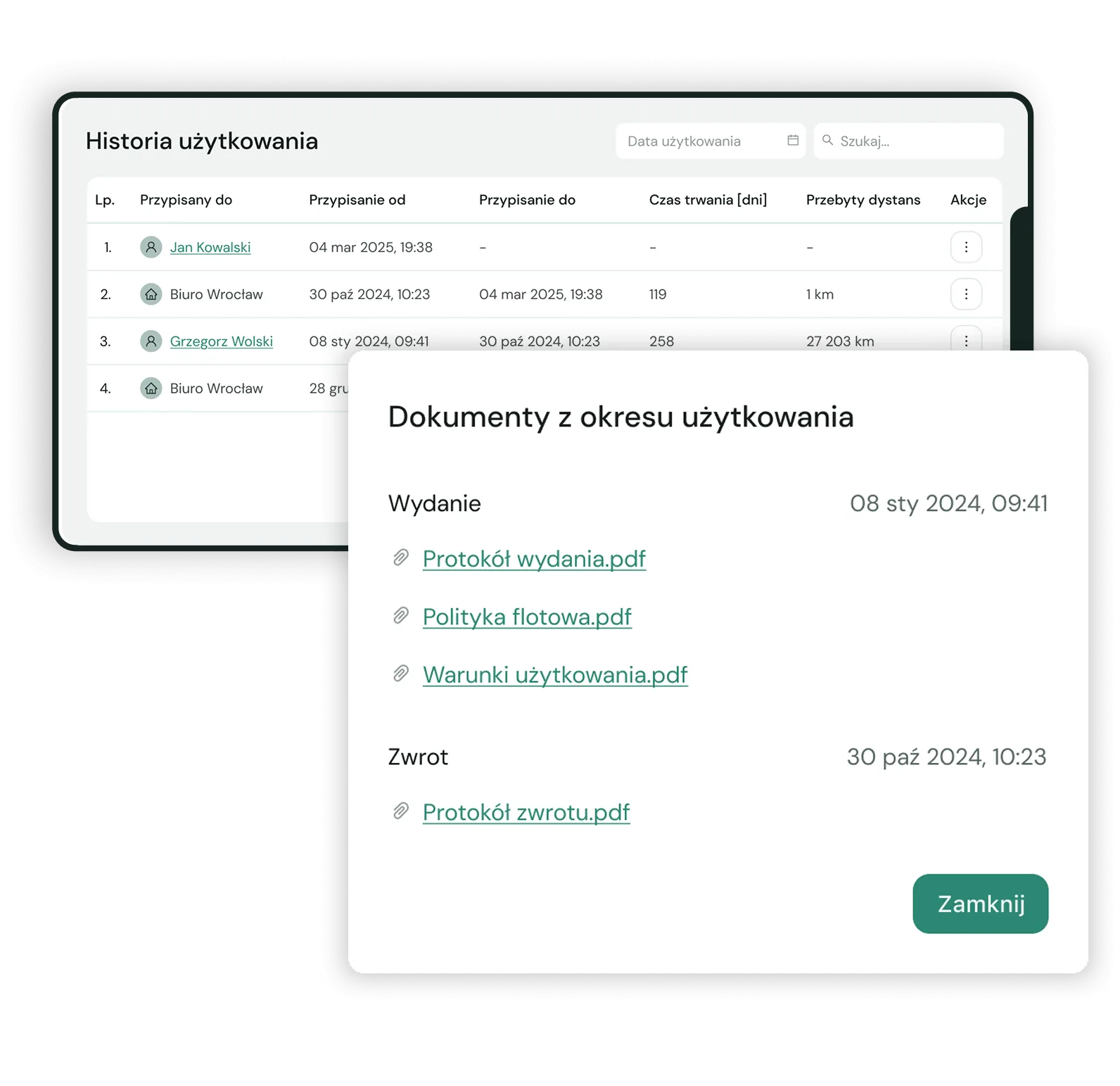
Fleet instructions
Instructions for what to do in various situations on the road, or a list of numbers to call, do not need to be on paper either. Add those documents to the app once and every new fleet user gets access to them automatically. So if you want handing instructions to a driver to stop being a separate procedure every time, Navifleet is what you are looking for.
Our customers have got rid of the paperwork:

At head office
The fleet coordinator fills in handover and return reports on their phone. Everything in the report is visible in the app immediately. The ring binders are no longer needed — managing fleet reports has entered the digital age.

At branches
Branch or project managers hand vehicles over and take them back themselves. Nobody has to chase missing reports, and the fleet team at head office always knows the condition of the vehicles.

Out in the field
Vehicle users report the car's condition themselves when they start and finish using it. The app walks them through it step by step and alerts the fleet team to new problems, which makes tracking damage across the fleet far easier.
They trusted us, and so can you:
 ★★★★★
★★★★★
“At last the fleet world has taken a step towards going digital. The fleet policy and every other paper document can simply be replaced by a phone. It works — I checked.”
Piotr LitwinHead of Logistics
 ★★★★★
★★★★★
"I manage a fleet of 200 vehicles across several branches. Managers do handovers and returns on their phones, and I can see the condition of the cars even when I never see them in person."
Mariusz KrajewskiService technical adviser
 ★★★★★
★★★★★
“I reckon I save an hour of work on every handover.”
Piotr LitwinHead of Logistics
LOGO ★★★★★
Want to see whether we can help you too? Create an account, add your own vehicles and try it for 30 days with no commitment.
Try it freeDigital handover reports — try them instead of taking our word for it
With us you are not buying a pig in a poke. See whether our handover app, and the easier way it lets you manage the fleet's condition and equipment, is worth it for you. Create an account and try it for 30 days with no commitment.










Everything the Handover reports module does:
 Digital vehicle handover reports
 Document templates for signing
 Electronic signature
 Collaborative mode for filling in a report
 Usage history
 Fleet instructions
 Checking vehicle condition with photos
 Alerts about reported problems
 Support for several companies and forms of employment
 Your own logo on the report
 The report sent to the driver automaticallyPhoto history from previous reports
 Reports filled in by drivers out in the field
 History of signed documents
Related articles

FAQ
Who can fill in handover reports or inspections?+
A vehicle condition inspection and a digital handover report can be done by anyone with access to the app. That means fleet coordinators, branch or project managers and vehicle users alike. The system supports user roles, so different people have different levels of access: an administrator can load photos into a report from the phone's gallery, while vehicle users always have to take new ones. The result is handover documentation kept to the standard the company expects.
How do I add my own usage policy and entrustment agreement templates?+
Navifleet accepts text files in *.docx format. You can upload your own entrustment agreement template, but first you need to put „variables” into its text so the app knows where to fill the right content in automatically. There is more about this in the article „How to add a document for signing at vehicle handover”. So if you want to sign a fleet policy (or agreements of any kind) online and keep fleet documents in order automatically, our app is the answer.
Is a signature on screen as valid as one on paper?+
Digital handover documentation speeds up handing a company car over and taking it back considerably. Importantly, a digital confirmation of handover carries the same legal weight as a written report. Every document signed through our app automatically carries a clause with the signatory's key details, an image of their signature and the date of signing. Once the report that completes the handover is signed, it cannot be changed or cancelled.
How long does filling in a handover report take?+
Very little time. For one handover count on 5 to 7 minutes. A digital report is much faster than its paper counterpart, because the app fills in on its own:
- vehicle details (registration, make, model, year, mileage, fuel level),
- user details (name, type and number of ID document, address),
- details of the company the vehicle is registered to (name, registered address, VAT ID).
The app also holds a complete list of damage as at the date of the last report. So if the inspection finds no new damage, there is nothing to type in — it is pulled in automatically. The same goes for photos of the vehicle outside (front, rear, diagonals) and inside (dashboard, seats, rear bench, boot). If nothing has changed, you simply tick the earlier photos and they appear on the report.
Can the handover report template be adapted to our needs?+
Yes, digital handover reports can be modified, within limits. The report in Navifleet Manager contains what good practice says it has to contain, above all:
- the vehicle user's details,
- the details of the company handing the vehicle over,
- the vehicle's details,
- a list of equipment,
- photos of damage,
- overview photos.
As for what can be changed in the template, the „checklists” inside it are configurable. A report can carry more than one such checklist, used to verify the equipment list, cleanliness or technical condition.
On top of that, you can upload your own logo to the report — depending on which company the vehicle belongs to, that company's logo appears on the report.
What are the main benefits of digital handover reports in Navifleet?+
It is hard to imagine managing a fleet's condition and equipment effectively without taking the digital road. Modern technology is the key to:
- recording vehicle damage efficiently and reliably,
- checking the fleet's condition and equipment so that you know about every piece of damage and every fault,
- keeping on top of service dates and every other date that matters in a fleet.
Thanks to going digital, processes such as vehicle condition inspections, sharing documents with drivers and filling in handover reports run far more smoothly, which saves time for everyone involved.
Digital forms and handover reports are one of the tools that make for better fleet management. Which of the benefits deserve particular attention?
Time saved
Above all, a digital handover is faster than one on paper. It removes a whole set of steps, such as printing and scanning. The report is filled in within the app in moments, and signing it — like signing the other necessary documents — happens on a phone or tablet screen.
Mistakes in documents removed
Tracking vehicle condition on paper carries the risk of all sorts of mistakes, and when documents are filled in by hand they are hard to avoid. Digital documentation does much better here, because checking vehicle equipment becomes not only easier but also more precise.
The fleet's condition history in one place
Plenty of companies wish it were easier to follow a vehicle's history and keep track of reports — and with Navifleet it is. Every handover and return is recorded automatically in the vehicle's usage history. That makes establishing who was responsible for a car at any given moment no trouble at all.
Fleet documents kept in order and shared with whoever needs them
Navifleet gives you excellent control over documentation and plenty of ways to manage it. Do you want to share a scan of the registration document or the insurance policy with a driver? Or make sure every authorised user can reach the fleet instructions easily? With Navifleet your documents are yours to hand out as you see fit.
Digital report management as a way to lower your fleet's footprint
Not having to print hundreds of documents reduces the energy used, which matters in the context of ESG.
Does Navifleet make checking vehicle equipment online easier?+
Navifleet is a real help to companies wondering not only how to improve handovers but also how to keep track of equipment. It supports effective inspections of both a vehicle's technical condition and its equipment, which lets you easily reduce losses from the unexplained disappearance of fire extinguishers, first aid kits or warning triangles. So if you need a workable tool for checking vehicle equipment, Navifleet will meet your expectations.
How does Navifleet make managing pool cars easier?+
Do you want to manage pool cars better and need proven software for reporting damage across the fleet that also does a great deal more? Navifleet is the tool you are looking for. It supports drivers taking and returning pool cars on their own. A driver who does so has to fill in the report when taking the car and document its condition and equipment carefully.
Importantly, a driver's inspection requires new photos taken in the app itself. Adding photos from the gallery is blocked for them, which means vehicle condition can be monitored closely without you taking part in every handover in person.
Does Navifleet support a digital handover of an LPG vehicle?+
Yes. Set the right fuel type in the vehicle's details in the app and enter the current gas level while filling in the report, and that information stays in the system.
Does Navifleet make damage control on company vehicles more convenient?+
Yes. With Navifleet, both keeping digital reports in order and controlling damage on company vehicles become far simpler. The system holds a complete list of damage as at the last report, and if an inspection finds no new problems, the report being filled in is completed automatically with the damage already recorded. Nothing important is missed, and the reports themselves are quicker to produce.
So if you are wondering how to improve vehicle handovers and manage the fleet's condition and equipment better, Navifleet will help you get there. And there is another benefit: digital reports and other fleet documents are easier to keep in order. Every document signed at handover or return is archived in the cloud automatically, so you can reach it whenever you need it.
What else does Navifleet offer?+
Besides the Handover reports module, Navifleet Manager offers two more:
- periodic technical condition reports — if you are wondering how to check the fleet's condition and equipment and how to record damage, then the Inspections module deserves your attention,
- deadline notifications and the fleet's service history – the Scheduler module is ideal for anyone who needs a dependable way to keep on top of fleet deadlines.
And if we look at what the complete fleet management system Navifleet offers beyond Navifleet Manager itself, users get an even wider set of useful features, including: