How to prepare a document for signature?
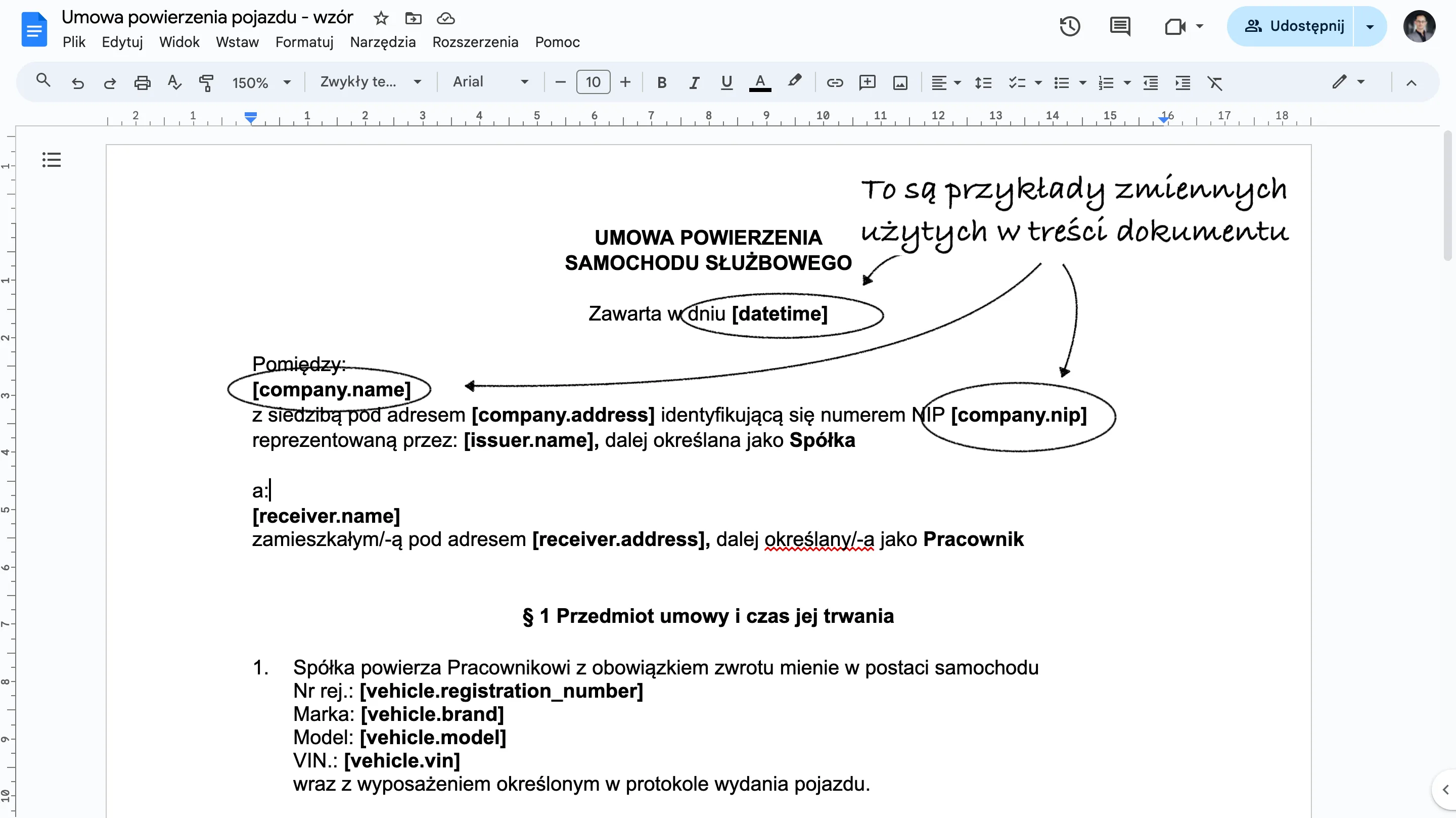
You do this using document templates. A template for a document that must be signed when a vehicle is issued is an ordinary text file in *.docx format. The only thing you need to remember is to include so-called variables in its content, which will be automatically replaced with data at every handover. Every time a vehicle is issued, the app will load into the uploaded template the content of specific fields relating to the details of the handover, the vehicle, the company and the person issuing and the person receiving the vehicle. Make sure these are always filled in and up to date.
List of variables that can be used in a template
The full list of variables available is as follows:
Handover:
- [date] - handover date
- [datetime] - handover date and time
- [address] - handover location
- [notes] - Handover notes
Vehicle being handed over:
- [vehicle.registration_number] - Registration number
- [vehicle.brand] - Make
- [vehicle.model] - Model
- [vehicle.vin] - VIN
- [vehicle.year] - Year of manufacture
- [vehicle.mileage_km] - Mileage in km
- [vehicle.mileage_mth] - Mileage in engine hours
- [vehicle.insurance_policy_number] - Policy number
- [vehicle.variant] - Model variant
- [vehicle.group] - Vehicle group names
- [vehicle.energy_source] - Fuel type
- [vehicle.fuelcard_PIN] - Fuel card PIN
- [vehicle.registration_date] - Date of first registration
- [vehicle.registration_card_number] - Registration certificate number
- [vehicle.type] - Vehicle type
- [vehicle.segment] - Vehicle segment
- [vehicle.notes] - Vehicle notes
Company that owns the vehicle being handed over:
- [company.name] - company name
- [company.address] - company postcode, city and street
- [company.nip] - company tax ID (NIP)
Person issuing the vehicle:
- [issuer.name] - Full name of the person issuing the vehicle
- [issuer.address] - postcode, city and street of the person issuing the vehicle
- [issuer.phone] - phone number of the person issuing the vehicle
- [issuer.driving_license] - driving licence number of the person issuing the vehicle
- [issuer.email] - E-mail address of the person issuing the vehicle
- [issuer.job_title] - Job title of the person issuing the vehicle
- [issuer.group] - Group names of the person issuing the vehicle
- [issuer.notes] - Profile notes of the person issuing the vehicle
- [issuer.ID_type] - Identity document type
- [issuer.ID_number] - Identity document number
- [issuer.cooperation_form] - Form of engagement
Person receiving the vehicle:
- [receiver.name] - Full name of the person receiving the vehicle
- [receiver.address] - postcode, city and street of the person receiving the vehicle
- [receiver.phone] - phone number of the person receiving the vehicle
- [receiver.driving_license] - driving licence number of the person receiving the vehicle
- [receiver.email] - E-mail address of the person receiving the vehicle
- [receiver.job_title] - Job title of the person receiving the vehicle
- [receiver.group] - Group names of the person receiving the vehicle
- [receiver.notes] - Profile notes of the person receiving the vehicle
- [receiver.ID_type] - Identity document type
- [receiver.ID_number] - Identity document number
- [receiver.cooperation_form] - Form of engagement
Adding a template to the app

Once the template is ready, you can upload it to the Navifleet Manager app. You can add more than one template. To do so, go to Settings -> Documents for signature and click the Add button on the right-hand side of the screen.
Choose who has to sign the document

Fill in the required information. Upload the document template and indicate whether signing the document is required from the Issuer or from the Vehicle user. At every vehicle handover we will use this template to generate a PDF document filled in with the relevant data, ready for signature.
Choose the company and the form of employment
One person managing the fleets of several companies is perfectly normal these days. Another industry standard that adds complexity to the vehicle handover process is the use of different forms of employment. Depending on whether the user we are issuing the vehicle to is on an employment contract, a B2B contract or a contract for services, we need to prepare and fill in different document templates. You don't need to worry about that, though, because we thought of this detail too! The app lets you configure each document template according to:
- the company that owns the vehicle being issued,
- the form of employment of the person receiving the vehicle.

In practice this means that at every vehicle handover we check which company the vehicle belongs to and what form of employment the recipient has, and automatically prepare the right document templates for signature!
Signing the documents
The documents are signed together with the vehicle handover report. This means that if you want to sign documents with the user you are issuing the vehicle to, you have to complete a vehicle handover report. We wanted this step to take as little time as possible, so the user signs once, thereby accepting the content not only of the report but of all the other documents as well. By default, all documents signed at that handover are sent to the e-mail address of the user receiving the vehicle.
Register of signed documents
This paragraph is really only here to tell you that you no longer need to keep a register of signed documents, because we do it for you automatically. All documents signed at a given vehicle handover or return are automatically archived in the cloud and you can access them whenever you want.
 Agata Świerczek
E-marketing Specialist
As a UX/UI design specialist I combine creativity with precise communication. I design intuitive interfaces and engaging digital content, and I write product copy and blog articles that hold attention and support business goals.
Agata Świerczek
E-marketing Specialist
As a UX/UI design specialist I combine creativity with precise communication. I design intuitive interfaces and engaging digital content, and I write product copy and blog articles that hold attention and support business goals.