

Tracking of passenger vehicles is most often used to verify the progress of sales representatives, fitters or service technicians. Allowing employees to use a company vehicle for private purposes creates the need to separate private mileage from business journeys. In this article we outline how to control private journeys in a company car.
Control: private and business mileage tailored to working conditions
The driving mode is distinguished automatically or manually. If an employee has fixed working hours, the Navifleet® system automatically assigns journeys during working hours to the pool of business journeys and those outside working hours to private journeys. For this separation to work fully automatically, all you need to do is define working hours for each day of the week. Sometimes this solution does not do the job, because the employee made a private journey during working hours with the boss's consent or had to visit a customer in the evening. So that such marginal situations do not disrupt the order of settlements, it is worth using mechanical identification of journeys. The most popular is the use of RFID cards. After switching on the ignition, the driver must specify whether the journey is private or business. What protects the driver from unfortunately forgetting to identify the journey is a loud, insistent sound from the acoustic signaller. The only way to silence this annoying sound is to hold up one of the two RFID cards the driver is given: the private mileage card or the business mileage card. This technique of measuring driving time has the highest user ratings for convenience, price and reliability. Any discrepancy between the system's reading and the actual state of affairs is the result of the driver's deliberate action.
Private mileage: how are journeys settled?
The easiest way to learn the statistics of private journeys is to generate a report containing the basic settlement data: mileage, driving time and fuel burned. To make things easier, the system compares each day's private journeys with total journeys. The generated report can easily be exported to a spreadsheet for any further calculations needed. The convenient format lets you know exactly what share of the vehicle's total monthly mileage is private.
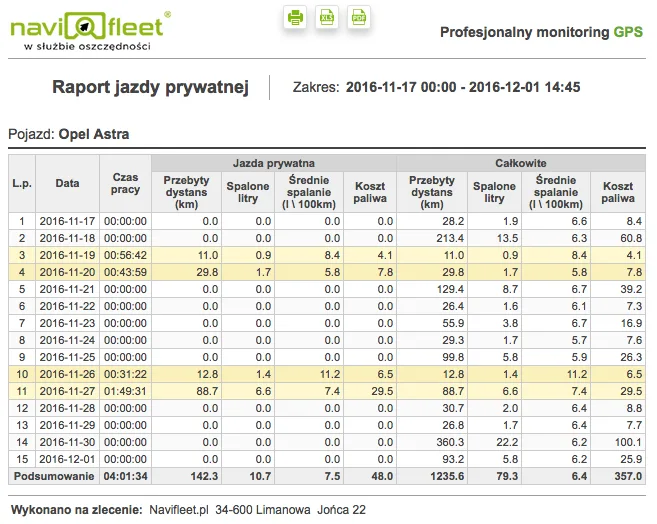
Fig. 1: Private mileage settlement report from the Navifleet® system
Control of private journeys for every driver
A very important aspect of settling business or private journeys is settling drivers, not vehicles. Even if a driver is permanently assigned to a single vehicle, chance situations will cause drivers to swap vehicles and the settlement will not be reliable. The Navifleet® system finds a given driver's journeys by itself, whatever vehicle they used, and then presents the totals. Only this method guarantees 100% consistency between the report and the actual state of affairs, and it should be borne in mind when settling private journeys.
Documenting business journeys in the mileage record report
The vehicle mileage record is a Navifleet® report containing all the necessary elements of a correctly completed record of business journeys. Polish law allows a business to recover the VAT on the costs generated by a vehicle, provided it shows that the vehicle was used entirely for business purposes. The vehicle mileage record report presents the odometer reading at the beginning and end of the month, all journeys with details, and a summary of the month's mileage. Each journey includes the exact start and end address together with the exact date and time of departure and arrival. In the mileage record report, business journeys are settled by filling in the "Purpose of journey" field, which unambiguously states the reason for using the company vehicle. A huge help is that the Navifleet® system identifies by itself the driver who drove the company vehicle and automatically fills in the "Driver" field in the report.
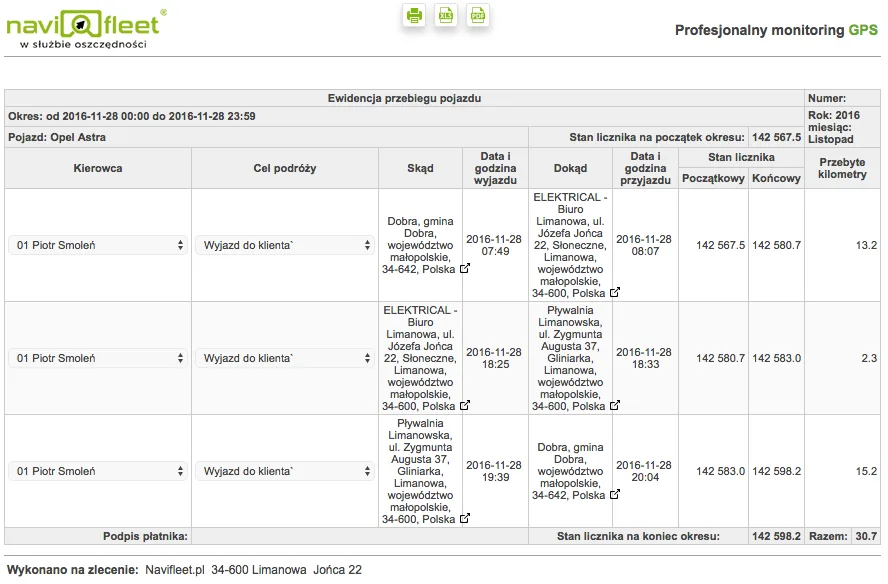
Fig. 2: Vehicle mileage record report in the Navifleet® system
The generated report only needs to be signed and filed with the accounting documentation. It contains all the elements needed to recover the tax paid.



