

A driver's journey along a given route can be analysed in terms of many driving parameters. These include distance covered, stop times and locations, journey times, average and maximum speed, fuel burned and the driver's driving style. Driver control can be within reach as soon as you implement a fleet management system such as GPS tracking. See how to comprehensively analyse a driver's route.
Visualising the route driven
The best method (especially for people commonly known as visual learners) is to present the route driven in graphic form. Even the basic version of GPS tracking has this function. Driver control through this uncomplicated function is very precise. The GPS system creates a virtual trail of the route driven on the map and marks the stopping points, i.e. the places where the driver stopped the vehicle. Additional information is a note on whether the engine was running while the vehicle was stopped. A very convenient complement to the route view is the journey animation function. The application imitates the car's journey, so you can easily determine the order in which the driver visited the individual stopping points.
Video player
00:00
00:25
Speed history under the microscope
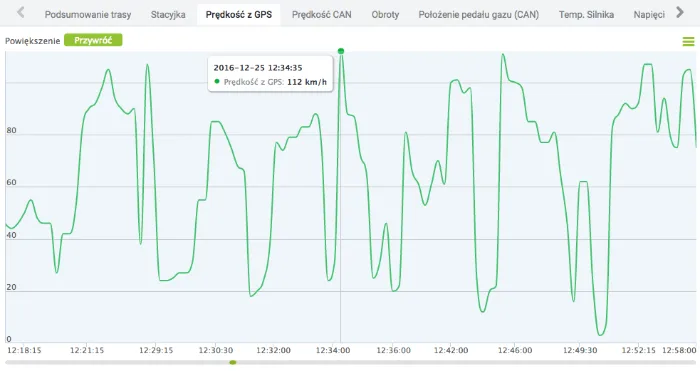
The speed at which a vehicle travels should be optimal: neither too slow nor too fast. The best insight into speeds is given by a histogram of speed distribution in five bands. This lets you see at once the speeds the driver reaches. Driver control also means responding to high speeds. The GPS tracking system allows alerts to be activated that inform us when the driver reaches too high a speed. The system sends notifications of this by text message or e-mail. Employee control can be extended with an analysis of the speed chart for the monitored vehicle. The speed chart is a precise record of speed changes along the route. This means that on the chart we can observe when the driver exceeded the maximum speed and for how long they kept it up
Stop addresses and journey log
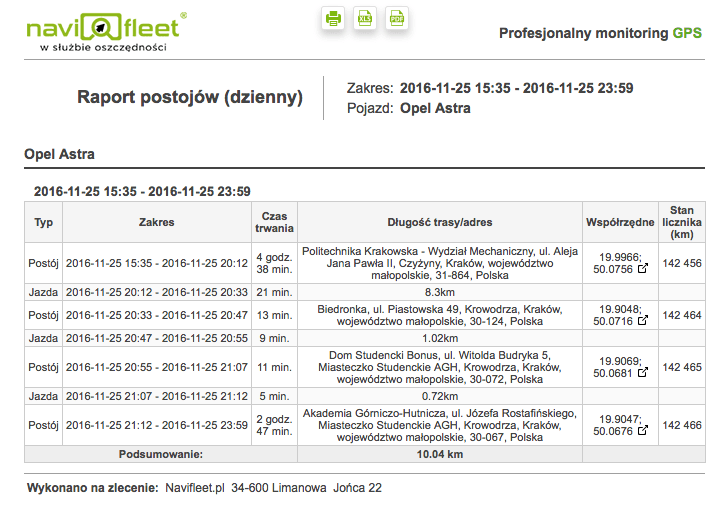
Route visualisation is a huge advantage of a GPS tracking system; the route taken by a dishonest driver will be precisely recorded and presented on the map. But driver control is not just charts. A format is needed in which data can be conveniently archived, which is why a GPS tracking system should be able to generate reports. The most basic report of routes driven is the stops report. It lets us analyse the driver's route from point to point, step by step. The stops report contains the exact date and time of the start and end of each stop along the route. Generating the report quickly lets you see at once the places the driver visited and determine the stop time at those points. Sometimes a stop address does not say much, so a convenient solution is to link the address to a point on the map in order to assess the location of the stopping point visually.
Controlling the driver's driving style
Whether a given route was driven economically or not is most often shown by the average fuel consumption figure. Unfortunately, a high average consumption reading does not always indicate uneconomical driving, especially in freight transport, where the varying weight of the cargo carried and changes in road gradient (mountainous or lowland terrain) significantly affect fuel consumption. To check precisely how our driver drives, data from the on-board computer should be used. Thanks to technology, almost every driving parameter is now recorded. Starting with the basic value of RPM, i.e. engine speed, through accelerator pedal pressure and instantaneous fuel consumption, and ending with engine temperature. An addition that increases the accuracy of employee control is the accelerometer reading. With these readings, the user of the GPS tracking system has a clear view of how harshly the driver accelerates and brakes in the vehicle. All the information collected from the vehicle is presented on a chart whose view can be freely zoomed in and out. To find out more about a specific abuse, for example excessively harsh acceleration, just click on the worrying reading on the chart to see the date, time and place of the event on the map.
Summary
Such comprehensive control of a driver's driving is the key to success for every company. If we do not know how our driver drives, how can we know they drive well? The costs of uneconomical or, worse, dangerous driving are enormous. Some appear immediately, such as claims settlement costs or fuel costs. But there are costs that are not visible at first: increased wear and more frequent replacements. GPS tracking is a tool that helps control employees, but only at the start. For drivers it is extra motivation to strive for even better results. Above all, a GPS tracking system is meant to increase the driver's sense of care for the vehicle entrusted to them, and for the fleet manager or dispatcher it is a way to keep every driver's route under control.



