
A fleet manager's job does not have to be a towering pile of paperwork to fill in, scan and file on a shared drive. It does not have to mean a dozen unexpected phone calls a day. And above all, it does not have to be chaotic.
Working directly with fleet managers and building on their needs, we have created a completely new fleet management solution, tailored as neatly as the upholstery in your new car.
That solution is Navifleet Manager: an application that is easy to use and comprehensive at the same time.
In this article we explain exactly what our application is, what it consists of, why it was created and, most importantly, how we are going to develop it further to cover more and more of a fleet administrator's needs.
Buckle up, let's go!
Why did we build Navifleet Manager?
There are plenty of solutions that make a fleet manager's life easier. So where did the idea for our application come from?
Navifleet Manager was created to approach the whole fleet management process from a slightly different angle.
First, our application has a very low barrier to entry. It is easy to use, which makes it easy to roll out into daily work, even when you are introducing it to a team of several dozen people.
Second, Navifleet Manager covers many different areas of a fleet manager's work, but lets you use only the modules you actually need. If electronic handover reports are all you are interested in, you can happily use that feature alone, without paying for functionality you do not use.
Likewise, in Navifleet you pay only for the vehicles you add to the application, and there is no minimum number of vehicles.
Third, although our application is highly intuitive and easy to use, it is just as comprehensive and effective. It covers the rigid processes that simply have to be carried out in a specific way, such as handing over or returning a vehicle, while also giving you the flexibility to build your own processes and templates from the elements available in the application and the ones you add yourself.
In Navifleet Manager you can automatically create a vehicle handover report, sign it electronically on a phone screen and check the technical condition of every vehicle added to the application, all in one place.
Our main goal is to make fleet managers' work easier, saving them time and money and replacing chaos with as much order as possible.
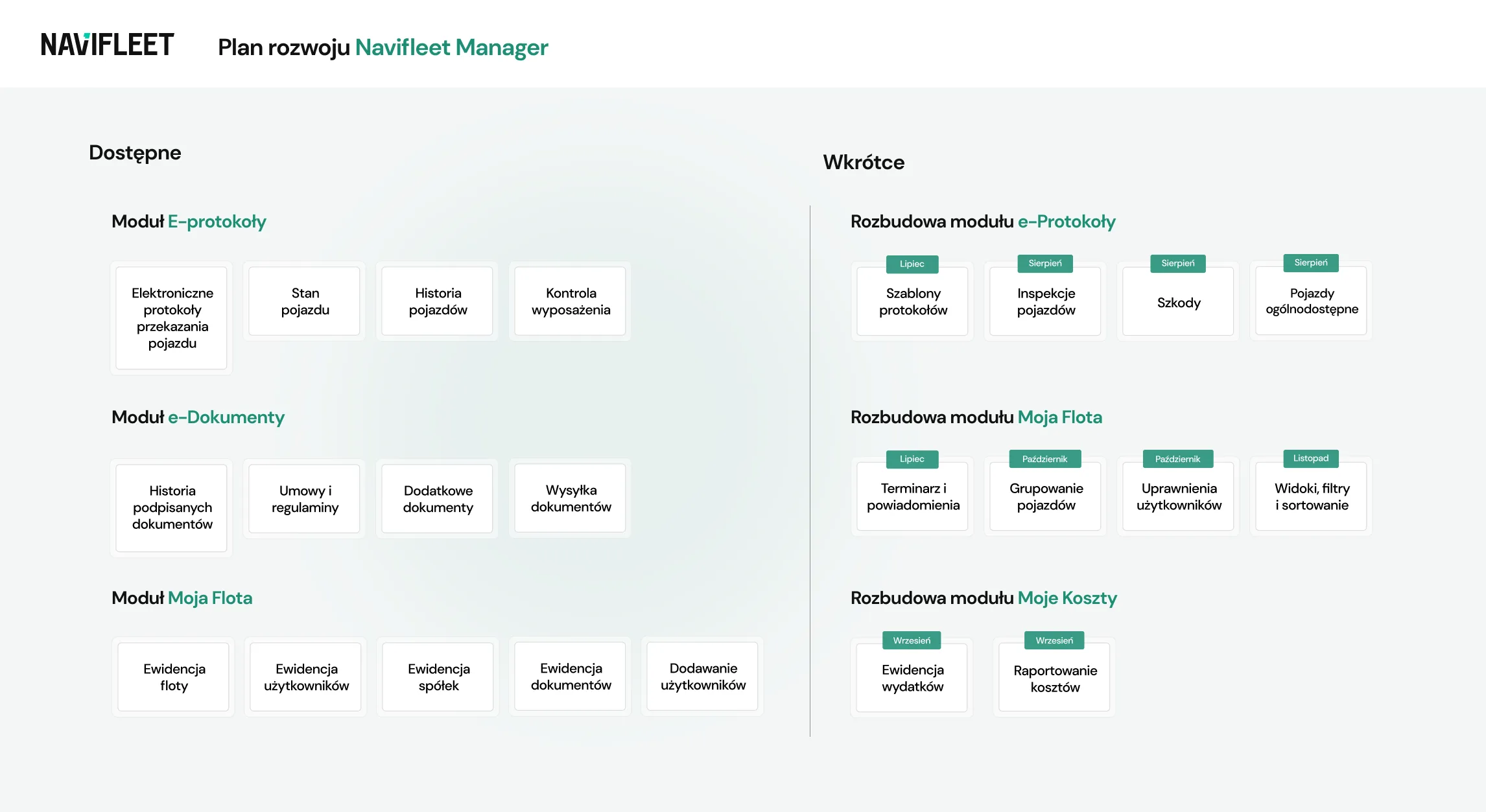
We achieve this through the four innovative modules of our application:
- the e-Documents module,
- the e-Reports module,
- the My Fleet module,
- the My Costs module.
The whole application is available on a subscription basis, which means no long-term contract. You can cancel your subscription with one month's notice.
Below you will find a detailed description of each Navifleet Manager module, the features currently available in each of them, and the features we are working on, with the planned dates for adding them to the application.
No need to buy a pig in a poke: check whether Navifleet has what your fleet needs.
The e-Reports module
The foundation of Navifleet Manager, and one of the first features we made available to fleet managers, is the ability to create electronic handover reports: the e-Reports module.
The e-Reports module currently consists of:
Electronic vehicle handover reports
The application guides your drivers through creating a handover report in 4 simple steps.
That way you no longer have to worry that an important step of the process will be skipped, and you are not pulled away from your work yet again.
The document is generated automatically once all the steps are complete and is authorised with a binding electronic signature that can easily be drawn on a phone or tablet screen.
Documenting vehicle condition at handover and return
On top of that, every report is supplemented with actual photos of the vehicle being handed over or returned, taken directly from within the application.
The size of a scratch or the depth of a dent is no longer left to the imagination: everything is visible in the attached photo documentation.
Usage history
The e-Reports module also gives you an easily accessible usage history for every vehicle you add. We are talking about kilometres driven, fuel level and damage sustained.
This lets you keep an eye on the condition of your fleet and react in good time to upcoming events, such as an approaching service or returning a vehicle to the leasing company.
Equipment checks at handover and return
A missing hi-vis vest or, worse, a missing fire extinguisher or first-aid kit? Never again.
In the e-Reports module your drivers are required to complete equipment checklists when creating each report. You decide which items should be checked, choosing from those available in the application or adding your own.
In July and August 2024 we will extend the e-Reports module with additional features, including:
Report templates [July]
Looking for something less off-the-shelf? Or does your fleet include not only cars but also excavators, rollers or other types of machinery?
From July 2024 the e-Reports module will be extended with the ability to create your own report templates.
You decide what information your drivers should provide, so that the electronic reports created in Navifleet Manager match your fleet's needs as closely as possible.
And if your fleet is smaller or uses standard procedures, you can still use the professional templates prepared by our experts.
Damage reporting and periodic inspections [August]
Every fleet manager will agree that the budget has to add up. And a vehicle fleet budget is made up of many different items, from fuel to running costs.
To protect yourself against unexpected expenses and look after your fleet's image, from August every fleet manager will be able to add periodic vehicle inspections in the e-Reports module.
Once the application notifies them that a report is due, your drivers complete it, providing the key information about the vehicle they use, including photo documentation.
You decide how often you want to receive reports, so you can easily keep watch over the condition of your fleet with no nasty surprises at the worst possible moment.
Damage module in the web application [August]
Reporting damage only while creating a handover report may not be enough. That is why in August 2024 the e-Reports module will be extended with the ability to report damage to your vehicles directly in the application, without having to generate a report at the time.
Every damage case is an extra row in the web application, giving you a broad overview of the condition of your fleet. And every case you add creates an individual, more detailed folder in which you will find not only the key information about the incident but also all the related documents, including invoices and photo documentation.
All of this is complemented by statistics across all damage cases, helping you spot recurring patterns, factors, dependencies or repeat offenders faster, without having to rely on your sixth sense.
Drivers collecting and returning pool vehicles on their own [August]
If your fleet includes pool vehicles, so-called hot vehicles available to any driver, from August your drivers will be able to collect and return them on their own without involving the fleet manager.
With the extended e-Reports module you can give your drivers room for greater independence, especially if you work in an organisation with a distributed structure. After all, you cannot be in two places at once when several drivers are handing over and collecting vehicles at several different locations.
Define the collection and return steps your drivers should complete in the application, matching them to your own process, whether that is photo documentation, signing the report or reading the fleet policy you have set, and your drivers will go through all the required steps on their own.
The e-Documents module
Handover reports, although a very important part of fleet management, are not the only key issue fleet managers have to deal with.
After fleet managers tested the original version of our application, we received valuable feedback: handing over and collecting vehicles is about more than the report.
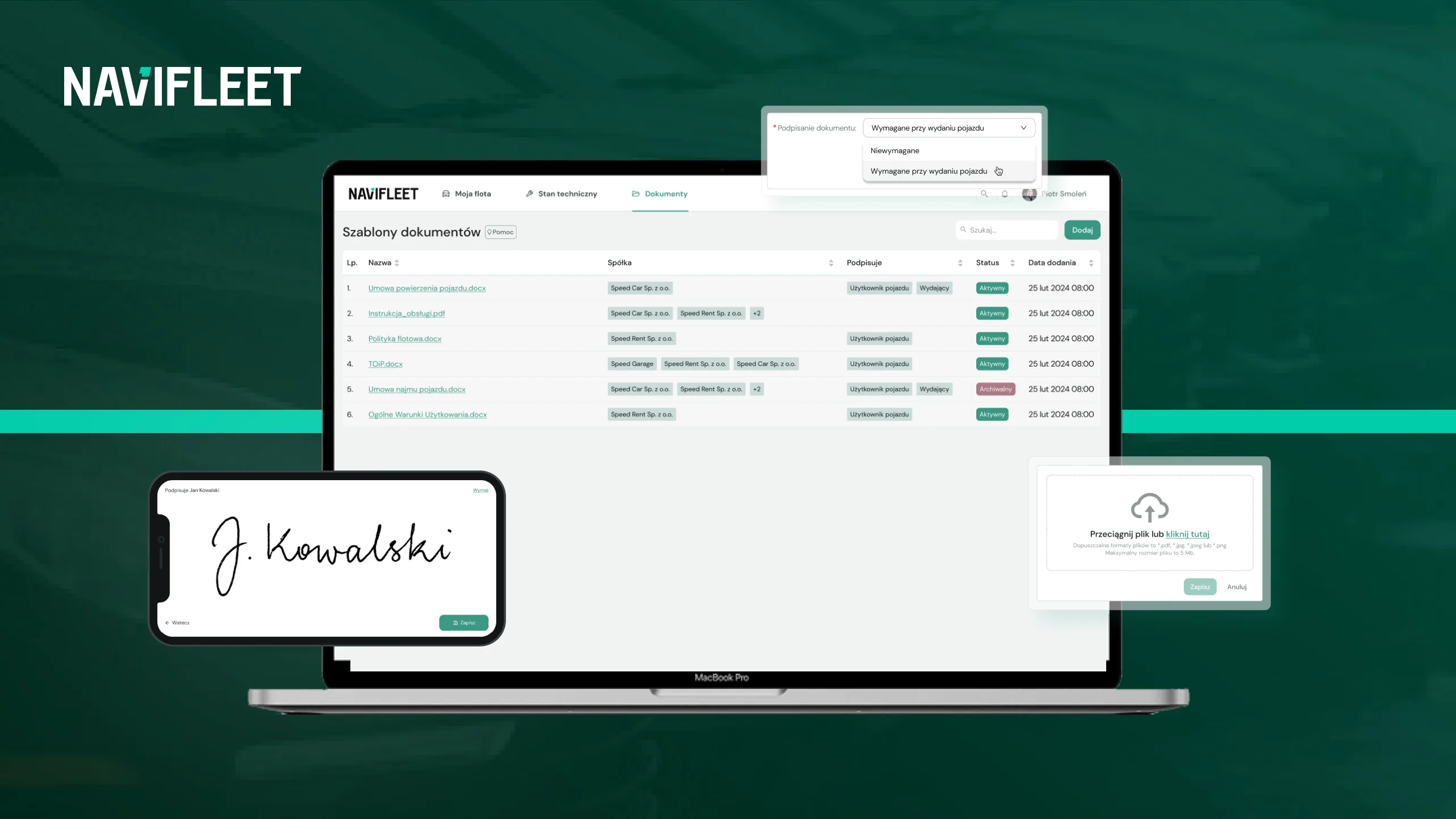
Many fleet managers rightly suggested adding the option to sign other documents during the handover process as well. That is how the e-Documents module came about. It lets you add various kinds of documents to the application, such as the fleet policy, vehicle usage rules, agreements, instructions, leaflets and others, including ones that require the driver's signature.
On 4 June 2024 we added the following to Navifleet Manager:
Electronic signing of agreements and rules at vehicle handover
Add agreement templates, rules or other documents to the application, and the Navifleet system will automatically load them and make them available to drivers at vehicle handover.
Drivers can easily read the necessary documentation and sign it electronically on their smartphone or tablet screen in a matter of moments.
No printing, no handwritten signatures, no posting documents and no unnecessary trips to the office.
Records of documents signed at handover
Electronically signed documents do not disappear. Quite the opposite: they are automatically saved in the Navifleet application, so they are easily accessible to both drivers and fleet managers.
This step eliminates unnecessary scanning and filing of documents and also significantly reduces the unexpected phone calls asking for an important document to be sent over.
Adding instructions and leaflets for vehicle users
Besides adding individual documents for a given driver to sign electronically, or documents assigned to a specific vehicle, the e-Documents module also lets you easily attach all company-wide documents.
Whether these are vehicle usage rules or procedures to follow in the event of a collision, your drivers will find all the necessary information and documents in one place.
And in the event of an unexpected roadside check, they simply reach for their phone and open the application.
Sending signed documents to the driver's email
Better safe than sorry: every driver in your fleet receives the documents they have signed in their email inbox.
That gives you certainty that all the necessary documents have been handed over, and the paperwork is behind you.
The My Fleet module
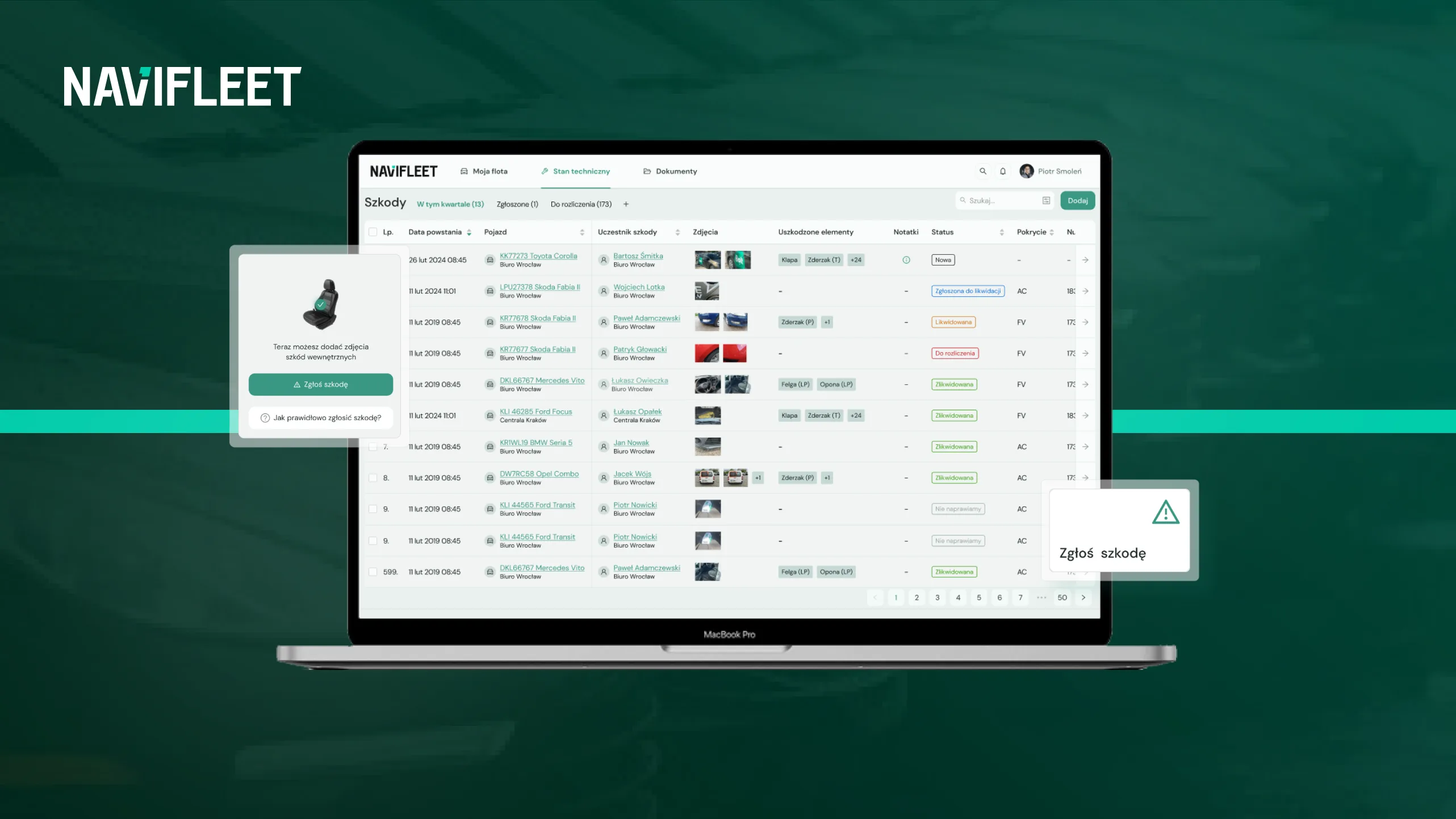
Going a step further, beyond simply creating handover reports, keeping an eye on the condition of your fleet and vehicle damage, or signing agreements electronically, Navifleet Manager has been extended with an additional module: My Fleet.
My Fleet is your command centre, literally and figuratively. Here you will find the data aggregated by Navifleet, which you can easily browse and then use to optimise your processes and costs.
The data we are talking about includes all the companies, vehicles and their users you have added.
More specifically:
Vehicle records
Vehicle records bring together all the key information about the vehicles in your fleet.
Starting with the basics, such as make, model, registration number and VIN of each vehicle, through to broader data, such as the date of first registration or the model variant of a given car.
This gives you a “single source of truth” about your fleet: a place where all the key information is gathered and kept up to date. A place you can access anytime, anywhere, from within the application.
Knowing that nobody collects fleet data as a hobby, the My Fleet module lets you easily analyse all the available information and draw conclusions from it. You will quickly find out what percentage of your fleet is made up of electric vehicles or of a specific model.
User records
Besides vehicles, the My Fleet module also keeps records of the users added to the application.
That way, all the details of vehicle users and system administrators are in one place, and you can easily get in touch with them when needed.
What is more, user details are automatically filled in on every handover report. Each subsequent report for the same user will already be pre-filled with the right details, eliminating yet another repetitive task.
Company records
Do you work in a distributed organisation with more than one company? With the My Fleet module you can easily add all your companies to the application, including their logos.
Every report generated for a given company will then be marked with the right logo.
Vehicle file records
Another feature available in the My Fleet module concerns documents, or more precisely document scans.
You can easily add a scan of the insurance policy, roadworthiness test or registration certificate of every vehicle to the application, which not only keeps your fleet's documents in order but also gives drivers easy access to them.
As a result, drivers will dial your number far less often, simply because they can look up all the key documents and information on their own.
Inviting other users to the application (vehicle users and administrators)
To minimise repetitive tasks in a fleet manager's work as much as possible, you can invite additional users to the Navifleet application: vehicle users and administrators.
With their own access account, every user can use the features described above and, for example, report damage, generate handover reports or read the fleet policy and other important documents on their own.
But records and access for other users are not everything.
From July to the end of 2024 the My Fleet module will be extended with further features, including:
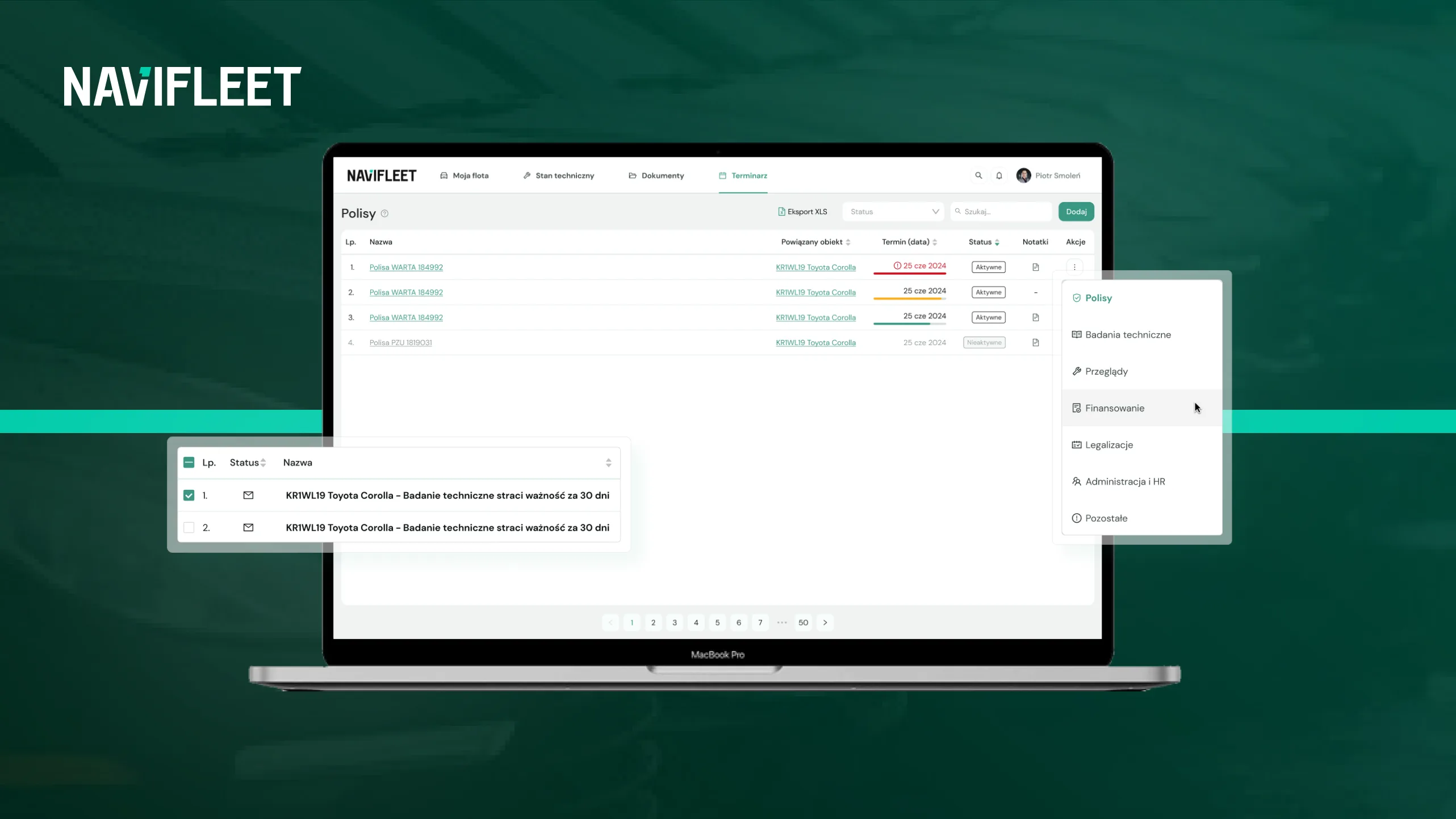
Scheduler with email reminders [July]
With the scheduler and reminders you will be able to add all your important dates to Navifleet Manager, and the My Fleet module will keep track of them for you.
Whether it is the expiry of an insurance policy, a warranty service interval or an upcoming roadworthiness test, you will be notified by email well in advance.
To keep track of important dates easily, avoid the risk of a lapsed policy and steer clear of possible financial penalties, add deadlines based on a specific date or on a given vehicle reaching a specific mileage. One less worry on your list.
Vehicle grouping [October]
From October the My Fleet module will also let you group all the vehicles you have added to the application.
Grouping will be based on criteria or vehicle attributes that you define. What is more, you will be able to assign specific functions to each vehicle group.
This will streamline all bulk operations, for example producing a report on the costs generated by a specific branch of your fleet. You simply select the right vehicle group in the application instead of ticking each vehicle one by one.
User permissions [October]
Since additional users can be added to the application, it is essential to be able to grant them the right permissions.
From October 2024 the My Fleet module will let you define what level of access specific users should have. You will be able to define access to specific vehicles, as well as to the specific actions a given user can perform.
Perhaps you want to add a branch manager who should manage only a certain part of your fleet. Once this feature is added, you will easily give every user the right permissions.
Views, filters and sorting on lists [November]
The My Fleet module holds a great deal of data aggregated by our system, hence the strong need for a few more features: filtering, sorting and saving views for quick access.
To browse the stored information quickly and easily, from November 2024 the My Fleet module will give you unlimited filtering and sorting conditions on every list in the system, with the option to save them for quick access in a separate tab.
You will easily work through lists of users, vehicles or damage cases and tailor how you browse this information to your needs.
Archiving vehicles and users [December]
If any vehicle or user leaves your fleet, once the archiving feature is added you will be able to withdraw inactive vehicles or users from the application.
It is worth stressing that deactivating a vehicle or user in the system does not delete the data associated with them: all historical data is retained in the system.
This addition to the My Fleet module makes it easy to keep your fleet system tidy, while still letting you go back to historical data whenever you need to.
XLS data import and export [December]
In December the My Fleet module will be extended with XLS data import and export.
This will speed up adding vehicles to the system as well as editing data. You will be able to add and update vehicle and user data in bulk based on an uploaded XLS file.
Adding and editing data is not all, though. This update will also let you easily generate tabular summaries, pulling data from every module in the system, which you can then edit in an XLS file and attach back to the application.
The My Costs module
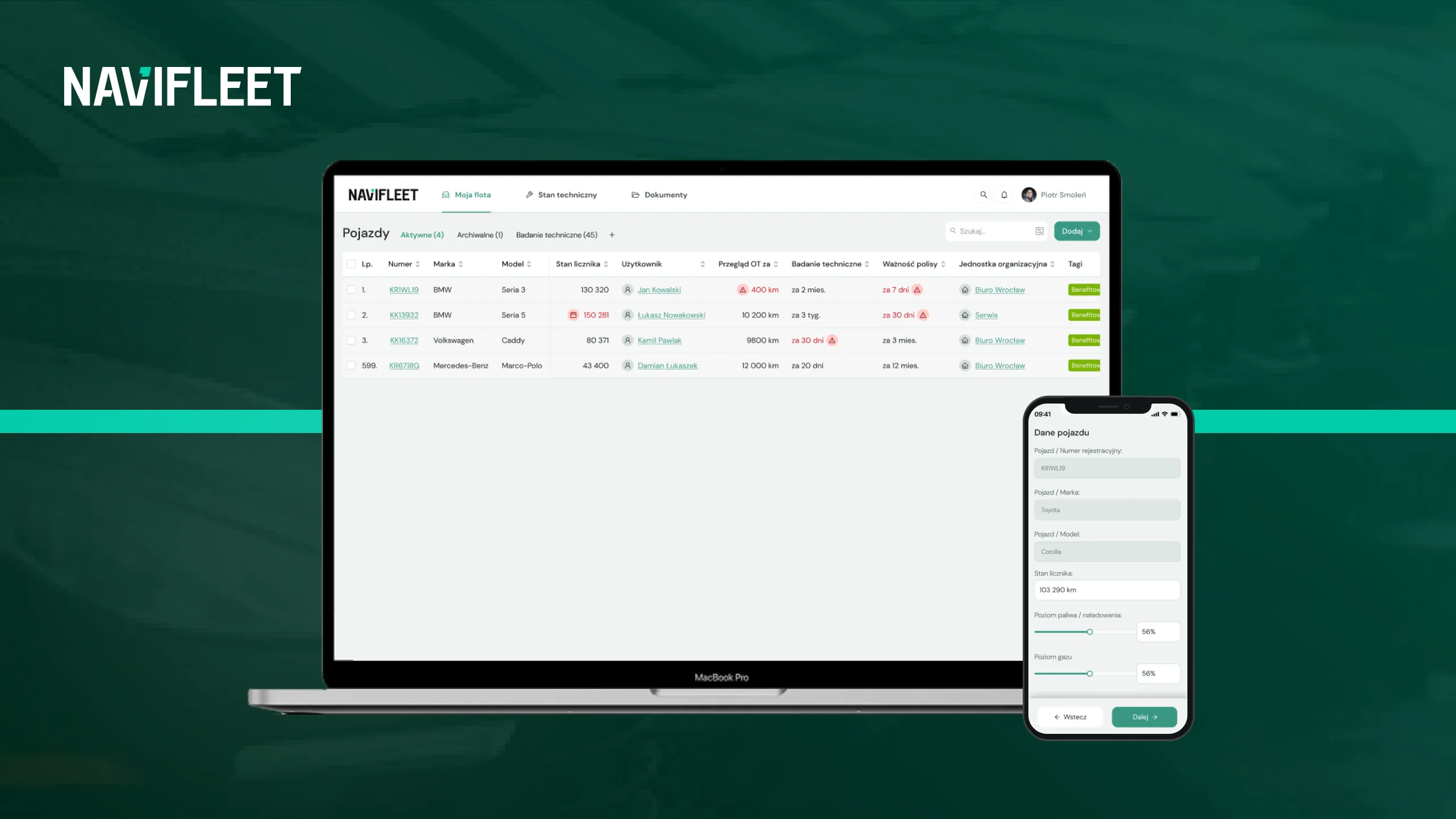
Besides eliminating repetitive tasks and aggregating all kinds of data, Navifleet Manager will also help you cut the running costs of your fleet as much as possible.
We want to achieve this by letting you record and allocate expenses and report on the size and structure of your fleet costs.
Recording and allocating expenses [September]
With expense recording and allocation you can quickly enter and categorise every expense in your fleet, whether it is a repair cost, a fine, a towing invoice or servicing costs.
You add the data while using other system features, for example when adding a new damage case, where one of the fields to fill in is the associated cost.
That way you get complete cost data about your fleet with very little effort.
Reporting on the size and structure of fleet costs [September]
Beyond adding cost-related data, you will be able to round it all off with reporting.
From September Navifleet Manager will let you generate cost reports based on various factors, for example a report per company or per vehicle make.
That way you get a bird's-eye view of the collected data and see more. You may notice certain patterns and react quickly, for example withdrawing a given vehicle model from your fleet because of the high costs it generates.
How do we differ from the competition?
Having read the article so far, you know exactly what we will be working on until the end of 2024 and how Navifleet Manager will change. However, since there are several solutions on the market that streamline fleet management, we want to highlight what sets Navifleet apart.
First of all, as this article makes clear, we consider it very important to communicate our application's development plans.
We believe that full transparency towards our customers matters far more than whether our competitors “see through” our intentions. Thanks to open communication of our development plans, you will not only learn what we are planning to add to Navifleet Manager, but also read about how the new features connect with those currently available and how they can help you streamline fleet management.
We are equally open to feedback from our customers. As we have mentioned several times, Navifleet Manager was built on the real needs of fleet managers and in direct cooperation with fleet administrators. We want to keep it that way, so that our application reflects your needs as closely as possible.
Another distinguishing feature is that we offer our application as a SaaS solution. SaaS, or Software as a Service, is an open application based on a monthly subscription, which you can simply cancel with one month's notice. This is our answer to long-term contracts and to the lack of any real opportunity to test a fleet management solution before committing.
You can easily try Navifleet Manager by creating a free account. Once you have checked that our product suits your needs, you can pay for your first subscription. Nothing simpler. You do not need to contact our sales department. We believe that the product has to stand on its own, and our customers are the best judges of that.
We also know how tedious introducing a new fleet management solution into your daily work can be. If the whole process gives you a headache, feel free to get in touch with our team and we will support you through it, importing data from your current system or from the spreadsheets you use.
We believe that selling our solution does not end with a purchased subscription. We support our customers after the sale as well, whether by introducing individual solutions based on their needs or by offering professional support in optimising their fleet operations or documentation. Our experienced team of fleet professionals is ready to take on new challenges!
Suppose your fleet is not huge and consists of, say, 10 or 20 vehicles. Competing solutions may then prove somewhat too rigid, requiring you to sign a long-term contract for functionality you do not need at all. At Navifleet we look after smaller and larger fleets alike and let you adapt our application to your needs. You pay only for what you use, both in terms of features and the number of vehicles you manage.
Another thing that sets us apart from the competition is our philosophy of “balanced rigidity”. We have found our place on the market thanks to a balanced approach to building the application. We dig very deep into the analysis of fleet processes and design the application to reflect how they really work. Some elements require processes to be followed rigidly, by the book, but in other places we allow freedom and let you adapt the application to your needs.
The last thing we must mention is our effort to make our system as useful as possible in the simplest possible way.
Every feature is designed to require as little effort as possible. We believe that by automating our customers' work we free up their time for initiatives they simply had no time for before.
Any questions? Don't hesitate to ask
Create a free account and see for yourself how easy fleet management can be. Test the application completely free of charge for 7 days.



