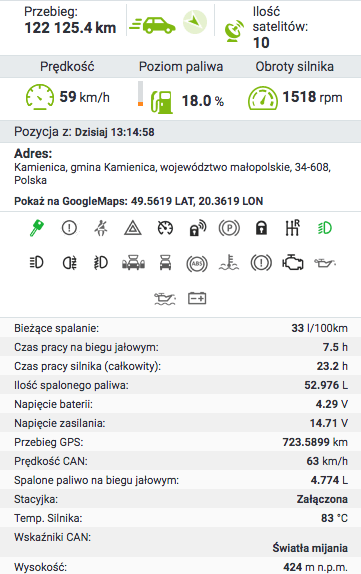
Few people realise that on-board computers in vehicles were created as far back as the 1980s. The German company Robert Bosch GmbH developed it for communication between the various mechanisms in a vehicle. Today, at least 95% of the cars we see on Polish roads have an on-board computer. See what a car's on-board computer shows and how much it matters for fleet management systems.
Fuel level control using the CAN bus
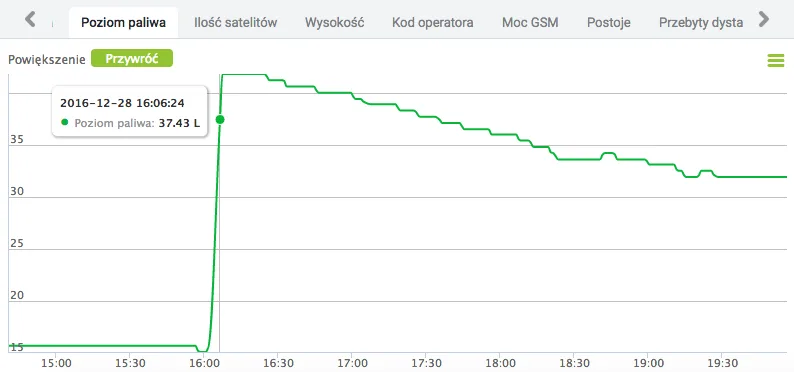
The CAN bus (Controller Area Network), as the communication channels through which information from the various sensors in a vehicle flows are professionally called, holds very accurate fuel data. The first type of fuel information is, of course, the current reading of the amount of fuel in the vehicle's tank. The information is read from the factory-fitted measuring instrument, commonly known as the float. The most common form of this information is the percentage fill level of the tank, although some cars provide the exact value in litres on the CAN bus. Our fuel control system used in GPS tracking has a feature that lets technicians calibrate the fuel data reading during installation. This is particularly important for the fleet owner, because they know exactly how many litres of fuel are in the tank, even if the vehicle's on-board computer does not say so directly. The current tank reading is something without which fuel control would not be possible. The tracker connected to the on-board computer records changes in the amount of fuel, and the Navifleet vehicle monitoring system processes this data to clearly indicate a loss or a refuelling.
Fuel consumption control and correcting incorrect on-board computer readings
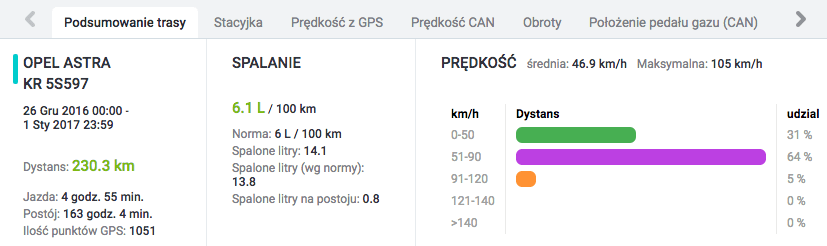
The second most important piece of information shown by a car's on-board computer is the fuel consumed counter. The information on fuel consumed from the on-board computer tells us exactly how much fuel the engine has burned while running. The reading from the on-board computer can be very accurate, although it is not always so. We often find that fuel consumption control in a company is not possible on the basis of the on-board computer's readings, because they are inaccurate and the discrepancies reach as much as 20%. In the course of research and analysis in GPS tracking systems, it has become possible to correct incorrect fuel consumption readings from the on-board computer. The result is that the gauge in the vehicle shows an incorrect value, while the Navifleet system shows the correct one 🙂
Operating parameters: monitoring engine speed, instantaneous fuel consumption and accelerator pedal pressure
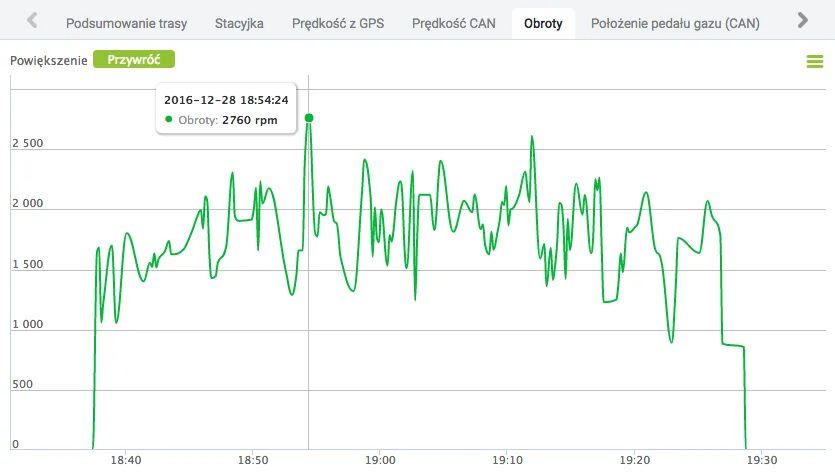
Readings from the on-board computer can be used in a GPS tracking system as a source of knowledge about how the driver uses the vehicle. The most basic of these is engine speed. A chart of changes shows what "revs" the driver was using. The GPS tracking system mercilessly exposes imperfections in the driver's driving style. Driving style control, however, is more than just monitoring engine speed. Besides that first value, the on-board computer also provides readings of instantaneous fuel consumption and accelerator pedal pressure. These readings make checking drivers incredibly easy. Just look at the accelerator pedal pressure chart to find out whether the driver tends to drive economically or, on the contrary, likes to floor it. The instantaneous fuel consumption reading is a rich source of information about the load the engine is working under. To understand this properly, just display the instantaneous fuel consumption reading on the dashboard while driving. You will then observe how fuel consumption changes depending on how hard the accelerator is pressed and the current gear. You will notice that if the gear is too high or too low, consumption will be higher than when driving in the optimal gear for the given speed and RPM range.
Engine temperature monitoring and overheating protection
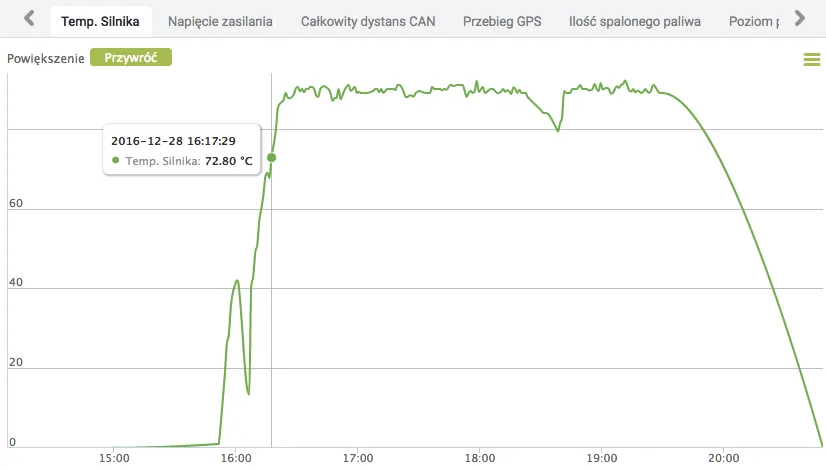
As is well known, the operating temperature of machinery is very important. GPS tracking uses readings from the on-board computer to track key temperature indicators in the vehicle. The first is engine temperature, which under standard conditions should be around 90 °C. A huge help is the ability to configure an SMS or e-mail alert so that the system notifies us when the engine operating temperature exceeds a value, e.g. 95 °C, so that we can react early enough to impending overheating. The second piece of information, which is not always shown on the vehicle's dashboard, is the oil temperature. The online vehicle tracking system makes it possible to trace in the history how these two values changed – also on a clear chart.
Dashboard warning lights: door open, driving without a seat belt and lights left on while the vehicle is parked
Using the connection to the car's on-board computer, the GPS tracking system also provides monitoring of fault events shown on the dashboard as warning lights. The most common include "Door open", "Driving without seat belt" and lights on. In addition to the basic information, GPS trackers can also read more advanced ones, such as "Engine fault", "Low oil level", "ABS fault", etc. The user can view the log of recorded icons during live vehicle tracking and when displaying the route history on the map.