In the previous article I described the devices and additional accessories that can be installed in vehicles, outlining how they work and what functions they offer. But the devices themselves are only part of the whole GPS tracking system. For the Navifleet Platform to be useful it must manage and locate vehicles efficiently, and that also requires software to process all the data.
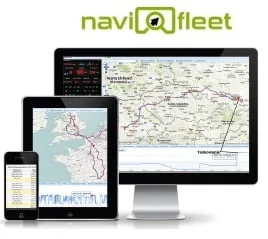
In this article I would like to discuss and introduce the Navifleet platform, the proprietary GPS tracking system of a company with many years of experience in the IT industry: Intellect S.C.
The Navifleet Platform is a set of the most innovative and advanced tools for GPS tracking and location of various types of vehicles and people. The system provides a complete, user-friendly tool for effectively managing vehicles or human resources. Navifleet lets you view the current position of all your vehicles on a map in one place and monitor vehicle parameters such as fuel level, fuel consumption, engine speed and much more. Another advantage of the system is access to historical data on routes driven, statistics and an extensive database; the simple, clear interface lets you navigate the system's functions efficiently.
How does it all work and look?
The devices have a built-in GPS and GPRS module. Every dozen or so seconds they read the vehicle's position and, in the version connected to the CAN bus, information from the on-board computer; using data transmission over an encrypted GPRS protocol, they send the information to the system's servers. The data is processed by the application, and after logging in the user can view all the data and the vehicle's current position on the map.
What features does the Navifleet platform offer?
In addition to tracking the current position on the map, Navifleet's "trail on the map" function gives access to historical data on routes driven and statistics. Once you select the period you are interested in, the system reproduces the route driven on the map, marking the stopping points, and colours the route according to the vehicle's speed. Additional charts also let us learn about the driver's behaviour, i.e. the vehicle's speed with a precise indication on the map of where and at what speed the event took place. Beyond speed itself, the charts present data on engine speed, supply voltage, fuel level, the amount of fuel burned and other parameters that can be extracted from the vehicle.
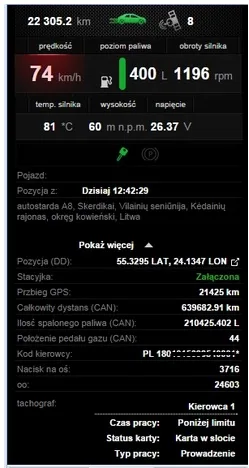
The Navifleet system also lets you view the current position of all your vehicles on the map in one place. In real time you can also see all the vehicle's parameters, e.g. engine temperature, fuel level, accelerator pedal position or active dashboard warning lights. Thanks to the intelligent stop detection module, you have control over idling and the length of stops.
One of the platform's functions is the creation of "geofences", i.e. virtual fences; in practice it works like this: you mark a chosen area on the map (e.g. an office, a city, a region) and, by defining an e-mail or text notification, you are notified every time the zone is left or entered. A special report can also be generated showing all zones visited or not visited over a chosen period, with the exact number of visits and the time spent in the defined zone.
Since I have touched on alerts and notifications, it is worth saying more: the range of alerts does not end with geofences. Notifications can also be set for other vehicle variables, such as exceeding a set speed, a drop in the vehicle's electrical voltage, the ignition being switched on, or a sudden fuel drain from the vehicle's tank; these are just a few of the notifications that can be set in the system.
Another useful function of the system worth discussing is the virtual vehicle service book.
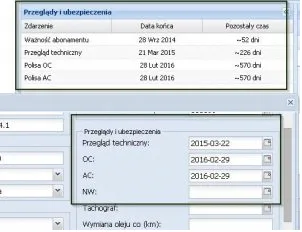
With this function you can keep better control of the technical condition of your fleet. In the book you can define the dates of upcoming servicing such as replacement of operating fluids and spare parts, roadworthiness tests, or the expiry of mandatory third-party or comprehensive insurance premiums. When one of these events is approaching, you are informed.
The Navifleet Platform also offers a powerful library of reports that make work considerably easier and help settle drivers' work more efficiently. Let me briefly describe a few selected reports.

Daily/weekly distance report: the most useful report and the basis of GPS tracking. It lets you total up daily working time, kilometres driven, maximum speeds and the vehicle's utilisation percentage, broken down by day or by week. For GPS CAN solutions, it includes the fuel burned on a given day, average consumption and the fuel level at the end of the day.
Stops/driving report: precise data for each day in the form of a vehicle log showing the car's route with the distances between one stopping point and the next. Exact time frames allow precise settlement of the vehicle's route from departure to arrival.
Visits report: counts visits to undefined, arbitrary points, giving the exact date, the duration of the visit and the total time spent across all visits to a given place.
Driver working time report from the (digital) tachograph: a report showing the driver's working, driving and rest time. The data is read from digital tachographs; a driver card is also required. In addition to the report itself, which can be generated at any time, the vehicle panel lets you read information from the tachograph and driver card in real time.
Driver allowances report: under the established EU rules, international drivers should receive remuneration in the form of allowances. The report calculates by itself the time the driver spent in each country and the remuneration due at the applicable rates.
In addition, the report can serve as information on border crossings: it tells you which countries were visited and where the borders were crossed, with the exact date and time.
Speeding report: to quickly determine whether a driver tends to drive fast, just run a speeding report. Select the speed that will be the limit above which the driver should not drive. Once generated, you know the number of violations, the time, the place and the speed the driver reached.
This is only part of the available library of reports, which is constantly expanded with newer and more useful functions. Navifleet is a very extensive tool that gives you great possibilities to manage and control your fleet even more effectively.
Another important advantage of the system is the ability to create user sub-accounts. With this option, every user can create an additional account, e.g. for a company client, and share a view of a given vehicle with them.

For clients with the most demanding requirements we offer integration with any other IT environment via a dedicated API.
Navifleet has also been integrated with the TimoCom Platform, a virtual freight exchange. TimoCom is a provider of order platforms for the transport and logistics industry, offering its clients a powerful freight exchange and a tendering platform for transport services. The integration of the platform with the Navifleet system allows carriers to monitor the current position of their own vehicles fitted with GPS trackers and to share a view of that position with the companies commissioning loads on the TimoCom map, TC eMAP®.
In truth, the benefits of implementing GPS tracking are many, and I could write much more on the subject.
I hope my article helps you better understand the essence of the whole system and effectively encourages you to use Navifleet's services.
Feel free to contact our sales team; they will be happy to help you choose the right solution, answer your questions and present an attractive offer.