
A fleet management tool can significantly help you increase the efficiency of your fleet.
In this article we show you which specific features of such software can help you do that, using a real example of a vehicle fleet management system: Navifleet Manager.
What is a fleet management tool?
A fleet management tool is any system that helps us manage a vehicle fleet. It may be a GPS tracking system, telematics, or a solution that streamlines all the processes carried out in a fleet, as Navifleet Manager does.
Navifleet Manager is one of the more modern fleet management tools, available as a mobile and web application.
Example features include electronic vehicle handover and return reports, damage history records, automatic notifications of important vehicle and user deadlines, and sharing important documents with drivers.
Is it worth using fleet management tools?
There are many reasons to use fleet management tools, but above all simply to increase the efficiency of the fleet we manage.
At some point we hit the limits of what can be done working only with traditional solutions such as Excel and printing or scanning documents.
For example: a traditional vehicle handover generates so much paperwork that the whole process can stretch to several hours.
Gathering the right documents, printing each of them, travelling to the agreed meeting, filling in forms by hand, a dozen signatures, photos of the vehicle, and then tediously filling in more Excel tables, updating binders, scanning documents and sending them to the driver.
The right vehicle fleet management tool can cut the time to issue a handover report to just a few minutes.
The same goes for many other tasks fleet managers perform.
When should you decide on a fleet management tool?
Managing any vehicle fleet, even one of a few or a dozen cars, means plenty of different duties and matters to keep on top of, not to mention the need to increase efficiency and look after safe driving or environmental performance.
So every fleet, even the smallest, has a lot to gain from using the right tool. If we implement such a solution from the very start of our work as a fleet manager, we give ourselves even more room to streamline processes and cut costs.
There is no set point at which you have to start using a tool. You can do it from the very beginning, or you can do it later.
Without doubt, though, a good indicator is the moment when you feel overwhelmed by the number of repetitive duties, when you know you lack the time to optimise costs or increase fleet efficiency in other ways.
How to really increase efficiency with Navifleet Manager
Enough theory, let's get down to specifics: how to really increase fleet efficiency with a management tool, using the features available in Navifleet Manager as an example.
#1 Create handover reports electronically
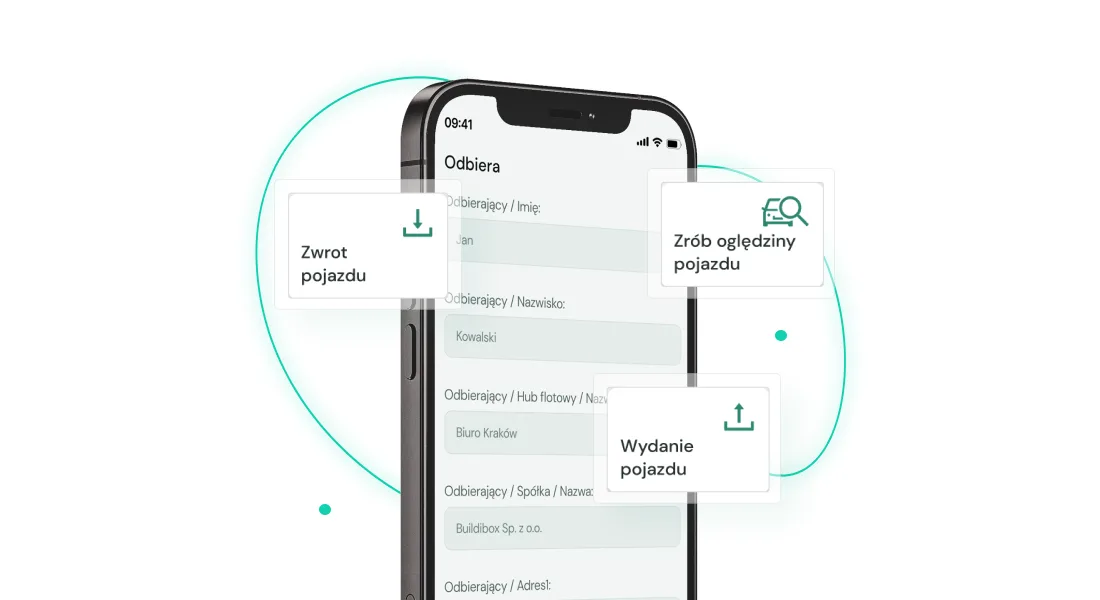
The Navifleet Manager application lets you create electronic vehicle handover and return reports in a few minutes, automatically pulling in the relevant data and photo documentation of the vehicle.
In four simple steps you mark the vehicle's current condition, including any damage, attach photos, record the equipment list and sign all the necessary documents with a single electronic signature. Finally, you enter the email addresses of the people who should receive all the handover documents, and as soon as the report is approved, everyone you specified receives them in their inbox.
This eliminates repetitive tasks such as printing the same documents and forms (they are available in the application), collecting a dozen signatures (one electronic signature is enough) and filling in the same data (it is pulled automatically from the application).
On top of that, you systematise the vehicle collection and return process. Every report is completed according to a set template, giving you the same data to track in the future and even more time saved.
#2 Have easy access to photo documentation
Think back to how many times you searched your entire Google Drive just to find that one missing photo of a car's bodywork for a handover. More than once it turned out that the photo you were looking for was illegible or, worse, did not exist.
With the Navifleet Manager application you say goodbye once and for all to pointless searches for photos in the cloud, on WhatsApp, or by asking one driver after another.
How?
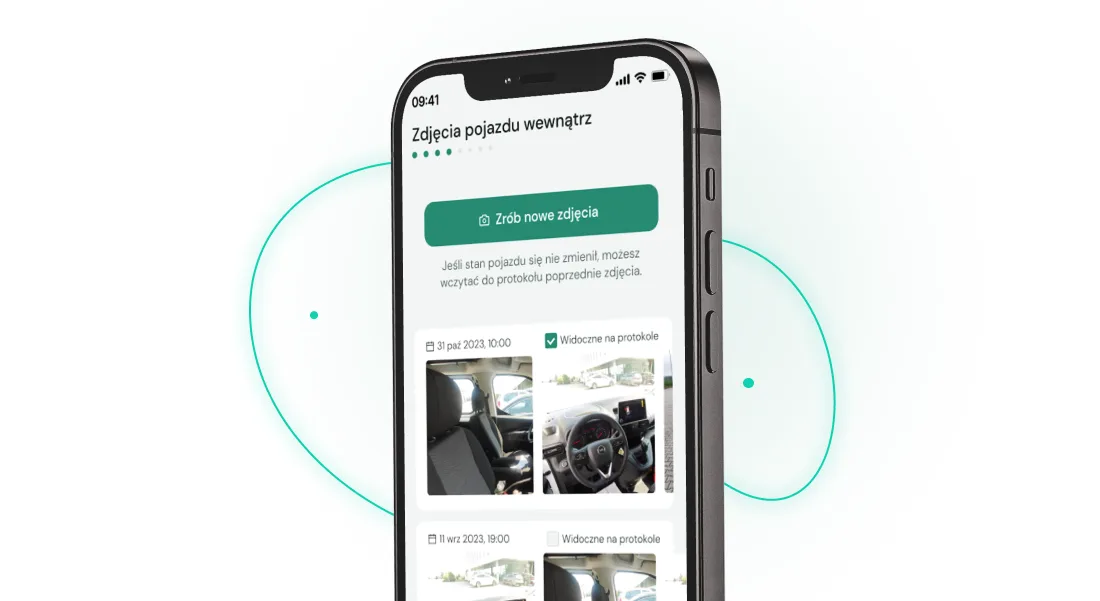
When creating each electronic report, you can attach detailed photos for every area of the vehicle. Once the report is created, the application saves every photo added, so you can easily come back to them.
#3 Sign documents electronically
Another feature of the Navifleet Manager fleet management tool that makes the vehicle handover process significantly easier is e-signatures.
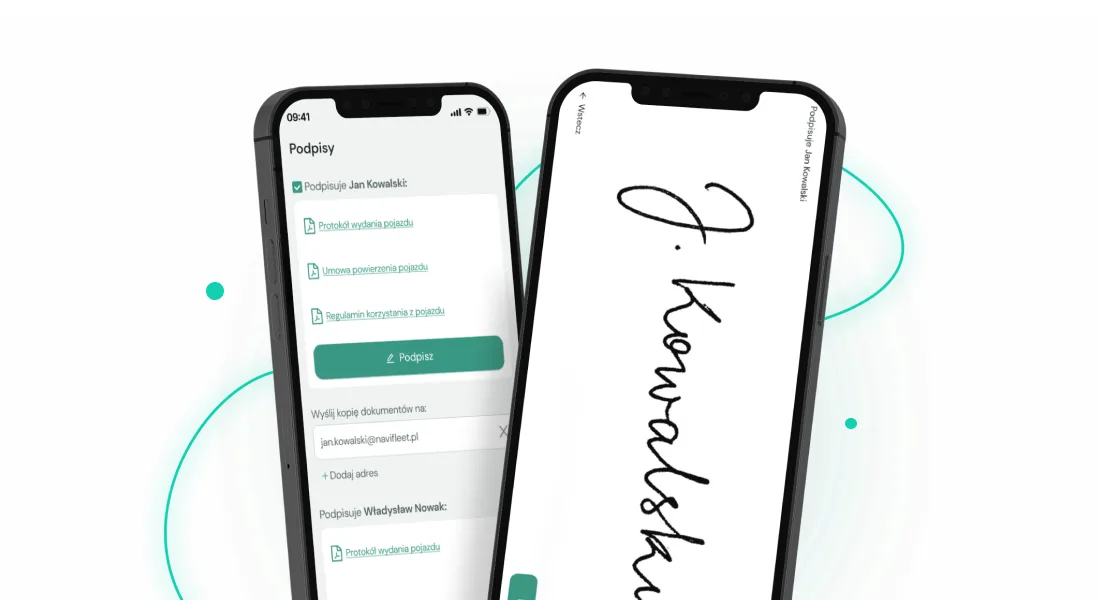
Or more precisely, the e-signature, because just one is enough to confirm that every document attached to the vehicle handover or return process has been read.
You attach templates of all the key documents to the application, including agreements, rules, vehicle usage instructions, commission and fee tables and others, and the driver collecting the vehicle signs them all with a single electronic signature.
#4 Fill in data automatically
Every vehicle and vehicle user in your fleet can be added to the Navifleet Manager application, which means the data associated with them is filled in automatically.
With every subsequent vehicle handover and report, the application fills in the required information about the vehicle and its user.
#5 Keep all information in one place
Collecting data is not only about filling it in automatically, though; it is also about easy access to all the key information.
With the right fleet management tool you build a professional archive of data about your fleet, accessible from a computer and a smartphone.
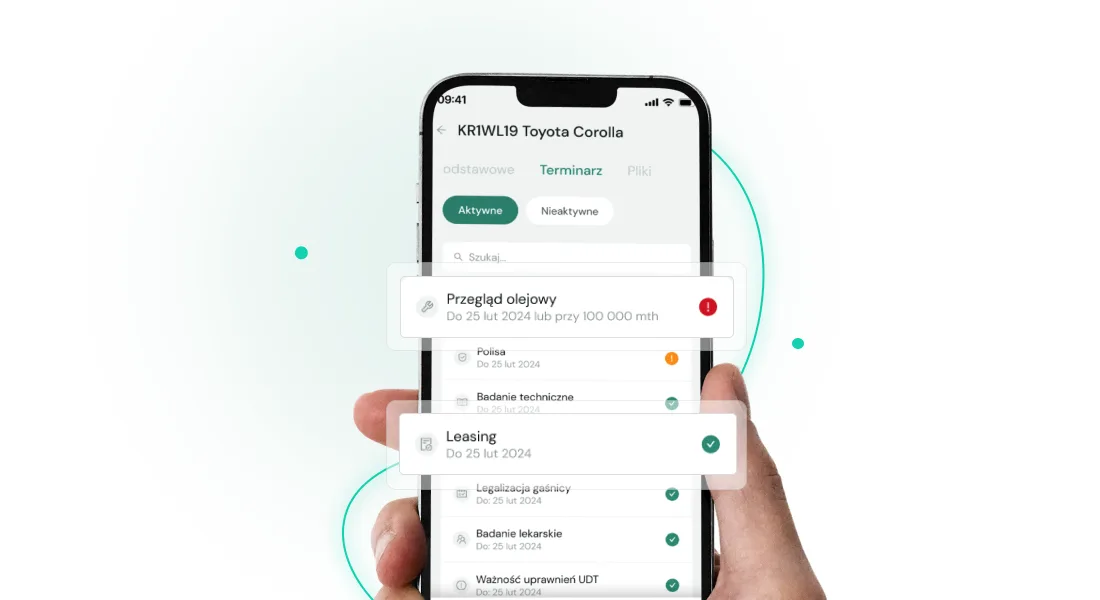
In the Navifleet application you can quickly check the key information about every vehicle, from the make to the registration number or kilometres driven.
You can also add the dates of the key deadlines you need to keep track of, and the application will send you a reminder notification about an upcoming inspection or the date for returning a vehicle to the leasing company.
#6 Build a knowledge base in the cloud
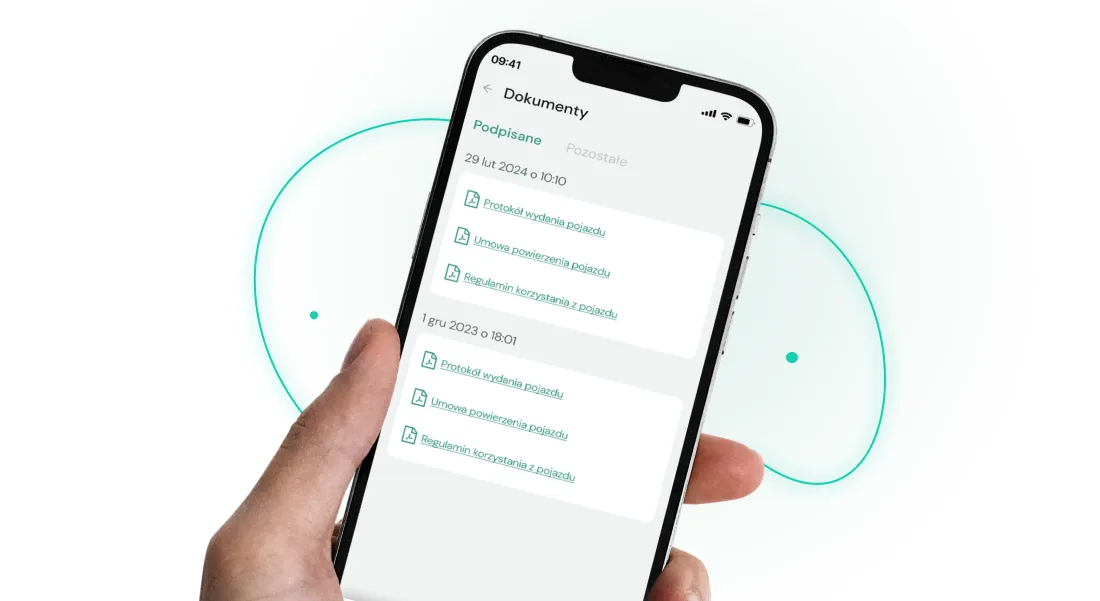
Besides information about vehicles and drivers, you can add shared documents to the Navifleet application, such as your fleet policy or scans of vehicle registration certificates, and even the fleet card PIN.
This way you avoid unnecessary phone calls: every vehicle user can easily reach the fleet's key documents.
GPS tracking system
A somewhat more traditional solution when it comes to vehicle fleet management tools is a GPS tracking system, which lets you increase fleet efficiency on other levels.
Using Navifleet Tracker as an example, with such a fleet management system you can:
- easily track the current odometer readings of the vehicles in your fleet,
- generate a report on fleet utilisation, like this one,
- check precise data from the vehicle's on-board computer,
- analyse a given driver's driving style,
- generate a report reconciling fuel cards with refuelling,
- settle journeys on toll road sections with e-TOLL.
With Navifleet you can build a comprehensive vehicle fleet management solution, combining e-reports, documents, signatures and a vehicle information base with precise data about your fleet from GPS tracking.
How much does a vehicle fleet management tool cost?
The costs of vehicle fleet management tools vary depending on the provider chosen, as do the terms of cooperation.
By choosing more modern solutions such as Navifleet Manager, we can avoid long-term contracts. Navifleet Manager is available on a subscription basis that you can cancel with one month's notice. You do not sign a multi-year contract.
The subscription cost depends on the application module chosen, but if we want to use all the available features we pay PLN 15 per month for every vehicle added to the application.
What is more, before buying a subscription, it is worth using the 7-day trial period to test the application's capabilities and how well it suits us.
How do you move data from one tool to a new one?
Depending on the size of the fleet and the history of the data collected, moving data to a new fleet management tool will look slightly different.
If the amount of data to enter does not give you a headache, you can safely move it manually, even if that has to be done in stages.
If, however, there is so much data that you do not know where to start, it is worth asking the customer service or sales department of the tool you want to introduce for help.
Write to us and we will help you move your data.
Do not waste time on repetitive tasks: create a Navifleet Manager account
With one application you get rid of printing and filling in the same documents, build an easily accessible archive of all shared and individual documents, create a new handover report in a few minutes, build a register of vehicles, damage and photo documentation, and much, much more.
Every feature available in Navifleet Manager saves your valuable time in managing a vehicle fleet. Time you can finally spend on more important matters, whether that is safe driving training, cost reduction, updating the fleet policy or optimising vehicle fuel consumption.
Create a free account now and see how Navifleet Manager does the repetitive tasks for you.



