Download DDD files from the tachograph remotely with Navifleet
Remote tachograph download and automatic download of DDD files from driver cards in Navifleet Tracker. See how to simplify compliance with inspections and settlements.
Agata Świerczek07/05/2026 · 17 min read
Managing working time in transport is not just a matter of logistics; above all it is a matter of strict legal requirements. A key challenge for fleet managers is downloading data from driver cards and tachograph memory on time. The solution to this problem is the remote download module for driver cards and tachograph memory in the Navifleet Tracker system.
In this article you will learn how automated file download works and why it is worth implementing in your company.
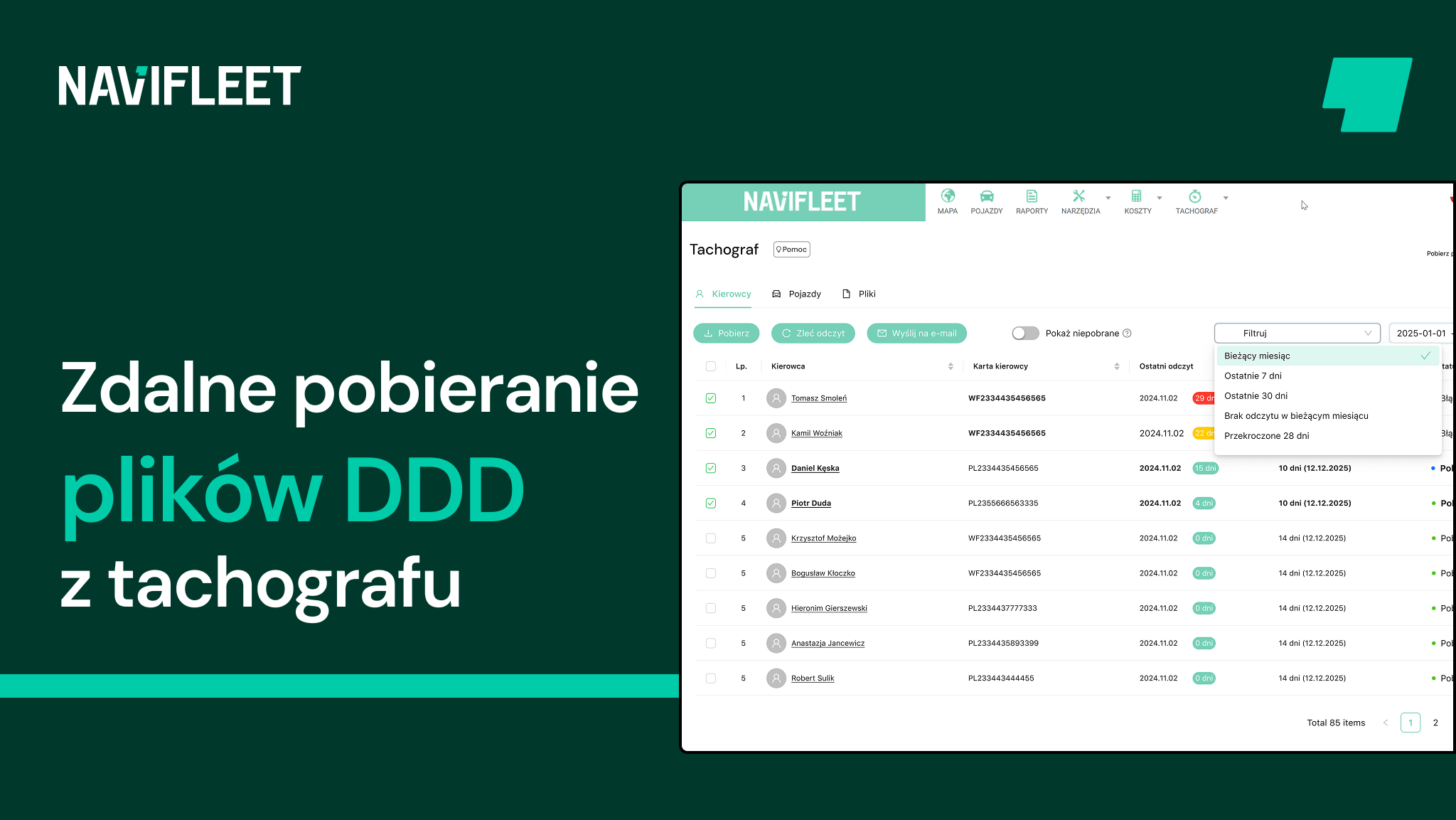
Download DDD files from the tachograph remotely with Navifleet
Why is regular tachograph data download important?
The DDD files you collect are the foundation of two key areas in every transport company:
Infringement analysis: monitoring compliance with driver working time regulations.
Payroll settlement: precise calculation of wages (usually by the 10th of the month, which requires the data for the previous period to be gathered efficiently).
Want to download data from driver cards and tachograph memory automatically?
Automation in Navifleet: how does the dynamic schedule work?
The Navifleet system is designed so that you do not have to remember deadlines. It is based on an intelligent schedule that takes care of regular data downloads by itself
start at the beginning of the month: from the first day, the system attempts to download the files,
download "on the road": data is transmitted automatically as soon as the driver card is in the tachograph slot and the system detects that a connection is possible. The data is downloaded remotely, which removes the need for the vehicle to return to base,
error diagnostics: if a download fails, the system tells you why (e.g. ignition off or no card in the slot).
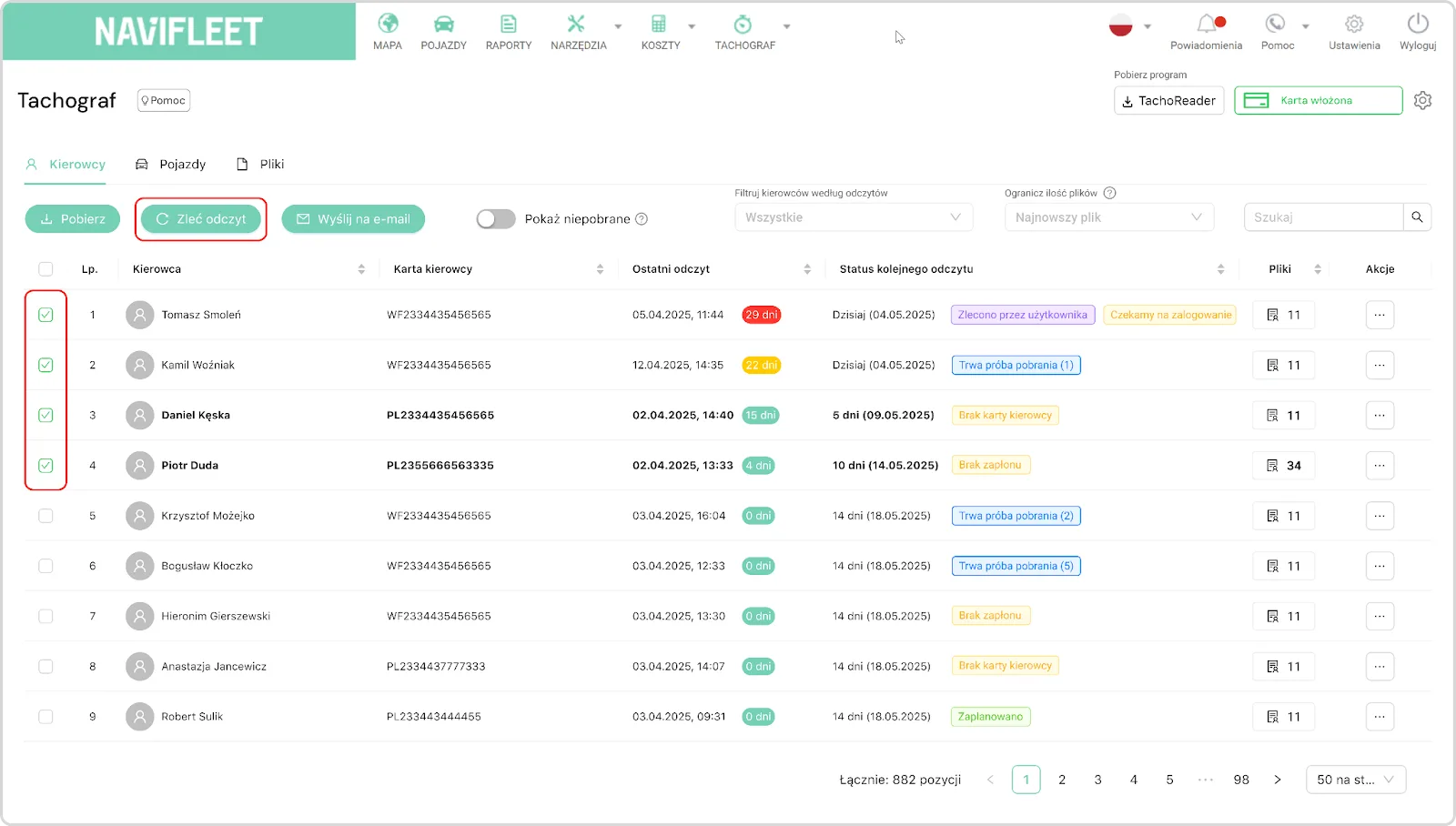
The system is also designed to let you initiate a download manually for one or many vehicles at once on request, using the "Request download" function.
Image 1. The Request download function in the Drivers tab of the Tachograph module.
File management and automatic data delivery by e-mail
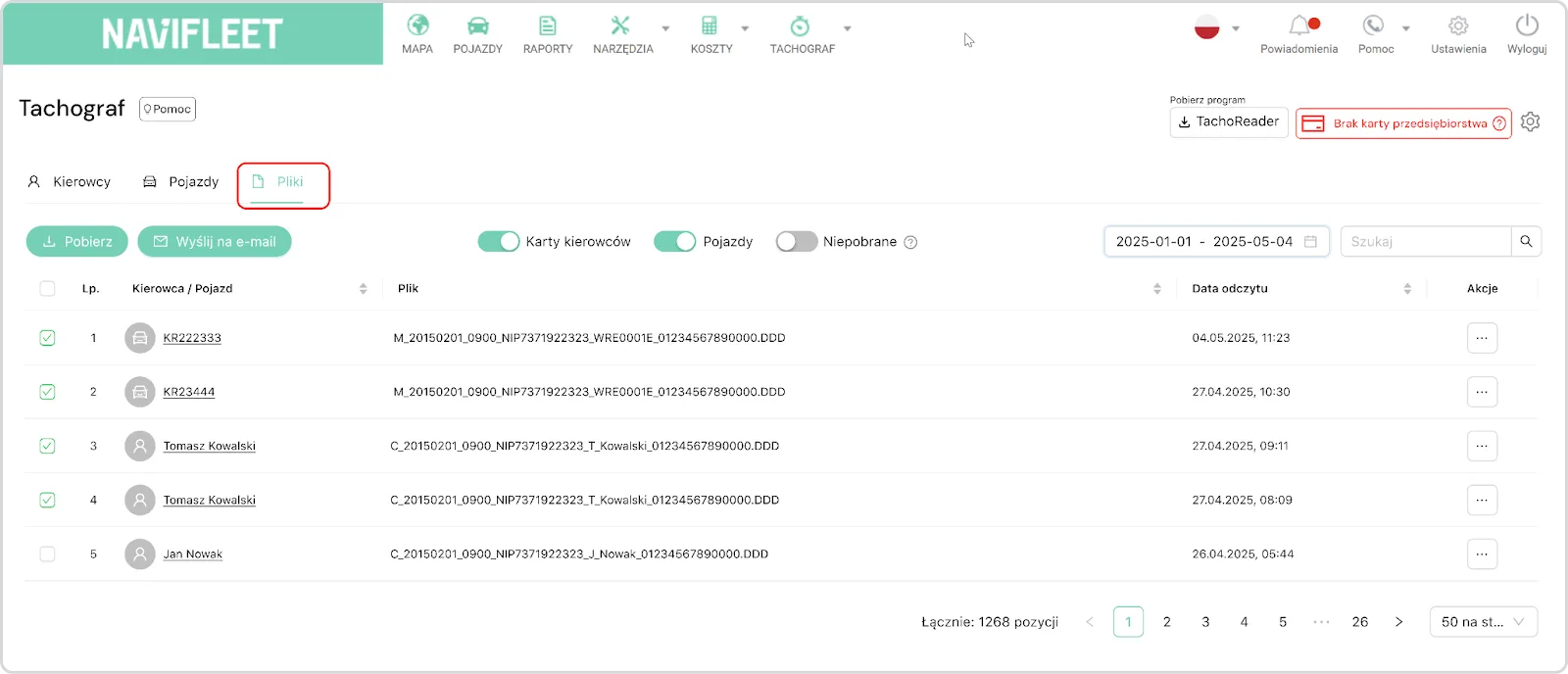
Navifleet is not just about downloading, but also about managing data efficiently. All files are archived on the server and assigned to a specific driver or vehicle.
Image 2. The Files tab of the Tachograph module.
Sending by e-mail
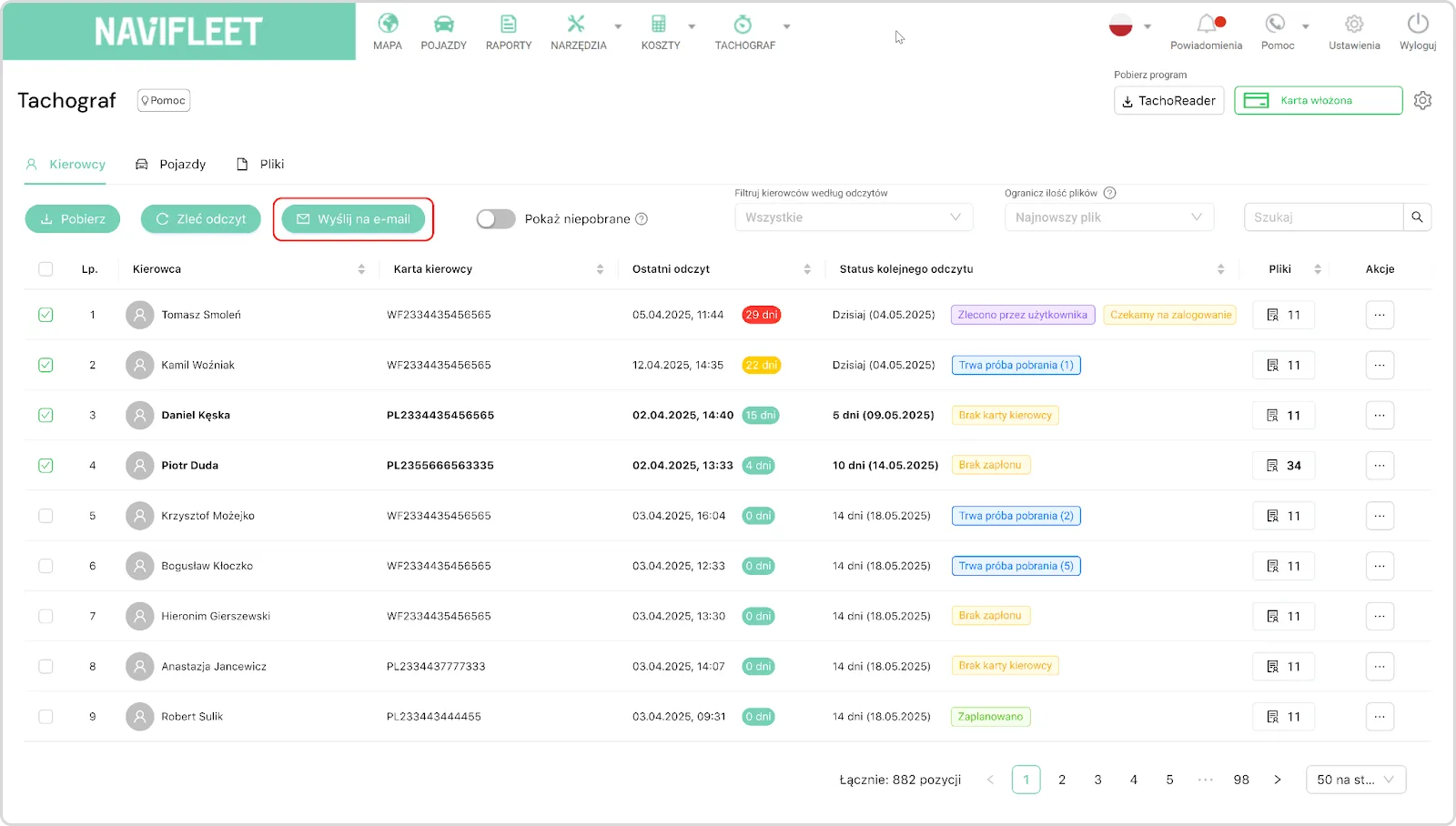
A single click sends the files to a chosen address, e.g. to accounting or the settlement office. The process can also be fully automated: the system sends the complete data set to the chosen address by itself.
Image 3. The Send by e-mail function in the Drivers tab of the Tachograph module.
Archived data
Even if a driver no longer works for the company, their data remains available in the system (within the retention period).
Files archived for 18 months, with no download limit: certainty of compliance.
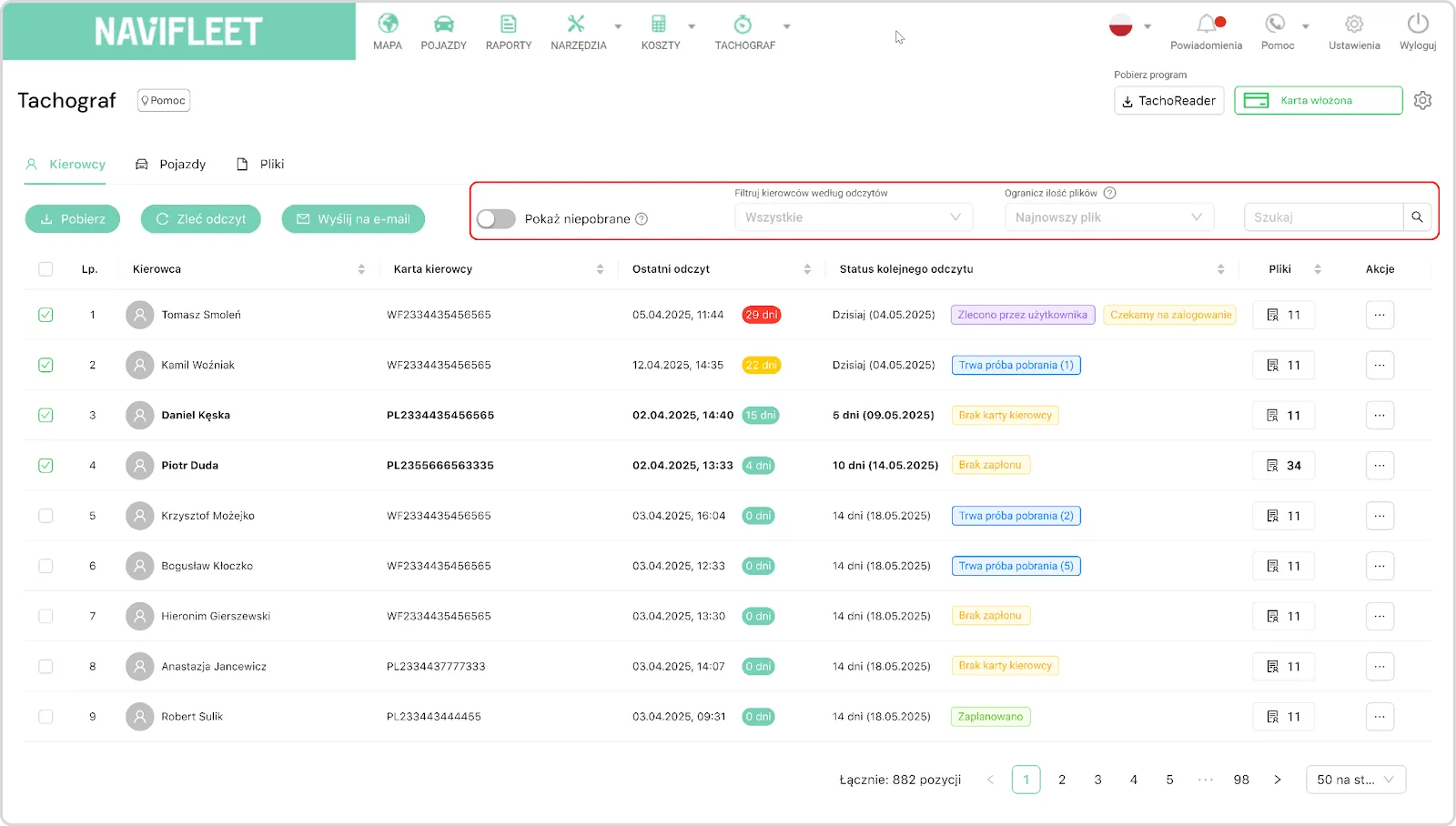
Advanced filters let you quickly check whose data has not been downloaded this month or who is approaching the statutory download deadline.
Image 4. The available filters in the Drivers tab of the Tachograph module.
Legal compliance and deadlines (road transport inspections)
Automation helps you stay compliant, but it is worth knowing the official limits:
driver card: download at least once every 28 days.
tachograph memory: download at least once every 90 days.
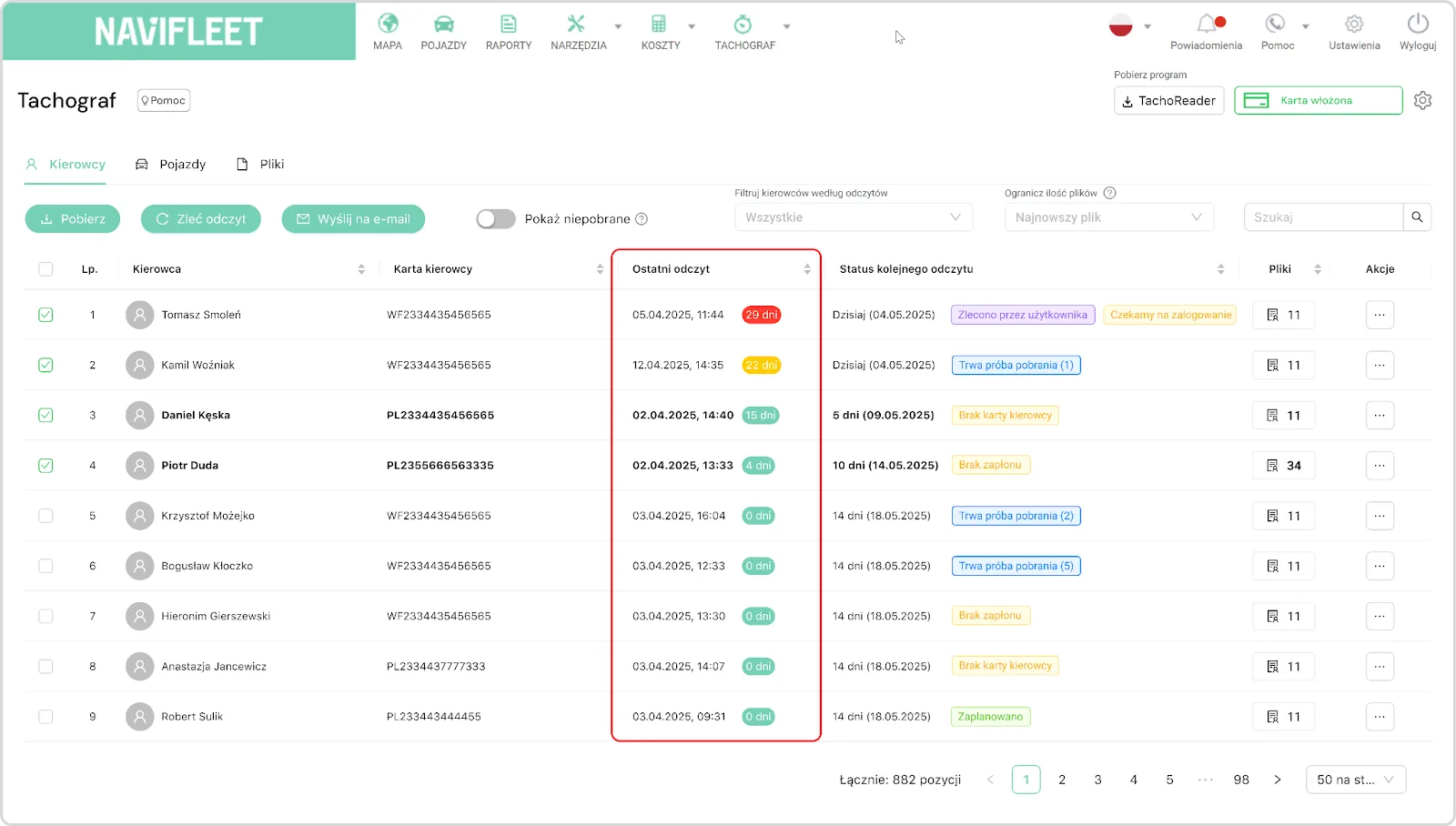
The Navifleet panel has a "Last download" column with an intuitive warning system:
green: download on time,
yellow: fewer than 7 days left until the limit,
red: the deadline has been exceeded; immediate action required.
Image 5. The Last download column in the Drivers tab of the Tachograph module.
Important: the system stores data for 18 months (a considerable margin over the 12 months of data retention required by law). After that time the files are deleted.
How to ensure a successful download
For a remote data download to succeed, some basic conditions must be met:
Ignition on: the tachograph must not be in sleep mode.
Card in the slot: the driver card must be inserted in the device.
Company card in the office: it must be connected to a computer running the TachoReader application.
Summary
Remote tachograph download saves time and guarantees compliance with the law. With Navifleet the process becomes transparent and the risk of penalties is reduced to a minimum.
Want all your tachograph and driver card data available online?
What is remote download of tachograph and driver card data?
Remote download of DDD files from the digital tachograph and driver cards is one of the useful functions offered by the Navifleet system. With it, there is no need to bring the vehicle back to the company's base specially to download the data; everything happens remotely. Navifleet allows DDD files to be downloaded automatically according to a set schedule, which helps you avoid missing the applicable deadlines and exposing yourself to penalties from the inspection authorities. If needed, you can also request a download manually for a specific vehicle or driver, or collectively for several of them; simply choose the appropriate option in the system.
It is worth stressing that Navifleet not only allows driver card data to be read online and tachograph data to be downloaded remotely. It also provides secure archiving of the downloaded DDD files, so carriers using it effectively meet the obligation the regulations impose on them. What is more, once a complete set of DDD files for a given month has been collected, the Navifleet system can automatically send them to a chosen mailbox. As a result, the person responsible for settling drivers receives all the necessary data on time.
How do you read DDD files from the tachograph and what exactly are they?
DDD files: what are they and what information do they contain? This is a question often asked by people just entering the world of road transport. DDD files (Digital Data Distiller) are the standard format for data stored in the memory of digital tachographs and on driver cards. They contain information on, among other things:
driver activities: from DDD files you can learn, for example, how much time the driver spent driving, on other work, on availability, on breaks and on rest,
driving speed,
the length of the routes covered,
events that occurred while driving,
infringements of the regulations.
Specialist software is needed to open DDD files. Importantly, they are not intended to be edited. This gives the inspection authority certainty about the authenticity of the data being verified.
Which program reads DDD files correctly? One example of software that can do this is TachoReader. This application can be downloaded after logging in to the Navifleet system.
Is remote download of tachograph data legal?
Yes, remote download of data from the digital tachograph and driver cards is legal and is a valuable improvement for a transport company. If you are looking for a modern tool for reading DDD files remotely, the Navifleet system, which makes fleet management easier, will be the right solution.
What are the requirements for remote tachograph download?
For remote download of DDD files from the digital tachograph and driver cards to be possible, fleet vehicles must have the right equipment. What do you need to take care of? The basis is fitting modern digital tachographs that support the remote download function. In addition, each vehicle must be equipped with:
a GPS tracker,
a TMR (Tacho Memory Reader) module, which connects to the C and D sockets on the rear of the tachograph; it is essential because it enables cooperation with the telematics system and data transmission over the mobile network.
What else is needed to carry out a remote download of data from the digital tachograph and driver cards with the Navifleet system? The process requires a company computer running the TachoReader application, with a special reader connected in which the company card is inserted.
Does remote download work for all tachographs?
Remote download of DDD files is possible with modern digital tachographs, including second-generation smart devices (G2V2). It is not used with traditional analogue tachographs.
How do you download tachograph data remotely?
A proven way to read tachographs and driver cards remotely is implementing the Navifleet system in your company. It allows DDD files to be downloaded automatically, which guarantees that downloads are on time and saves time. All you need to do is activate remote download of tachograph and driver card data and indicate which vehicles and drivers should have regular downloads. Provided the required technical environment is in place, the system will automatically monitor the download schedule and carry out downloads in line with the applicable deadlines. The downloaded files are properly archived and the user has convenient access to them. Importantly, the Navifleet system also allows data to be downloaded on request, collectively or for a single driver or vehicle.
Can the tachograph be integrated with a GPS system?
Yes, this is possible with the Navifleet telematics system. This comprehensive solution allows, among other things, GPS tracking to be integrated with the download of DDD files from tachograph memory, and the drivers' remaining working time to be kept under control. This makes it possible to ensure data is downloaded on time and to prevent infringements of working time limits. By deciding to implement the Navifleet system, which combines advanced GPS tracking with remote DDD download, a carrier has the chance to streamline fleet management and gain certainty that it is operating in compliance with the regulations.
How often must tachograph and driver card data be downloaded?
The regulations clearly state that:
DDD download from the driver card should take place at least once every 28 days,
download of tachograph data should take place at least once every 90 days.
Using the DDD file reading tool offered by the Navifleet system, you can be sure that every data download takes place before the required deadline passes and that no regulations are breached.
How do you secure data from the digital tachograph and driver cards?
Many carriers interested in downloading DDD files over the internet wonder how to collect and secure the downloaded files correctly. The Navifleet system is a solution that enables both remote download and secure archiving of DDD data. It downloads and archives DDD files from tachograph memory and driver cards once every 14 days, so there is no risk of exceeding the applicable deadlines. The user has convenient access to the collected data, which helps avoid any problems in the event of an inspection.
It is worth mentioning that the downloaded DDD files are stored on secure servers for 18 months. The period required by the regulations is 12 months, which means the company gives itself an appropriate margin of time.
Can tachograph data be downloaded without physical access to the vehicle at the company's base?
Yes, remote download of DDD files from the digital tachograph and driver cards can take place at a distance and does not require the vehicle to be physically present at the company's base. Navifleet users therefore do not have to worry that a driver will not make it back from a route before the mandatory download deadline.
What benefits does remote download of DDD files from the digital tachograph and driver cards provide?
Given how remote download of tachographs and driver cards works, a carrier can gain many benefits from it. Which deserve particular mention?
Downloads on time: remote, automatic download of files from the tachograph and driver cards makes it easier to meet the mandatory download deadlines, which helps avoid problems in the event of an inspection.
Time savings: by choosing to download DDD files over the internet, you eliminate the need to bring the vehicle to base for a download. The whole process is automated, so drivers and fleet managers do not have to waste time on it and can devote themselves to other tasks.
A smoother driver settlement process: once a complete set of DDD files for a given period has been collected, they are automatically sent to the e-mail address of the person handling the monthly settlements. This prevents delays and potential errors and speeds up the settlement process.
Secure archiving of DDD data: a company using the Navifleet system can be sure that the downloaded DDD files are stored in compliance with the regulations. Authorised users have convenient access to them, which is useful both during inspections and when using the collected data for internal analysis.
Considering the benefits of remote download of tachographs and driver cards, implementing the Navifleet system, which offers this function, can prove very worthwhile for a company.
Is it possible to read DDD files online from a digital tachograph fitted in a van?
Yes, online tachograph download from a van and remote reading of the card of the driver of such a vehicle are possible. The solution that makes this possible is the Navifleet telematics system. The remote tachograph download from a van it enables is a proven way to download data on time and automatically.
By implementing this system, a carrier can prepare effectively for the new regulations coming into force on 1 July 2026. They oblige transport companies to fit second-generation smart digital tachographs in vehicles with a GVW above 2.5 tonnes used for commercial international and cabotage transport. Carriers in these branches of transport will also have to ensure regular download of the data stored in the memory of the recording devices. Remote download of DDD files from the digital tachograph and driver cards makes this significantly easier and helps you operate in compliance with the regulations.
What other possibilities does the Navifleet fleet management system with tachograph download offer?
Remote download of driver cards and tachograph memory is not the only noteworthy function the Navifleet system offers its users. Using telematics, it enables precise GPS vehicle tracking, which gives you control over current odometer readings, fleet utilisation and driver locations. The system also helps, for example, to prevent fuel fraud, infringements of driver working time limits and dangerous behaviour on the road.
Navifleet is also the ideal solution for anyone who needs an intuitive fleet management app. It combines many tools: the user can, among other things, use an electronic service book, carry out vehicle inspections more conveniently and prepare electronic handover reports faster.
If you are interested in remote DDD download and other tachograph-related topics, we encourage you to read the other articles on our blog devoted to them. They cover many interesting subjects, such as:
Agata ŚwierczekE-marketing SpecialistAs a UX/UI design specialist I combine creativity with precise communication. I design intuitive interfaces and engaging digital content, and I write product copy and blog articles that hold attention and support business goals.

 Agata Świerczek
E-marketing Specialist
As a UX/UI design specialist I combine creativity with precise communication. I design intuitive interfaces and engaging digital content, and I write product copy and blog articles that hold attention and support business goals.
Agata Świerczek
E-marketing Specialist
As a UX/UI design specialist I combine creativity with precise communication. I design intuitive interfaces and engaging digital content, and I write product copy and blog articles that hold attention and support business goals.


