
Incomplete tachograph data in the settlement process is a common problem, especially at the turn of the month. If the data is not downloaded on time, settling the period becomes difficult. When the month is closed, it often turns out that key files are missing, which requires extra work: establishing which data is missing, where to get it from and how to fill the gaps. Manual file downloads, calls to drivers or analysis of potential system errors become necessary. Incomplete downloads can lead to settlement errors and prolong the whole process. The problem grows when the company has no full control over the download schedule, which makes it hard to keep downloads on time.
What is remote download of DDD files?
DDD files are the standard format for data recorded by digital tachographs and driver cards. They contain key information about working time, breaks and rest periods, and the law requires them to be downloaded and archived regularly. Transport companies must download data:
- from driver cards at least once every 28 days,
- from vehicle tachographs at least once every 90 days.
Failing to meet these deadlines can have serious financial consequences. Automating the process helps avoid errors and gives you more control over the deadlines.
From chaos to full control: automation changes everything
Instead of downloading files by hand and checking for gaps, all the data can go straight to the e-mail inbox of the person doing the settlements. The system downloads the files automatically according to a schedule, ensuring they are complete and eliminating delays. As a result, the settlement process runs more smoothly, with no extra work required.
Navifleet: a comprehensive fleet monitoring system
Integration with the telematics systems in the vehicles allows DDD files to be downloaded, stored and archived automatically, in line with the applicable regulations. The files can be accessed through the app or the platform, and the whole process happens without your intervention.
Navifleet is a comprehensive fleet monitoring system that not only makes management more convenient but also delivers real savings. In practice, remote download of DDD files is one element of this system, helping transport companies improve fleet management. Thanks to integration with GPS tracking, driving style analysis and automatic reporting, businesses can effectively control driver working time, optimise fuel costs and increase operational efficiency.
What does this mean in practice?
- Automatic file downloads, wherever the vehicle is. With remote download, you get data from tachographs and driver cards as soon as 2 days after the end of the month, regardless of where the drivers or vehicles are.
- Faster, compliant settlements. The system provides complete, well-organised documentation, eliminating errors and delays. Settlements are ready before payday, with no need to chase missing data by hand.
- Less stress and less work for your team. Intuitive operation and process automation take a significant load off your staff. No more manual file downloads, phone calls and constant reminders to send files.
- Fast handling of large numbers of files. The bulk download function lets you pull a complete data set for the whole fleet in a single archive, without tedious clicking file by file.
- No risk of penalties for incomplete data. Automatic reminders and download schedules guarantee that all files are downloaded on time and in line with the regulations, removing the risk of financial sanctions.
Will remote download of DDD files improve your company's operations?
- Do you struggle to download files on time?
Remote download automatically monitors deadlines and sends notifications in case of delay. If for some reason a file is not downloaded on time, you receive an alert straight away, so nothing slips through. Everything happens in the background, with no manual intervention needed. - Have driver wages ever been paid late because tachograph data was missing?
Remote download guarantees that the data is available at the start of the month, allowing wages to be calculated quickly. The process runs automatically, without daily supervision. If something goes wrong, you are informed immediately. - Do you run a large fleet, and does manual data download eat up huge amounts of time?
Remote download saves the files to the server automatically, removing the need to involve staff. In the event of any failure, the system sends you the relevant information. - Are your drivers on long-haul routes?
Remote download works without interruption, even when the cards are away from the company. The data is downloaded automatically, without affecting the drivers' work.
Access to the latest data, always and effortlessly
When you sit down to do the settlements, you already have all the data you need, with no stress, reminders or tedious file collection. A modern remote tachograph download system works automatically, eliminating all the inconveniences of traditional data download.
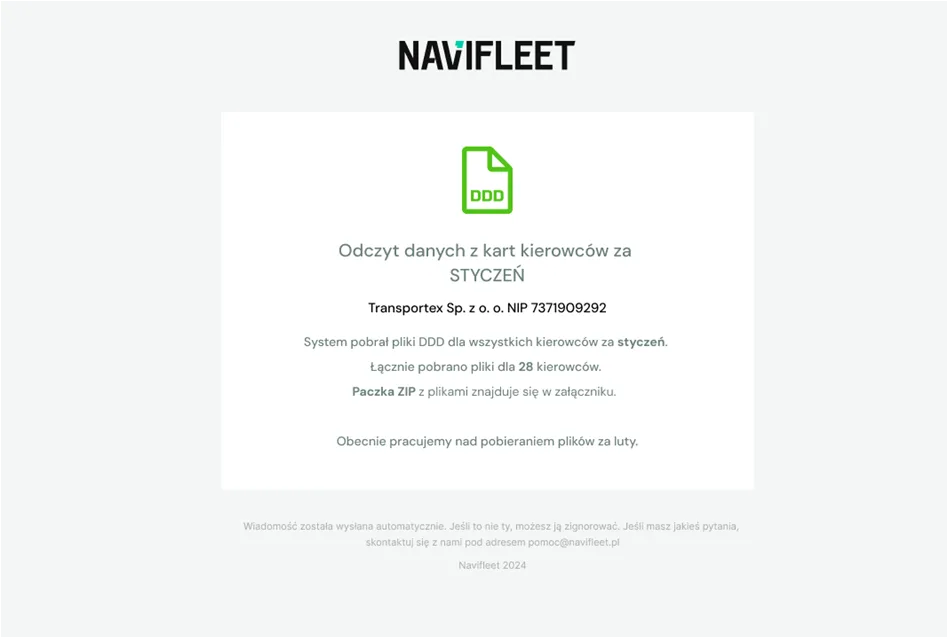
Once the download process is complete, the system automatically sends all the collected files to the e-mail address set in the settings. In addition, if the system detects that all files for the previous month have already been downloaded, the whole file package is sent to the same e-mail address. This way the people responsible for settlements receive complete, well-organised documentation without having to download files by hand.
The image below shows an example e-mail confirming that driver card data for January has been downloaded successfully. The message states in detail that the system collected DDD files for all 28 drivers and that the ZIP package with the data is attached. The e-mail also notes that downloads for the following month are in progress.
See how it works step by step:
1. Dynamic download schedule
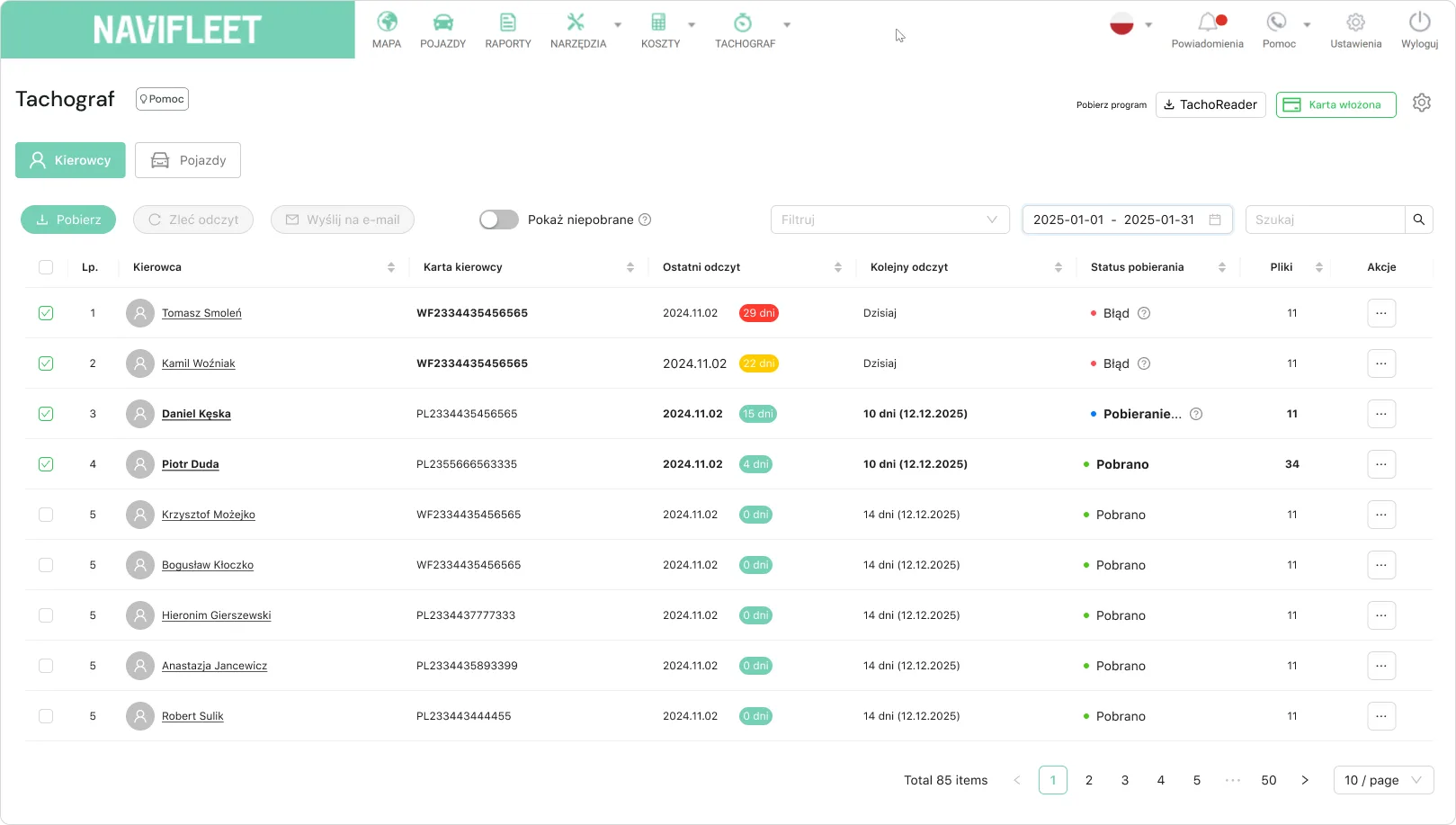
From the first day of the month, the system automatically starts attempting to download data from driver cards and tachograph memory. As the person responsible for settlements, you do not have to remember the deadlines; the system does it for you. When a vehicle is on the road, the system detects the driver card in the tachograph and immediately downloads data such as working time, breaks and infringements. The whole process runs automatically, without your involvement.
2. Automatic archiving and compilation of data
The system automatically archives the data, building a complete information package based on the trips drivers actually made. Only trips made after the driver logged in and selected a route are included. This gives you certainty that the data is complete, genuine and assigned to the right drivers or vehicles, enabling optimal fleet management and full compliance with the requirements.
3. No need for manual data download
If a vehicle is not on the road, you do not have to worry about not having complete data on time. The system makes sure the data is downloaded as soon as the driver logs in and the vehicle sets off again.
4. Manual download when needed
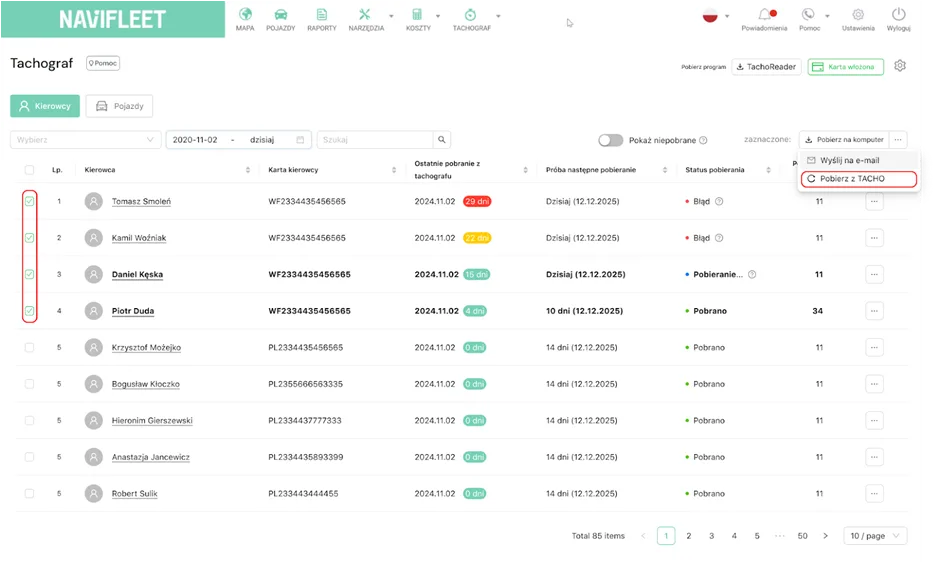
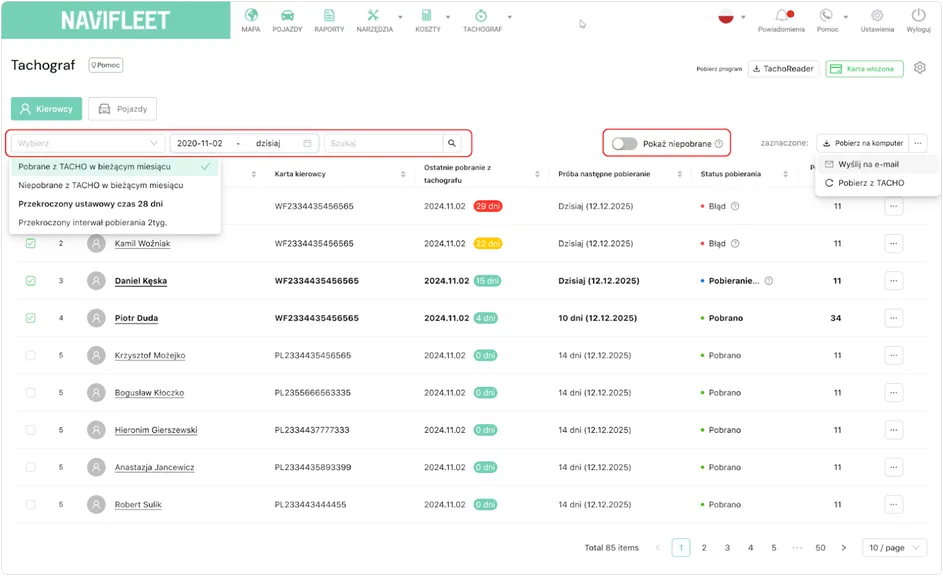
Although the system works automatically, you can force a download manually if needed. For example, if you want to download data quickly after a route is completed, simply select the "Download from TACHO" option. You can choose a single driver or several drivers at once, which gives you flexibility and saves time.
5. Filters for quick access to data
With the available filters you can quickly find the data you are interested in, with full access as soon as you log in. For example, if you want to see data for a specific month, you can easily apply a filter that shows you all the files for that period. In addition, the system lets you display only the files that have not yet been downloaded, giving you convenient, fast access to all the information you need.
Benefits of implementing remote download of DDD files
- Savings in time and resources: remote download of DDD files shortens data collection and removes the need to involve staff, allowing resources to be used better.
- Better organisation of work: automated data download provides continuous access to driver working time information, which streamlines working time settlement and improves accuracy.
- Data security: automatic storage of DDD files on the server minimises the risk of losing them, removing the need to keep them on physical media such as driver cards.
- Lower risk of errors and penalties: automatic file download and deadline monitoring minimise the risk of errors leading to non-compliance and financial penalties.
- Better regulatory compliance: remote data download ensures compliance with driver working time regulations, thanks to automatic deadline monitoring and immediate alerts in case of irregularities.
- Streamlined administrative processes: automated file download gives fast access to data without manual entry, reducing the burden on HR and accounting and letting them focus on other tasks.
- Better communication and coordination with drivers: remote data download enables better cooperation with drivers, especially those on long routes, as they do not have to return to base to deliver tachograph data, which makes the process more efficient.
- Integration with the fleet management system: integrating remote download with the overall fleet management system improves control over fleet efficiency and eliminates the risk of errors associated with manual data reading.
Summary
Remote download of DDD files is not just a convenience; above all it saves time and eliminates the risk of errors. By automating this process, transport companies can operate more efficiently, avoiding delays and potential penalties. If you want to simplify driver working time settlement, it is worth considering this technology and gaining full control over file download deadlines.
 Agata Świerczek
E-marketing Specialist
As a UX/UI design specialist I combine creativity with precise communication. I design intuitive interfaces and engaging digital content, and I write product copy and blog articles that hold attention and support business goals.
Agata Świerczek
E-marketing Specialist
As a UX/UI design specialist I combine creativity with precise communication. I design intuitive interfaces and engaging digital content, and I write product copy and blog articles that hold attention and support business goals.


