
Help › Navifleet Tracker › SENT
How to start and monitor communication with SENT in the Navifleet app?
Updated: 1 August 2025
Transporting excise goods requires the vehicle's current position to be sent continuously to the Ministry of Finance platform. Integration with the SENT system is one of the features of the Navifleet app and GPS tracker.
Communication with SENT in the Navifleet app
To start communication with the SENT system, go to TOOLS → E-TOLL/SENT DEVICES.
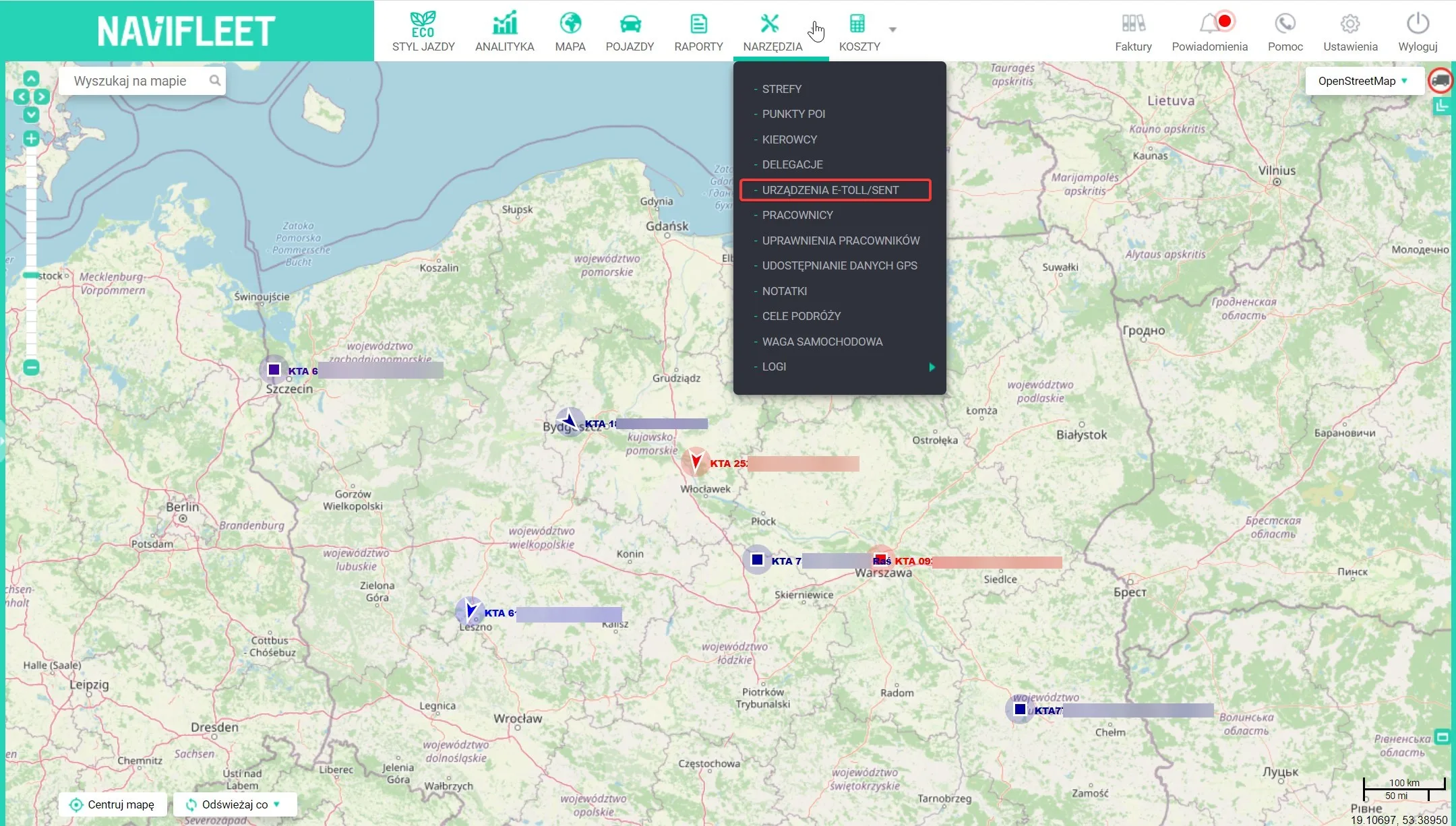
The window that opens shows a table with data on communication with the SENT (and e-TOLL) system. The information shown is:
- Device ID (1) - the device identifier in the Navifleet system.
- Vehicle name (2)
- Vehicle registration number (3)
- Technical identifier (4) - the device serial number, sent to the e-TOLL system.
- Business identifier for IKK (5) - the OBU / ZSL device identifier assigned by e-TOLL during registration. It is required to add the device to the account and assign it to a vehicle in IKK.
- PIN (6)
- SENT communication (7) - the status of data transfer to the SENT system.
- e-TOLL communication (8) - the status of data transfer to the e-TOLL system.
- Device status (9) - if the device only has access to SENT communication, the first icon shows the data sent to the SENT system (the current position or the last one sent). The remaining icons relate only to e-TOLL communication.

When working with the SENT system, the key items are the data transfer statuses in column 7. The app can display 5 different statuses:
| Status icon | Description |
| - | The device is not used in the SENT system. Contact Navifleet Customer Service and order access. |
 | Data transfer to the SENT system has not been activated. |
 | Communication with SENT has been activated. Waiting for the journey to start. |
 | Error in communication with the SENT system. Use the emergency procedure. |
 | Location data is being sent to the SENT system. |
Next to the status icons there is an Activate/Stop button (depending on the current communication state). It is responsible for starting or pausing communication with the SENT system.

The app lets you configure notifications about communication errors. You can activate them in Settings.

Notifications about communication errors (both with the SENT and the e-TOLL system) can be received by SMS or e-mail. PUSH notifications are also available. Make your choice by ticking the appropriate option according to your preferences.
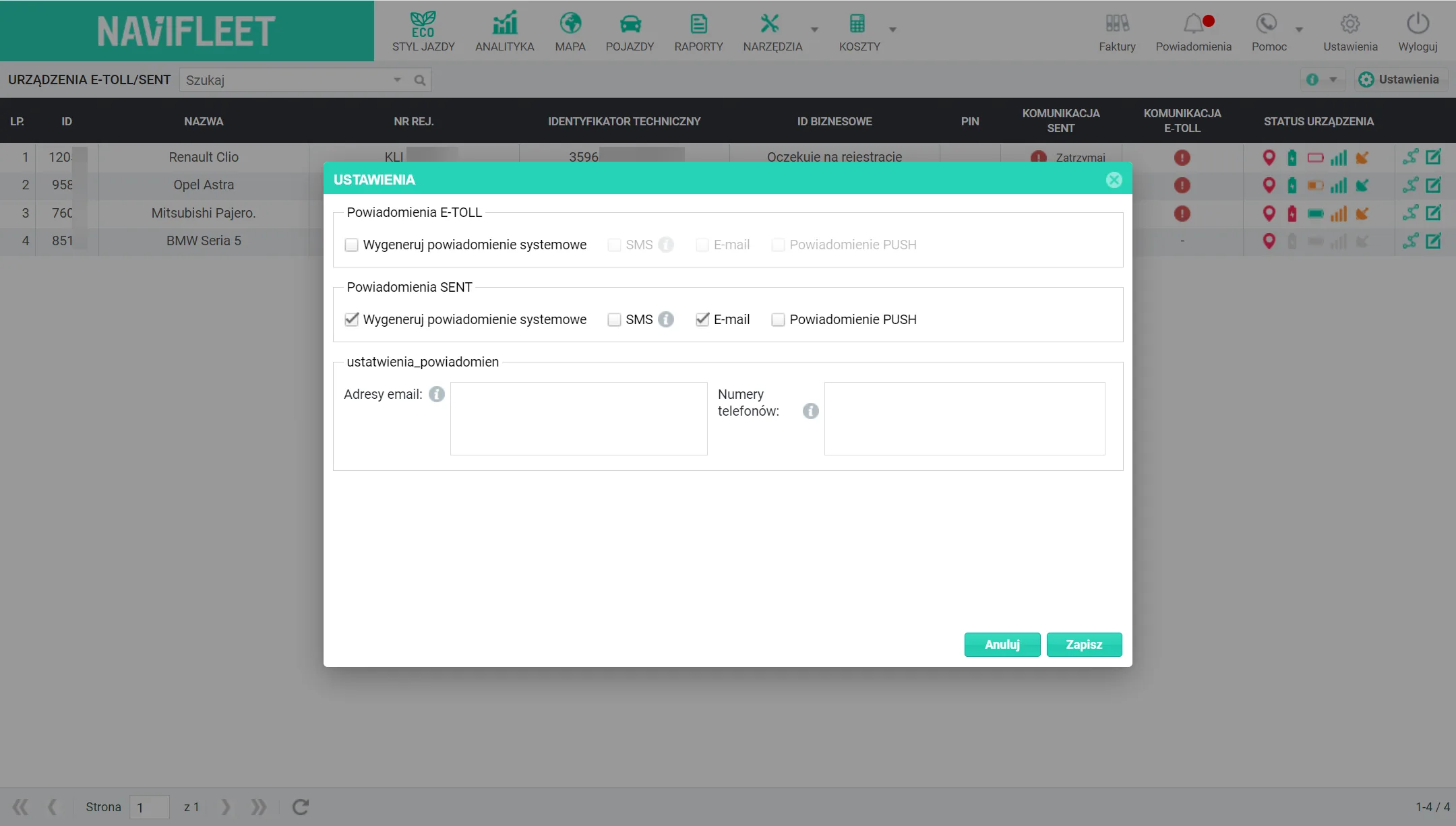
Alerts will be sent to the specified e-mail addresses and phone numbers. If there are several e-mail addresses or phone numbers, separate them with a space, comma, semicolon, the ENTER key or a slash.
You can edit the vehicle name and registration number directly in the table.

SENT emergency procedure
If you have problems sharing the current location, use the e-TOLL app (Since 1 October 2021, the e-TOLL PL app has been the only mobile app available in app stores for the SENT system. The mobile apps „Aplikacja Kierowcy SENT GEO" and „Aplikacja Kierowcy SENT GEO (Test)" are inactive).
The e-TOLL app lets you send location data to the system from a smartphone. The procedure for configuring a SENT journey in the mobile app is described HERE (p. 42).
From 1 December 2021, the Ministry of Finance is changing the rules for delivering data to the SENT system. Read about them HERE.