Help › Navifleet Manager › Web panel: Vehicle handovers
Vehicle handovers list
Updated: 20 August 2026
The Vehicle handovers section provides a consolidated view of all vehicles and their handovers. It lets you review the entire history without having to open the details of an individual vehicle.
The view lets you narrow the results down to a specific vehicle using the search box. The list also allows data to be filtered by:
vehicle,
type of handover (issue / return),
handover details or notes,
time of handover,
handover status.
You will find detailed instructions for checking the history of a single vehicle in the article Vehicle usage history.
Reviewing the handover history
To check the history of all handovers:

Go to the Vehicle handovers tab in the side menu.
Select a vehicle from the list or find it using the search box on the right.
On the list you will see the vehicle's handover history.
If a handover report was created for a given handover, it will be available in the drop-down menu at the end of the row.
Click View handover documents, then select the document.
Downloading the list to an XLS file
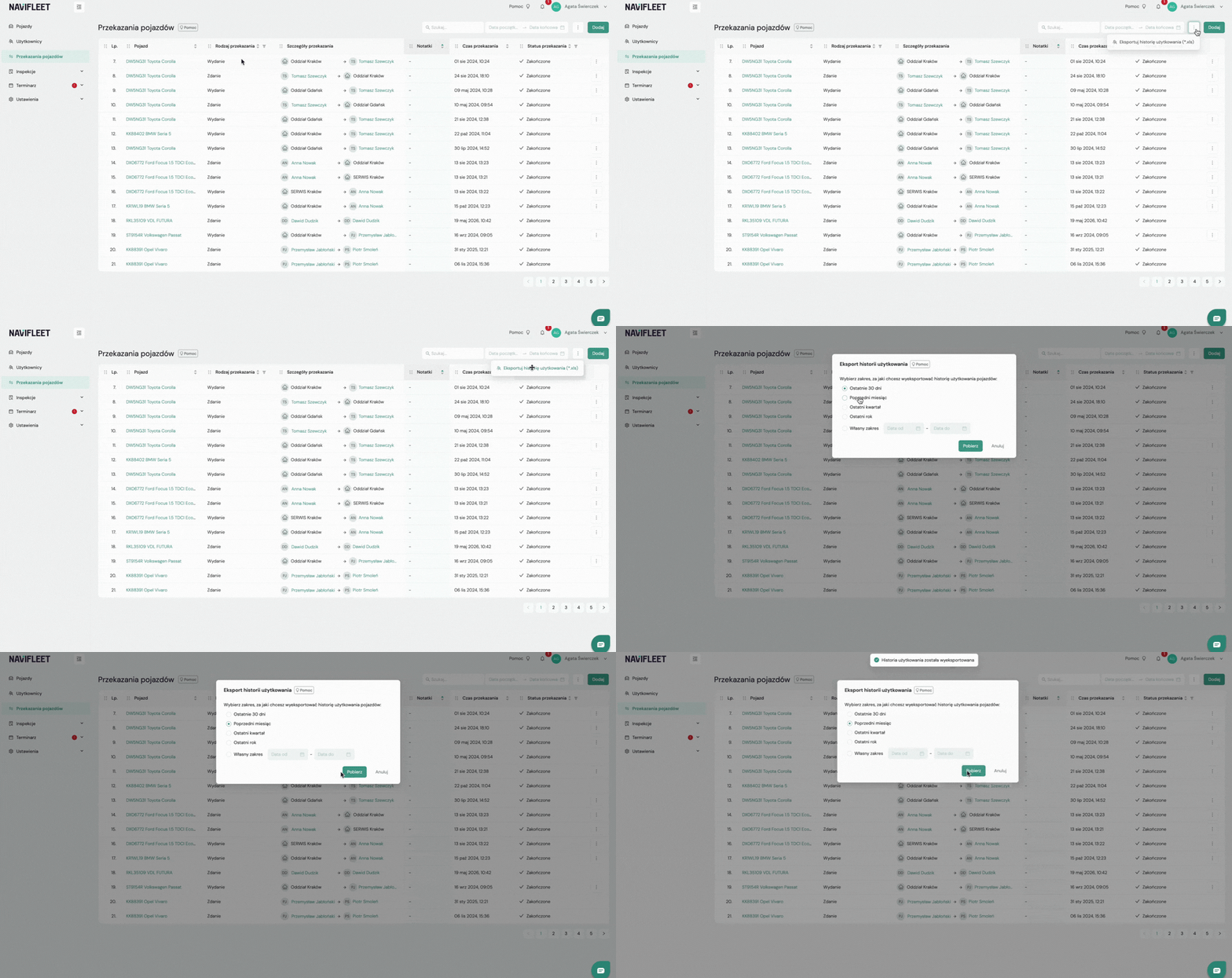
To download the full vehicle handovers list:
In the Vehicle handovers tab click the three dots in the top right corner.
Select Export usage history (*.xls).
Select the date range (e.g. last 30 days, previous month, last quarter, last year or a custom range).
Click Download.