
Help › Navifleet Manager › Web panel: Vehicle handovers
Electronic handover report
Updated: 19 August 2026
A vehicle handover report is a document that unambiguously defines the condition of a vehicle being issued or taken back. In this article you will learn, step by step, how to draw up a vehicle handover report in the Navifleet Manager app.
What does an electronic vehicle issue report look like?
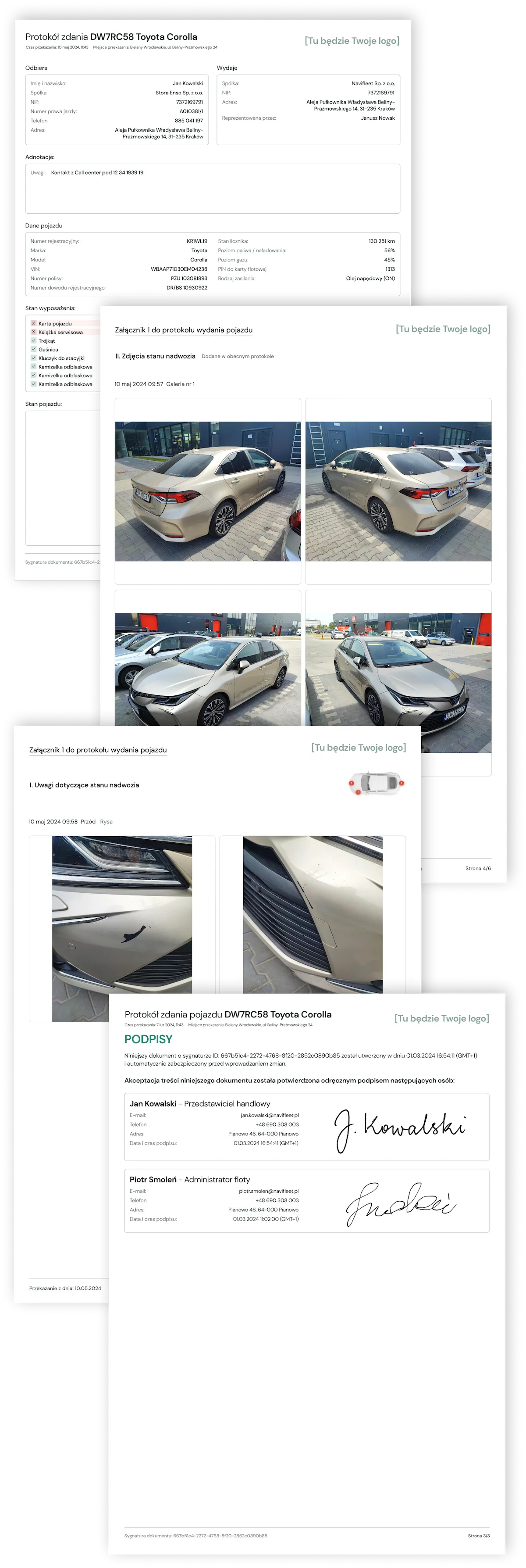
The electronic vehicle handover report in the Navifleet Manager app is a PDF file containing all the necessary information about the condition of the vehicle being handed over, together with photos.
Tip!
If you manage a fleet of vehicles with LPG systems, set the correct fuel type on them. We will then require the gas level at every issue and return report. We will also show this information on the report.
Vehicle user details shown on the report:
Full name
Company*
Tax ID (NIP)*
Document number and type
Phone
Address
* If the vehicle user is assigned to a company
Tip!
If you issue vehicles to customers with whom you have framework agreements, you can use the Company field and assign the user to that company. We will then show the name and tax ID (NIP) of the vehicle user's company.
Fleet administrator details shown on the report:
Company (to which the vehicle is assigned)
Tax ID (NIP) (of the company to which the vehicle is assigned)
Address (of the company to which the vehicle is assigned)
Represented by (full name of the user issuing or taking back the vehicle
Tip!
If you wish, you can have your own logo on the report. See  how to add your logo to the handover report.
Issuing or returning a vehicle with a handover report
A handover report can only be drawn up when a vehicle is issued or returned, and only in the Navifleet Manager app. Find out how in the article: How to draw up an electronic vehicle handover report?
Where do the signed vehicle handover documents go?
All signed documents are automatically sent to the cloud, and you can access them from the web app. In addition, on the signature screen you can specify the addresses to which we should send a copy of the signed documents. By default we fill in this step with the vehicle user's e-mail address, but you can add and remove addresses from this list.