
Help › Navifleet Manager › Web panel: Inspections, Defects, Damage
What is the Damage section and what is its role?
Updated: 21 August 2026
The Damage section is used for electronic recording, keeping records and comprehensive monitoring of the history of all vehicle damage.
Adding damage
In the web version of the system, because it serves mainly as a working tool for people administering the fleet, the process of adding damage is somewhat more extensive.
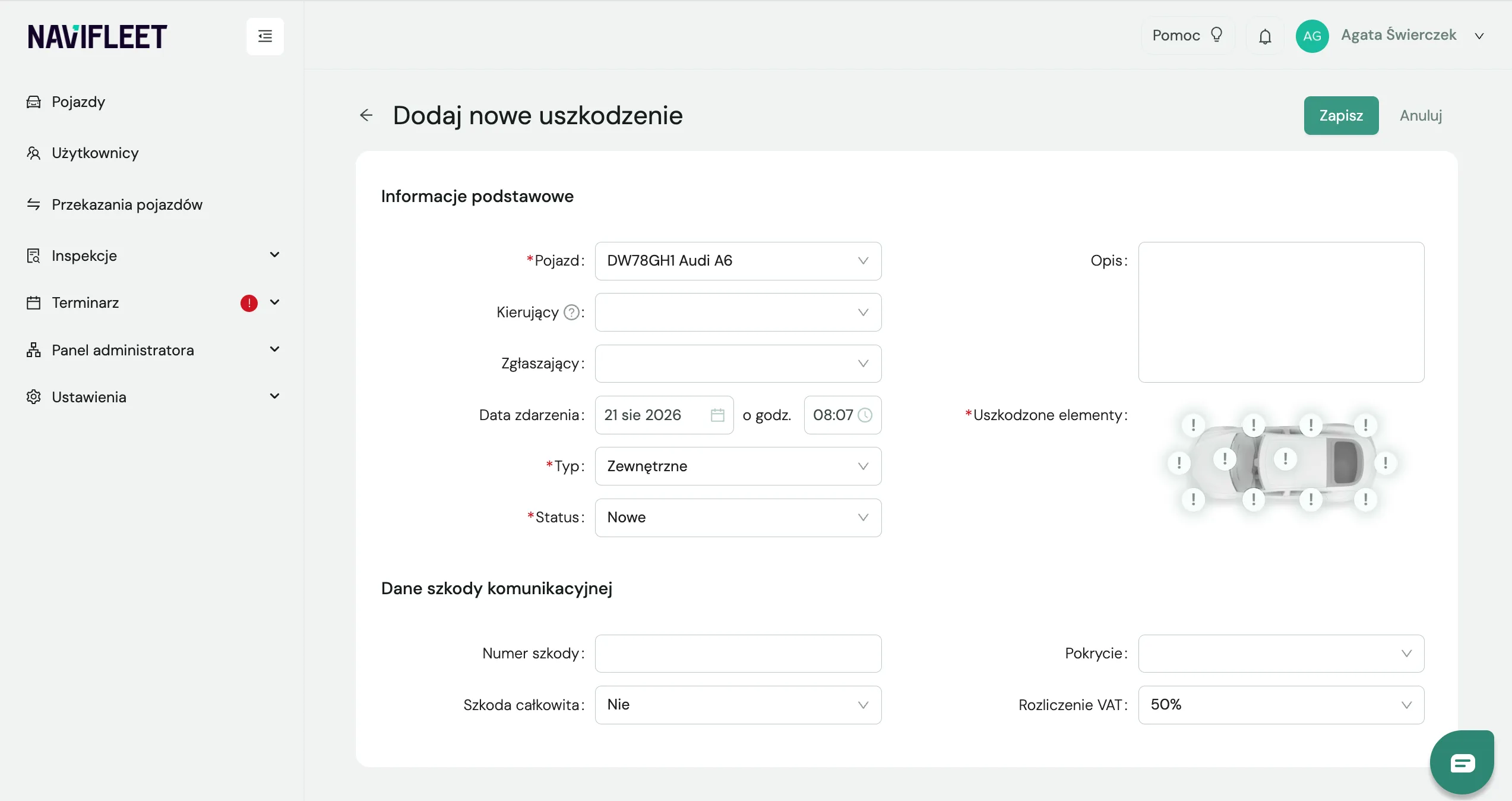
What is in the add damage window?
Basic information
Driver (filled in by default with the vehicle user at the time of the event),
Reporter (filled in by default with your name),
Event date (filled in by default with the current date and time, can be edited),
Type (external or internal),
Status (New, Not repairing, Reported for settlement, Being settled, To be invoiced, Settled),
Description (space for additional notes),
Damaged elements (external damage only).
Motor insurance claim details
Claim number (for example, assigned by the insurer),
Whether the vehicle is a total loss,
Cover (that is, how the claim is settled; useful for reporting),
VAT settlement (the field is read from the vehicle).
Viewing damage
All damage added to vehicles can be found in the Damage tab, in a single combined view. You can narrow down the list of results using the filters and the search box.
Exporting the damage list
To export the damage list:
Click the drop-down menu next to the date range filters.
Select the option to export to an *.xlsx file.


To view damage assigned to a specific vehicle:
Go to the vehicle details.
Scroll to the Inspections section, then click Damage.
The role of the damage status
The damage status defines the current stage of the damage case. It helps organise the process and lets you quickly check the key information about the report. The most important rules for damage statuses are listed below:
Damage with the status New is shown on the vehicle list in the New damage column.
Damage with the status To be invoiced and Settled is not shown when preparing a vehicle handover report or a vehicle inspection. Drivers will not see this damage when they open the details of the vehicle they are using. Users with a higher permission level can still see it.