Help › Navifleet Tracker › Driving style analysis
How is a driver rated?
Updated: 13 September 2022
The Navifleet app rates driver behaviour in real situations on the road. To detect poor behaviour it uses vehicle data (speed, accelerator position, engine revs), location data and supplementary data such as terrain gradient and signposted speed limits.
Based on this information, we built an algorithm that rates a driver's journey from the perspective of six factors. These are: Acceleration, Braking, Gears, Idling, Speed, Accelerate-Brake.
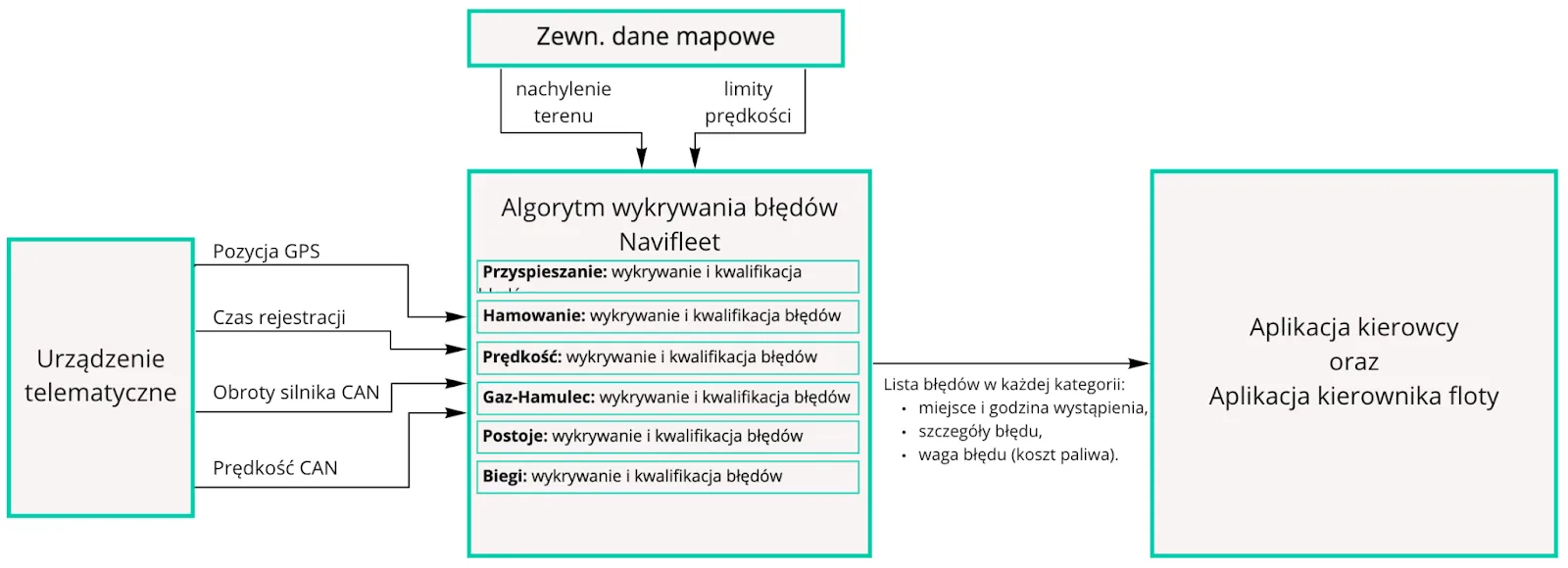
How the driving style rating algorithm works
Acceleration
According to the principles of eco-driving, you should accelerate decisively and smoothly with the accelerator pedal pressed to no more than 60-70%. Harsh acceleration beyond a certain intensity uses more fuel than is needed to get the vehicle up to speed, and errors are recorded on this basis. The size of the error is also affected by the initial and final speed range and by how long the manoeuvre takes. Bear in mind that terrain gradient also has a huge impact on fuel consumption during acceleration, so this factor is included in the rating too. In short, penalty points for overly harsh acceleration are proportional to the speed range, the duration of the manoeuvre and the terrain on which it was performed.
The calculated rating is based on the ratio between the scale of the errors made and the distance travelled, which means that isolated cases will not affect the rating negatively.
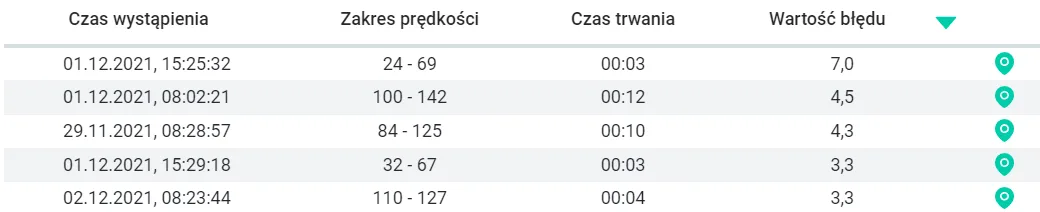
Below are example errors in this category.
Braking
The error value is calculated individually for each case and is proportional to the braking intensity and the range of speed lost.
A driver is rated positively for braking gently (e.g. engine braking) and well in advance. In such cases we recognise the driver's ability to anticipate situations on the road and to save brake pads and discs. It is also worth mentioning that lifting off the accelerator early, which accompanies gentle braking, translates into fuel savings as well. Moderately and very intensive braking is rated negatively, i.e. cases where the driver noticed the need to reduce speed too late.
Apart from the range of the speed change, the rating also takes the terrain gradient into account. For example, harsh braking uphill is treated more leniently than harsh braking on flat ground. This is because when coasting uphill the vehicle loses speed faster, so the higher braking intensity is not the result of a driver error but of the normal behaviour of the vehicle, which we cannot influence and which follows directly from the laws of physics.
The rating in this category also compares the detected errors with the distance the driver covered. If a given error happens once in a while (e.g. a pedestrian stepped onto the road), isolated cases will not have a significant impact on the rating.
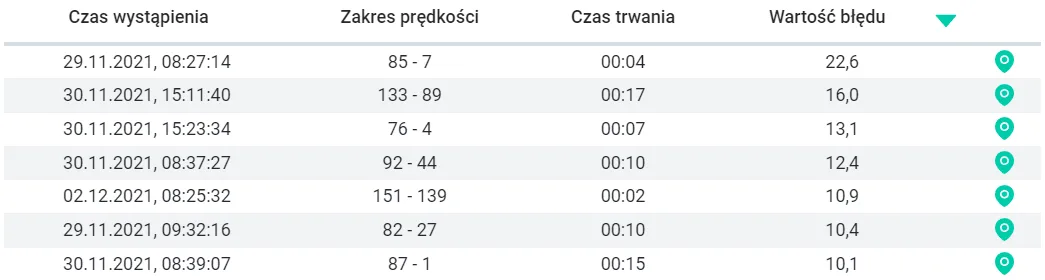
Example errors in the Braking category:
Speed
The road tests we carried out show that the optimum driving speed is around 70 km/h. We call optimum the speed that generates the lowest fuel consumption. At that speed the moving mass of the vehicle has the lowest rolling resistance, while aerodynamic drag is not yet that burdensome. Therefore, in this category, driving faster than the optimum speed and faster than the signposted limit allows is considered an error. The driver is penalised only when driving faster than the signs allow and faster than the optimum speed. This means that, although it is more expensive, we recommend driving fast, but no faster than the speed limit allows.
Example: The driver is not penalised if the vehicle travels at around 70 km/h (the optimum speed) on a road with a 50 km/h speed limit. Although they exceeded the signposted speed limit, they did not exceed the optimum speed (the most economical for the vehicle). The driver is also not penalised if the vehicle travels at 100 km/h on a road with a 110 km/h limit. This is because they did not exceed the speed limit on that stretch of road. Their rating will not be lowered even though they exceeded the optimum speed. |
At the user's request, a “Maximum recommended driving speed” parameter can be added to the speed rating configuration. Its value replaces the speed limits on a given road. Driving faster than the recommended speed (even if the signs allow more) will result in an error being recorded.
Note that the driver is not penalised for letting the vehicle pick up a little speed freely before an approaching hill (up to 15 km/h over the limit), because from the point of view of driving economy this is the recommended practice.
Apart from the duration of the speeding event, the app also takes the terrain gradient into account when calculating penalty points. The steeper the uphill, the larger the error added to the driver's account.
It is worth adding that the driver rating takes into account the proportion of detected errors to kilometres travelled, so isolated occurrences have practically no major impact on the rating. After all, it can happen to anyone :)
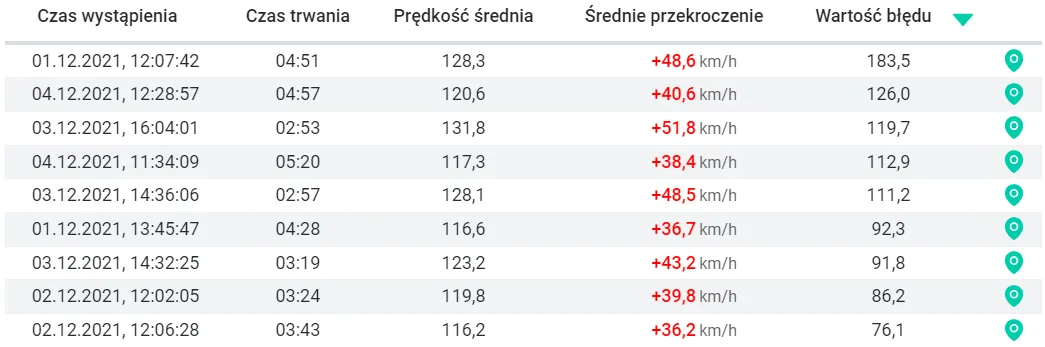
Example errors in the Speed category:
Accelerate-Brake
This category specifically rates the driver's tendency to avoid unnecessary speeding up. From the point of view of running costs, accelerating the vehicle and then braking it within a dozen or so seconds is highly undesirable. Firstly, accelerating the vehicle uses more fuel than maintaining a constant speed. Secondly, braking with the pedal accelerates brake wear and shortens their life. After all, in a short time the driver gained 30 km/h and then lost it. For this reason, dynamic acceleration followed almost immediately by braking has a negative impact on the driver rating. The error value for each “accelerate-brake” sequence is calculated from various parameters, including the range of wasted speed and the intensity of these manoeuvres.
The rating also takes terrain and road infrastructure into account, so the driver is not penalised for correct driving, e.g. from one set of traffic lights to the next, or for tackling hills correctly (speeding up downhill, slowing down uphill).
Isolated errors in this category are also insignificant - sometimes you have to overtake another car or a tractor. The rating takes into account the ratio between the scale of the errors made and the length of the route covered.
Example errors in the Accelerate-Brake category:

Gears
Driving in a lower gear than recommended in a vehicle with a manual gearbox uses around 5% more fuel. In vehicles with an automatic gearbox a similar effect results from overusing the so-called “Sport” mode. In both cases the engine runs at higher revs than necessary, which translates into high fuel consumption. For this reason the app rates prolonged driving in too low a gear, which results in the engine running at excessive revs, negatively. For a situation to qualify as driving in too low a gear it must last at least 7 seconds. This means that downshifting when overtaking or climbing hills is not treated by the app as incorrect behaviour.
The rating includes the terrain gradient, which guarantees that the driver will not be penalised for engine braking through the gears (including downhill) or for climbing a hill in a lower gear.
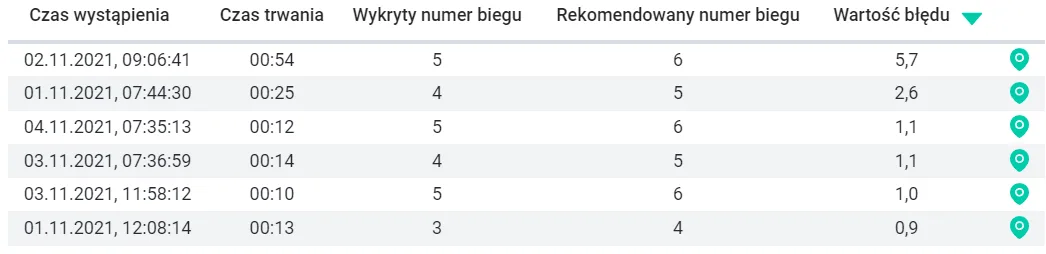
Example errors in the Gears category:
Idling
Running the engine while stationary is a very clear form of fuel waste (around 1 l/h in cars and 2 l/h in trucks). The most common errors include warming up the engine before setting off and cooling it down after motorway driving. In both cases this can be avoided by simply not letting the engine run while stationary. The last rating category is idling.
The driver is penalised for a stop with the engine running longer than 60 seconds. This means that no penalty points are assigned to the driver for stops forced by traffic conditions - in a traffic jam, waiting for a green light or waiting to join the traffic.
How is the potential fuel saving determined?
The potential fuel saving is estimated by the Navifleet algorithm and is an approximate value. It is determined on the basis of road trials (tests) through which we established how individual driver errors affect fuel consumption.
The result of these tests is an algorithm that detects clear driver errors and determines how much fuel each error cost. The estimate is based on telematics data from the vehicle which, thanks to appropriate sampling, make it possible to detect the start and end of a given event to within one second. Apart from telematics data, the algorithm uses a digital terrain model and a map of local speed limits based on road signs. This makes the estimate as close as possible to real values.
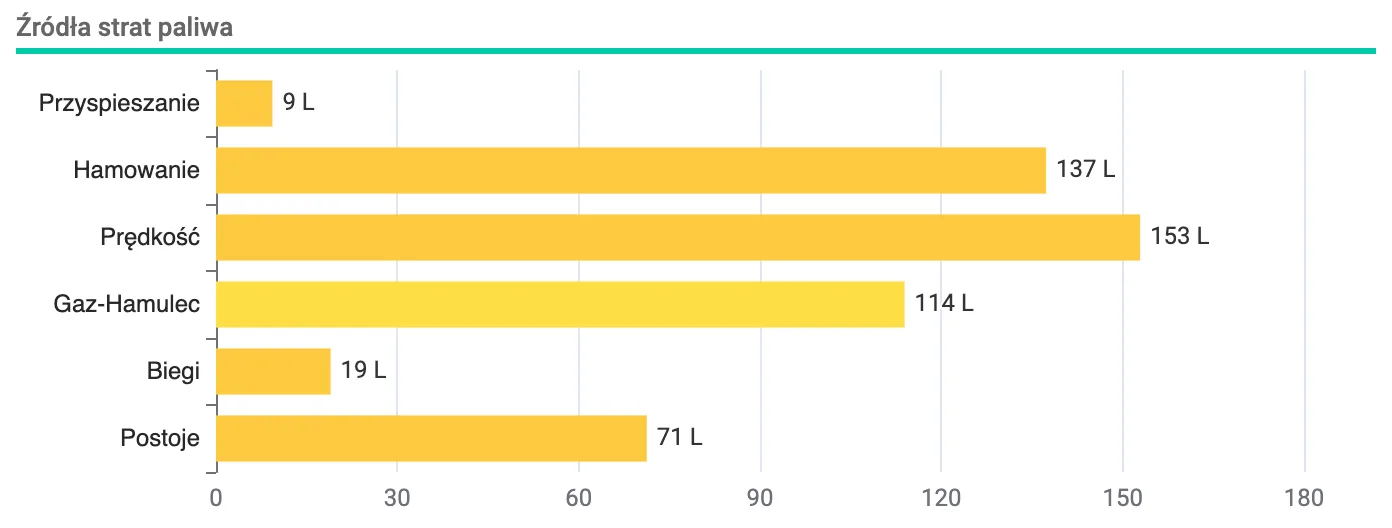
Based on the above data, the Navifleet app presents Sources of fuel loss, which tells you which errors behind the wheel are the most costly for the company. In other words, the chart presents the total amount of fuel wasted, broken down by cause, i.e. by category of uneconomical behaviour.