Help › Navifleet Tracker › Driving style analysis
Driving style analysis - getting started
Updated: 10 December 2021
The Driving style analysis module is an integral part of the Navifleet app. It is a tool that assesses drivers' behaviour on the road and helps them improve their skills behind the wheel. For fleet managers, it is a way to optimise costs, improve driver safety, support the environment and automate fleet management.
In this article you will learn the first steps to take after receiving access to the app.
Adding drivers
The first step is to add drivers. This is essential for the Driving style analysis module to work. The module does not assess the vehicle's performance, but behaviour behind the wheel in specific situations. The rankings and statistics created by the app relate to specific people. When adding drivers, it is extremely important to include their phone numbers. This will allow them to use the Navifleet Driver app.
You will find instructions on adding drivers HERE.
Contents of the DRIVING STYLE tab
Once you have finished adding drivers, you can go to the Driving style tab.
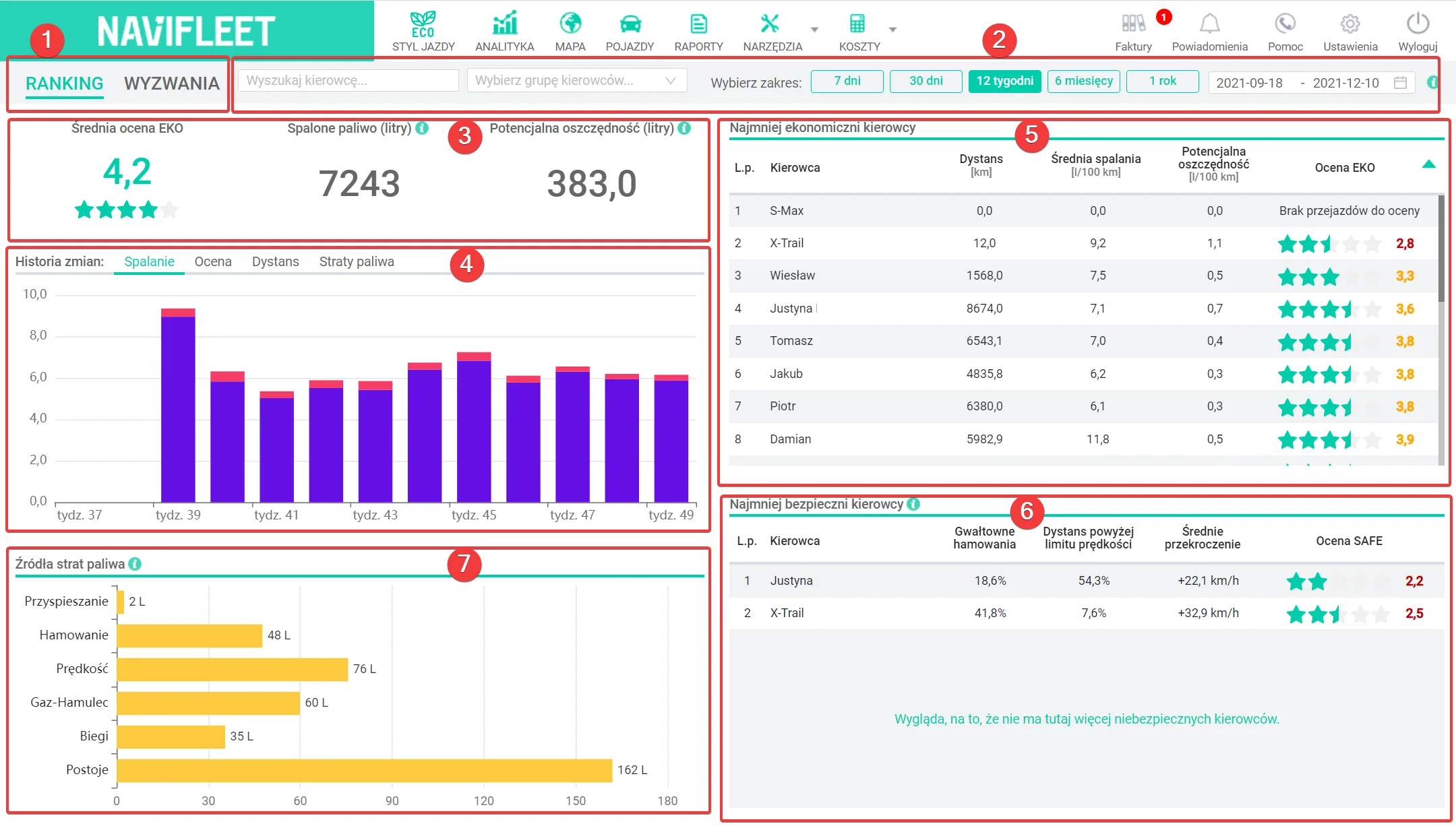
The main view of the feature has the following areas:
View selection: RANKING or CHALLENGES (1) - lets you switch quickly between driver statistics and challenges
Filters (2) - lets you adapt the view to your own needs. The statistics presented can be filtered by driver, driver group and date range.
Key fleet efficiency metrics (3) - average score, fuel burned, potential savings. You will learn how to interpret the values presented in the article How to measure savings and drivers' progress after implementing telematics?.
History of changes in selected metrics (4) - lets you track how the average eco score, fuel burned and potential savings have changed.
Ranking of the least economical drivers (5) - a list of drivers ordered from the lowest ECO score. You will learn more about this list in the article How to identify the least economical drivers?.
Ranking of the least safe drivers (6) - a list of drivers ordered from the lowest SAFE score. You will learn more about this list in the article How to identify the least safe drivers?.
Sources of fuel loss (7) - in which areas does your fleet waste the most fuel? In the article How is a driver assessed? you will learn more about the error categories and their impact on fuel losses.