
Help › Navifleet Manager › FAQ
How to upload a fleet policy or entrustment agreement template for signature?
Updated: 19 August 2026
How to prepare a document for signature?
A document for signature is prepared using document templates. The template of a document required for signature when a vehicle is issued is a text file in .docx format.
The template must contain variables, which are automatically replaced with data when the document is generated.
Each time a vehicle is issued, the system fills the template with information about:
the handover details,
the vehicle,
the company,
the person issuing and the person collecting the vehicle.
All required fields must be filled in and up to date.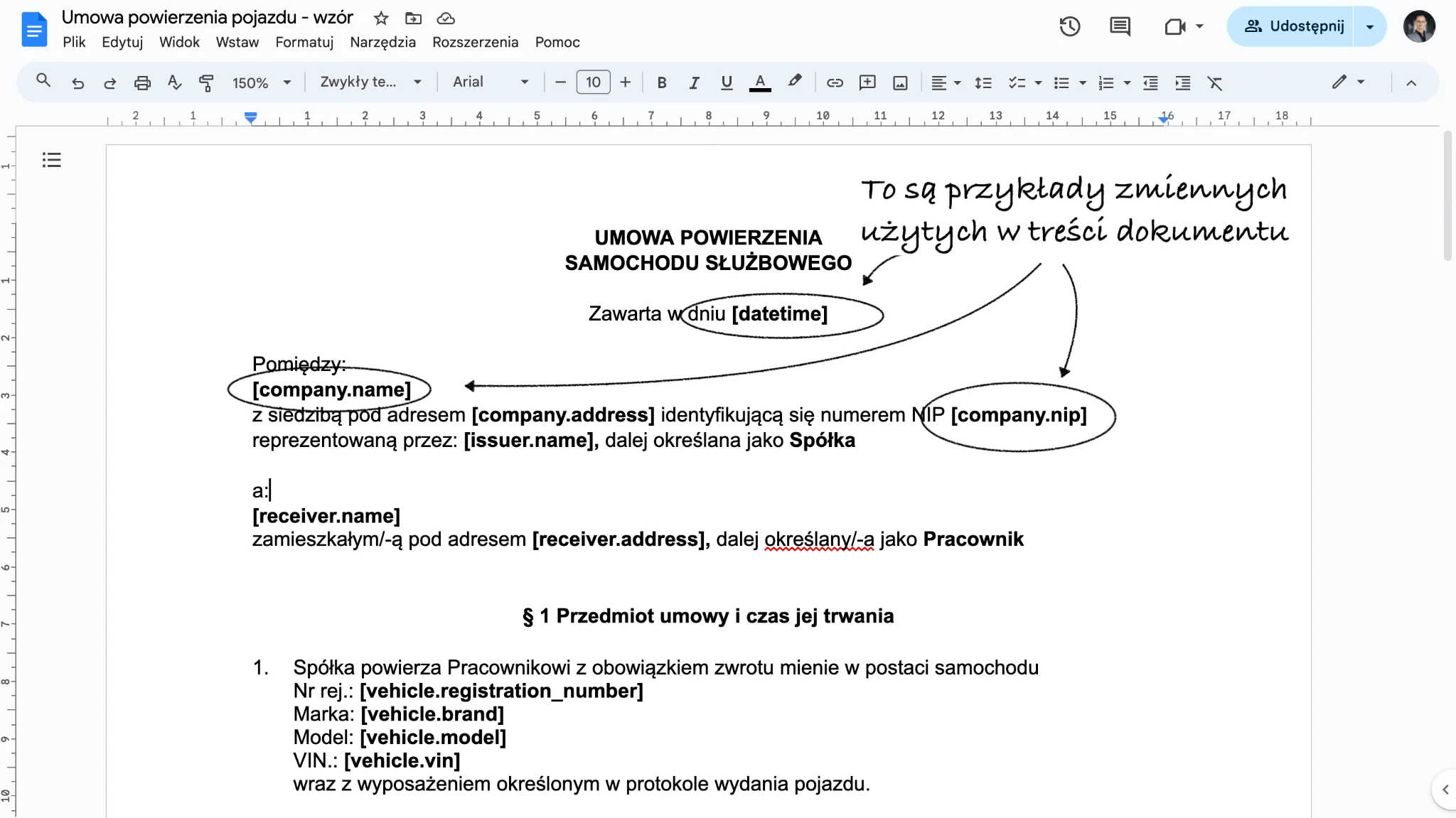
List of variables that can be used in the template
Full list of variables that can be used
Handover:
[date] - handover date
[datetime] - handover date and time
[address] - handover location
[notes] - Handover notes
Vehicle being handed over:
[vehicle.registration_number] - Registration number
[vehicle.brand] - Make
[vehicle.model] - Model
[vehicle.vin] - VIN
[vehicle.year] - Year of manufacture
[vehicle.mileage_km] - Mileage in km
[vehicle.mileage_mth] - Mileage in engine hours
[vehicle.insurance_policy_number] - Insurance policy number
[vehicle.variant] - Model variant
[vehicle.group] - Vehicle group names
[vehicle.energy_source] - Fuel type
[vehicle.fuelcard_PIN] - Fuel card PIN
[vehicle.registration_date] - Date of first registration
[vehicle.registration_card_number] - Registration document number
[vehicle.type] - Vehicle type
[vehicle.segment] - Vehicle segment
[vehicle.notes] - Vehicle notes
Company that owns the vehicle being handed over:
[company.name] - company name
[company.address] - company postcode, city and street
[company.nip] - company tax ID (NIP)
Person issuing the vehicle:
[issuer.name] - Full name of the person issuing the vehicle
[issuer.address] - postcode, city and street of the person issuing the vehicle
[issuer.phone] - phone number of the person issuing the vehicle
[issuer.driving_license] - driving licence number of the person issuing the vehicle
[issuer.email] - E-mail address of the person issuing the vehicle
[issuer.job_title] - Job title of the person issuing the vehicle
[issuer.group] - Group names of the person issuing the vehicle
[issuer.notes] - Notes from the profile of the person issuing the vehicle
[issuer.ID_type] - Identity document type
[issuer.ID_number] - Identity document number
[issuer.cooperation_form] - Form of cooperation
Person collecting the vehicle:
[receiver.name] - Full name of the person collecting the vehicle
[receiver.address] - postcode, city and street of the person collecting the vehicle
[receiver.phone] - phone number of the person collecting the vehicle
[receiver.driving_license] - driving licence number of the person collecting the vehicle
[receiver.email] - E-mail address of the person collecting the vehicle
[receiver.job_title] - Job title of the person collecting the vehicle
[receiver.group] - Group names of the person collecting the vehicle
[receiver.notes] - Notes from the profile of the person issuing the vehicle
[receiver.ID_type] - Identity document type
[receiver.ID_number] - Identity document number
[receiver.cooperation_form] - Form of cooperation
Adding a template to the app
Once prepared, you can upload one or more templates to the Navifleet Manager app.