Help › Navifleet Manager › Web panel: Settings
What are Companies and what is their role?
Updated: 21 August 2026
The Companies tab in the Settings section of the side menu lets you assign vehicles to specific companies within your organisation. This way, you can organise your fleet data and separate vehicles in line with your business's organisational structure.
Information about the assigned company can be used, among other things, when preparing documents related to the use of a vehicle, such as agreements or handover reports.
Adding companies
When creating an account, a mandatory step is to create the first organisation and the first company within it (this does not apply when you are invited to an existing organisation).
If you manage a fleet with vehicles belonging to more than one business, you can add further companies:
Go to the Settings tab in the side menu.
Select the Companies sub-menu.
Click the Add button (in the top right-hand corner).
Fill in the basic information.
Save the changes.

Editing and deleting a company
If a company's details have changed, you can edit them:
Click the company's name on the list.
Then click Edit located in the top right-hand corner.
Note:
A company can only be deleted if no vehicles, users or documents are assigned to it.

The role of companies in the vehicle issue and return process
The main benefit of organising companies on your account is that the company's details are loaded automatically onto issue and return reports as well as all other documents signed when a vehicle is handed over.
The company's details are loaded onto the report by default and this does not need to be configured.
If you want to find out how to prepare templates of the documents required for signature so that they display the details of the right company (e.g. on a vehicle custody agreement), read the article on signing additional documents when issuing a vehicle.
It is also worth reading the article describing how to add your own logo to the vehicle handover report.
The role of companies in managing drivers' access to documents
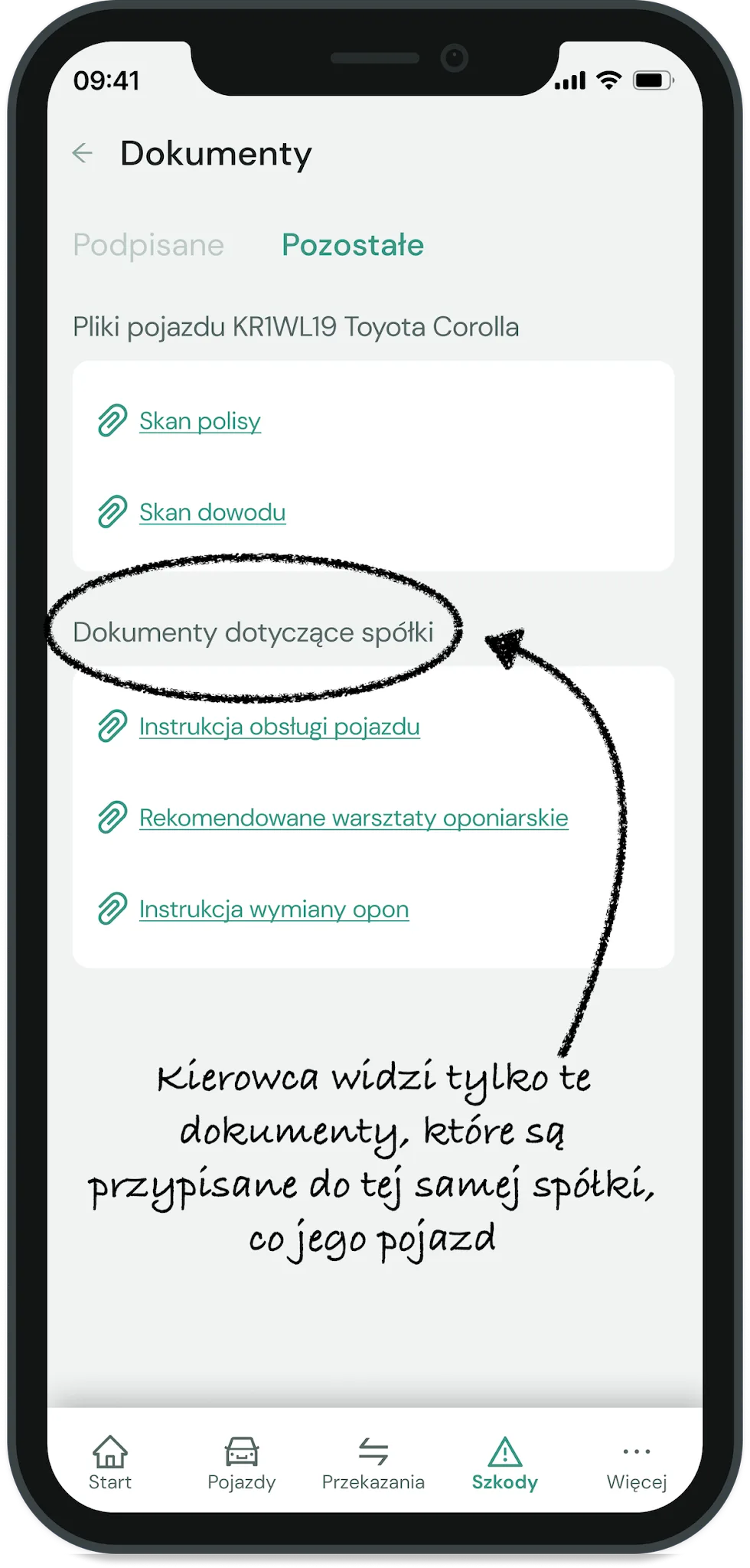
The division into companies also makes it easier to manage the documents shared with drivers.
If, for whatever reason, the procedures drivers follow in one company differ from those in another, you can upload different files for each company. This way, users of vehicles belonging to Company A will see their documents, and users of vehicles belonging to Company B - theirs.
Besides the practical aspect of this division, there is also a visual one. Even if the content of the documents is the same for all companies in the group, you can prepare a separate document for each company in line with its visual identity rules (logo, colours, font, etc.)
More about document templates can be found in the article What are Message templates and what is their role?