
Help › Navifleet Tracker › e-TOLL
OBU GH5200 device user guide
Updated: 11 April 2022
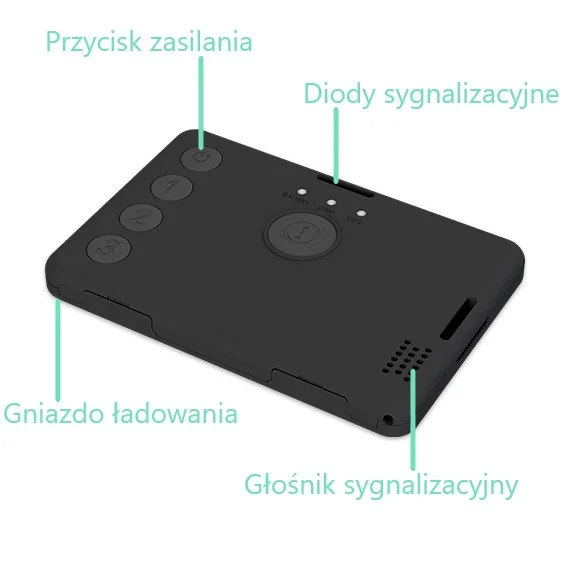
Device description
- Position recorded every 5 seconds and sent to KAS.
- Free support and technical assistance.
- LEDs showing the driver that the device is working correctly.
- Audible alarm for low battery and loss of GSM and GPS signal.
- Self-installation in the phone charger (USB) socket.
Box contents
|
Quick start
- Register your company in the IKK (Online Customer Account) at www.login.mf.gov.pl.
- Connect the power cable to a USB charger or a USB socket in the vehicle with a charging current of at least 2A.
- Switch the device on by pressing and holding the power button for 7 seconds. Start-up is confirmed by a beep and a vibration.
- You can start driving when the GSM and GPS LEDs flash green. This means the device has acquired GPS and GSM coverage.
How to connect the OBU device to power correctly.
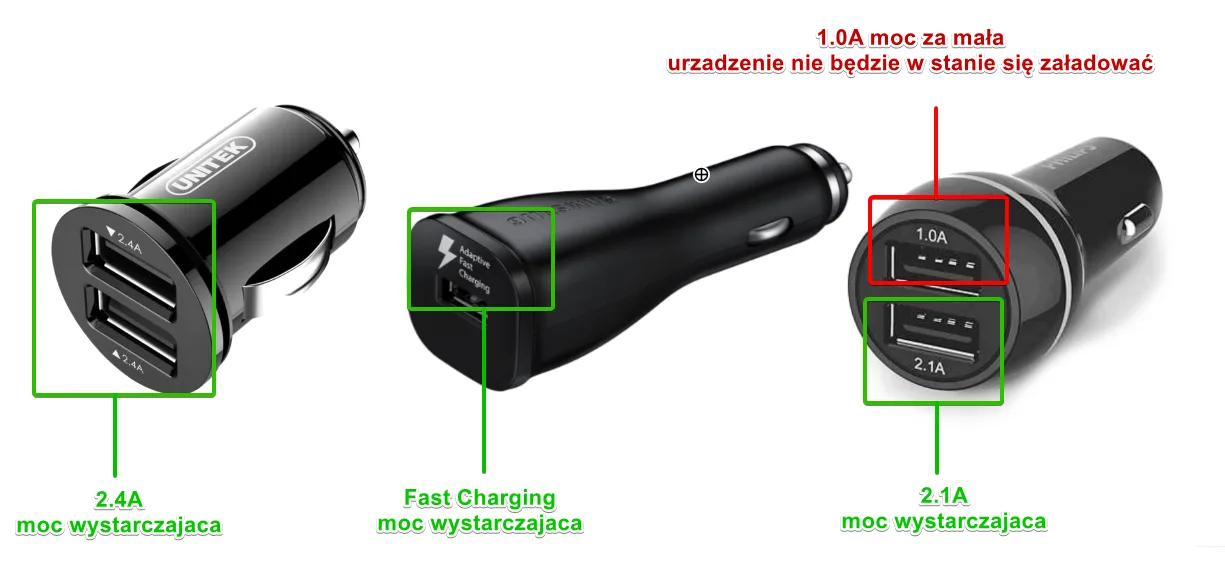
The OBU device must be connected to a charger or a USB socket in the vehicle with a charging current of at least 2A. So look for the 2A marking or higher on chargers. You may also find a Fast Charging marking on the charger; these are fast chargers, which also usually have a charging current above 2A, so they will be suitable too.
Example of where to look for the markings:
Device status indicators
LED BATTERY
Flashes red (6 short flashes every 5 seconds) - means the device's charge level is below 30% and no power is connected. A beep in the same pattern is also generated. Connect the device to a charger as soon as possible. You can continue driving.
Flashes red (2 long flashes every 5 seconds) - means the device has overheated above 45°C with the charger connected. A beep in the same pattern is also generated. Cool the device down as soon as possible. You can continue driving.
Flashes green (1 short flash every 1 second) - means the device is correctly connected to power and the battery is 100% charged.
Steady green - means the device is correctly connected to power and the battery is charging.
LED GSM
Flashes green - means the device is working correctly and connected to the GSM network.
Flashes red - the LED and a beep mean there is no GSM signal. The device records the route, but at this moment it cannot connect to the server. You can continue driving, but for no longer than 15 minutes. Once GSM coverage is regained, the device will send the missing data to the server.
LED GPS
Flashes green - means the device is working correctly and GPS coverage is good enough.
Flashes red - the LED and a beep mean there is no GPS signal. The problem may occur in tunnels and near tall buildings. If the problem persists for more than 15 minutes, stop driving.
Switching the device off
Press and hold the power button for 7 seconds . The device will confirm switching off with a beep and a vibration. The GPS and GSM LEDs will go out.
Usage notes
Like mobile phones, trackers are fitted with lithium-ion (Li-Ion) batteries, which can operate and be charged only within specific temperatures. GH5200 devices have intelligent temperature control that ensures safe use. When the tracker's temperature exceeds 45°C, charging is interrupted to avoid damaging the battery. The event is signalled by the light and sound signal mentioned above.
The most common causes of overheating are:
Placing the tracker in a sunny spot, e.g. a holder on the vehicle's windscreen.
Placing the tracker near heat sources, e.g. the compartment above the radio.
Placing the tracker in a holder on the air vent with the heating on.
If overheating is signalled, move the tracker to a cooler, shaded place and let it cool down. You do not need to disconnect the charger or switch the device off; charging will resume as soon as the tracker's temperature drops to a safe level. In the meantime the device continues to track the location and send data to the e-TOLL system.