
Help › Navifleet Tracker › GPS vehicle tracking
Sharing GPS position and vehicle data
Updated: 26 February 2026
Vehicle data from the Navifleet system can be shared both between companies using Navifleet and with those that do not use Navifleet. A link to the vehicle data can be shared by e-mail or via the API. The API allows integration with most logistics systems, for example Project44 or LKW Walter.
Sharing between Navifleet users
Example: Company A and company B are both users of the Navifleet system. In January, company A hired an Iveco truck owned by company B for a month. Company B shared the Iveco truck's data with company A. Once shared, an employee of company A, logged in to the Navifleet system, can monitor the data related to the Iveco truck, even though company B remains its owner.
How to share vehicle data with another Navifleet user
The process of sharing vehicle data with another Navifleet user is as follows (based on the example above):
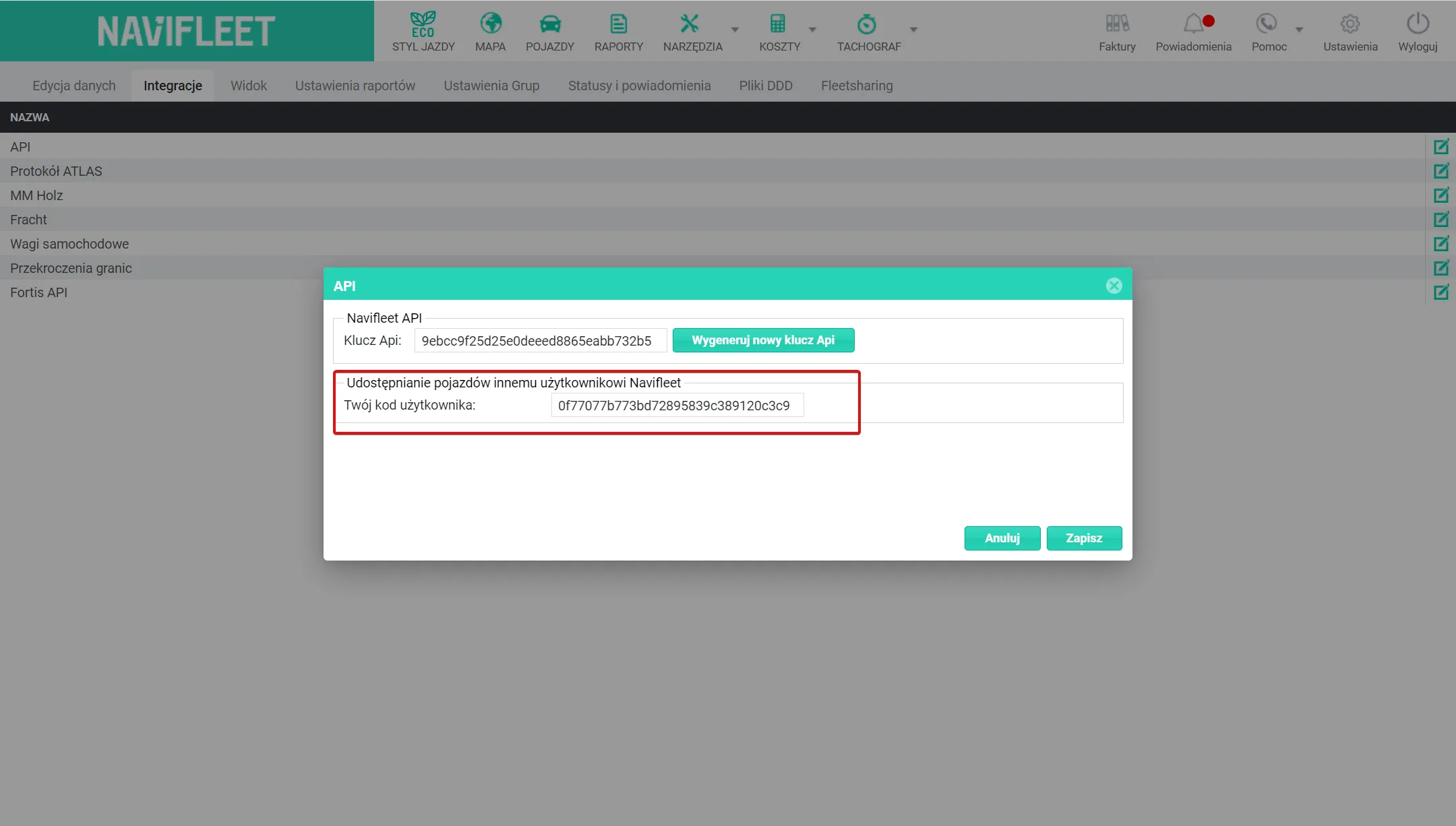
- User A, with whom the vehicle data is to be shared, must generate a vehicle sharing code in the Navifleet app. The code can be found in the Settings → Integrations → API → Vehicle sharingtab. They should then pass it on to User B, who will be sharing the vehicle with them.
- User B (sharing the vehicle data) selects the Tools → GPS data sharingtab in the Navifleet app. The list displayed contains all the shares made so far (sorted by the individually entered name).
- User B's next step is to select the option (in the top right-hand corner) Actions -> Share vehicle with another Navifleet user.

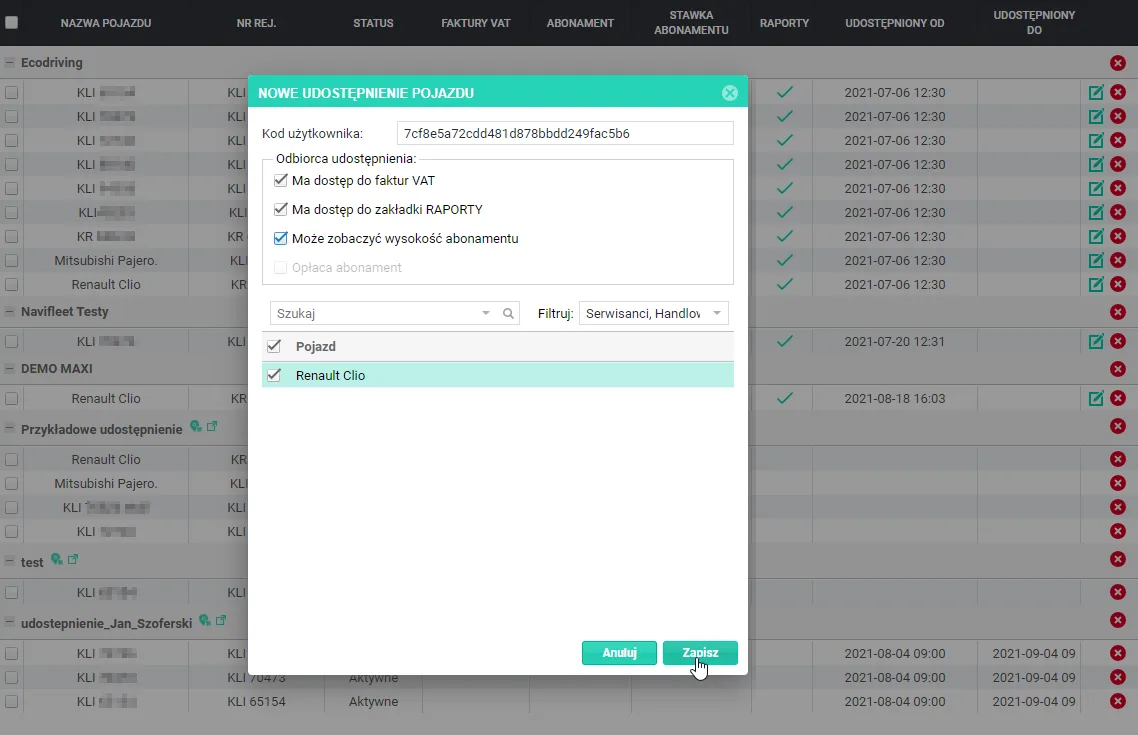
- In the New vehicle share window, User B enters the User code obtained from User A, with whom they want to share the vehicle data. They also tick the options specifying which data the share recipient will have access to and select the vehicle(s) to be shared.
- After clicking Save the new share appears on the list of shares. From now on, the share recipient (User A) can view the selected data.
Sharing with a company that does not use Navifleet
A Navifleet user can share the positions of their vehicles with a recipient who is not a Navifleet app user. Vehicle positions can be shared by e-mail or via the API.
Example: Company C does not use the Navifleet system. In February, company C hired a Volvo truck for a month from company A, which uses the Navifleet system. An employee of company A shared the Volvo truck's data by e-mail and via the API. As a result, an employee of company C can monitor the data related to the Volvo truck.
How to share a vehicle/vehicles by e-mail
- Select the Tools → GPS data sharingtab. A list of all the shares made so far appears, grouped by the individually entered name.
- In the top right-hand corner, select Actions -> Share vehicle position via API or e-mail.
- The add new share window appears. Enter the details of the share in it.
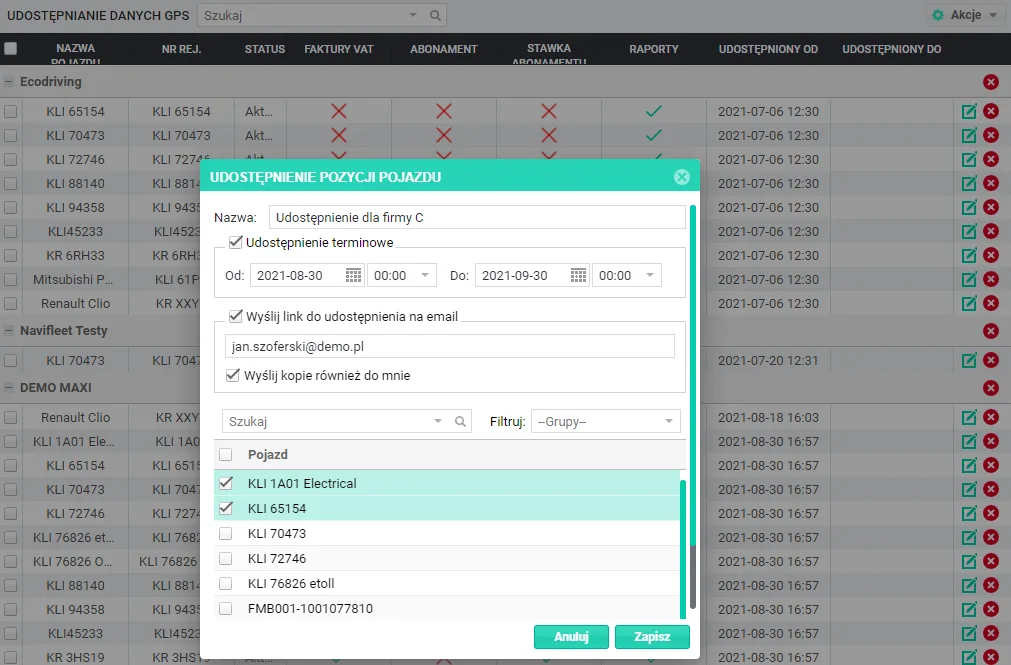
- Name – a name identifying the share.
- Time-limited share – the time period during which external users will have access to the shared vehicle positions on the map. Once this time has passed, the share is deactivated automatically and the vehicles stop being displayed on the map. If the vehicle positions are to be shared indefinitely, leave this checkbox unticked.
- E-mail address – the address to which the app will send a link to the vehicle positions shared on the map, together with brief instructions in Polish and English. You can tick the Also send a copy to meoption to receive the share link in your own mailbox.
- Vehicles – a list of vehicles with the appropriate permissions for this feature. Tick those whose position is to be shared on the map.
- Click Save. The new share appears on the list of shares.
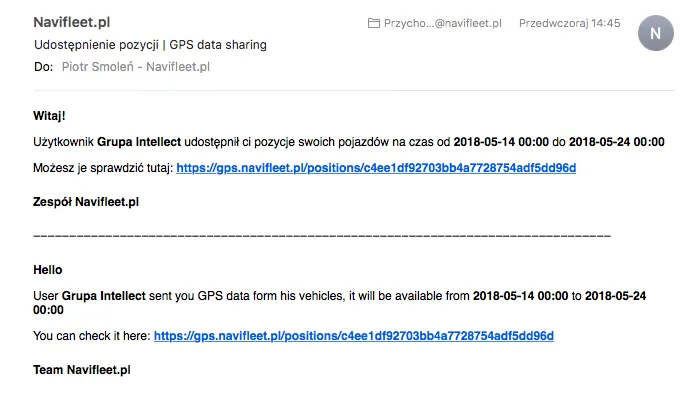
The app sends a notification about the new share to the e-mail address provided. The notification contains information about the event, the time range during which the share will be visible, and a link to the map. The message is given in Polish and in English.
Granting access to GPS data via the API
This feature is very useful for sharing GPS data with other systems. Access to the current positions of the selected vehicles is available at a unique address containing a temporary API key (API Key). The address can be displayed in the browser by clicking the Show source data icon next to the given share on the list.

A preview of the shared data in code form opens in a new browser tab. Simply pass the displayed address (link) to the person responsible for receiving the GPS data in the external application.
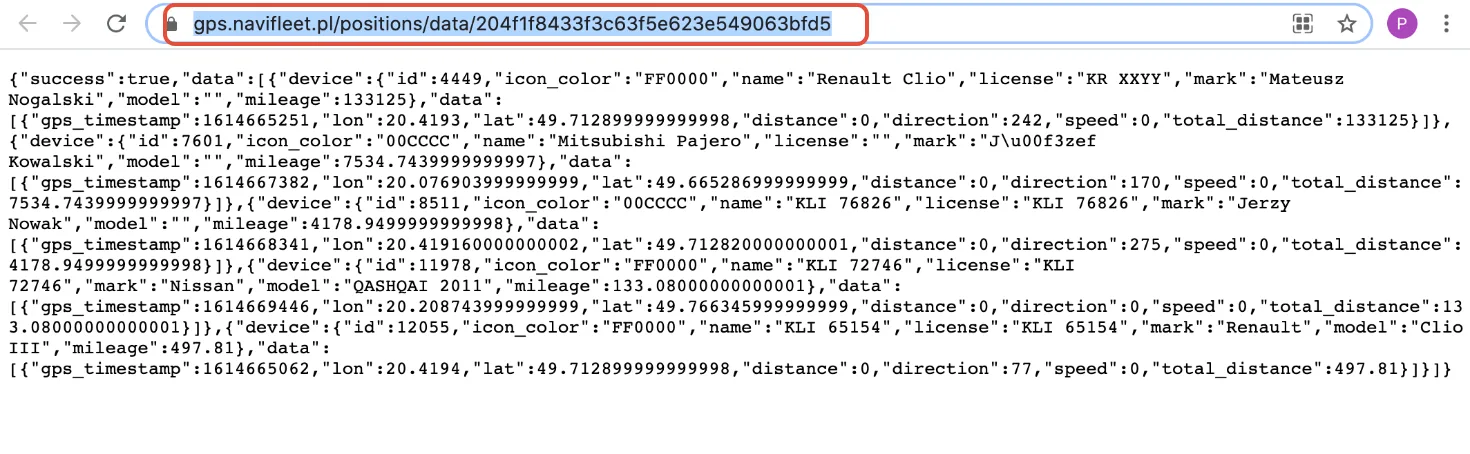
The data at the generated link is refreshed automatically every 60 seconds. The data structure for a single vehicle is as follows:
- id: the device identifier, displayed on the vehicle list in the gps.navifleet.pl app,
- icon_color: the colour of the vehicle positions on the map in the gps.navifleet.pl app,
- name: the vehicle name from the gps.navifleet.pl app,
- license: the registration number from the gps.navifleet.pl app,
- mark: the vehicle make from the gps.navifleet.pl app,
- model: the vehicle model from the gps.navifleet.pl app,
- mileage: the vehicle's current mileage, displayed in the vehicle details on the list next to the map,
- data: detailed data about the current position:
- gps_timestamp: the date the last GPS position was recorded,
- lon: the longitude of the current GPS position,
- lat: the latitude of the current GPS position,
- distance: the distance travelled since the previous GPS position,
- direction: the direction of travel (bearing),
- speed: the current speed according to the advanced configuration,
- total_distance: the vehicle's mileage from CAN.
Deleting a share
When a share is no longer needed, you can delete it. You can delete individual shares by selecting the red Xsign. You can also select the chosen vehicles and delete the share in bulk using the Delete selected entriesaction.